การปรับแต่งฟังก์ชันการทำงานผ่าน inheritance

การเขียนโปรแกรมเชิงวัตถุใน Python

Alex Yarosh

Content Quality Analyst @ DataCamp

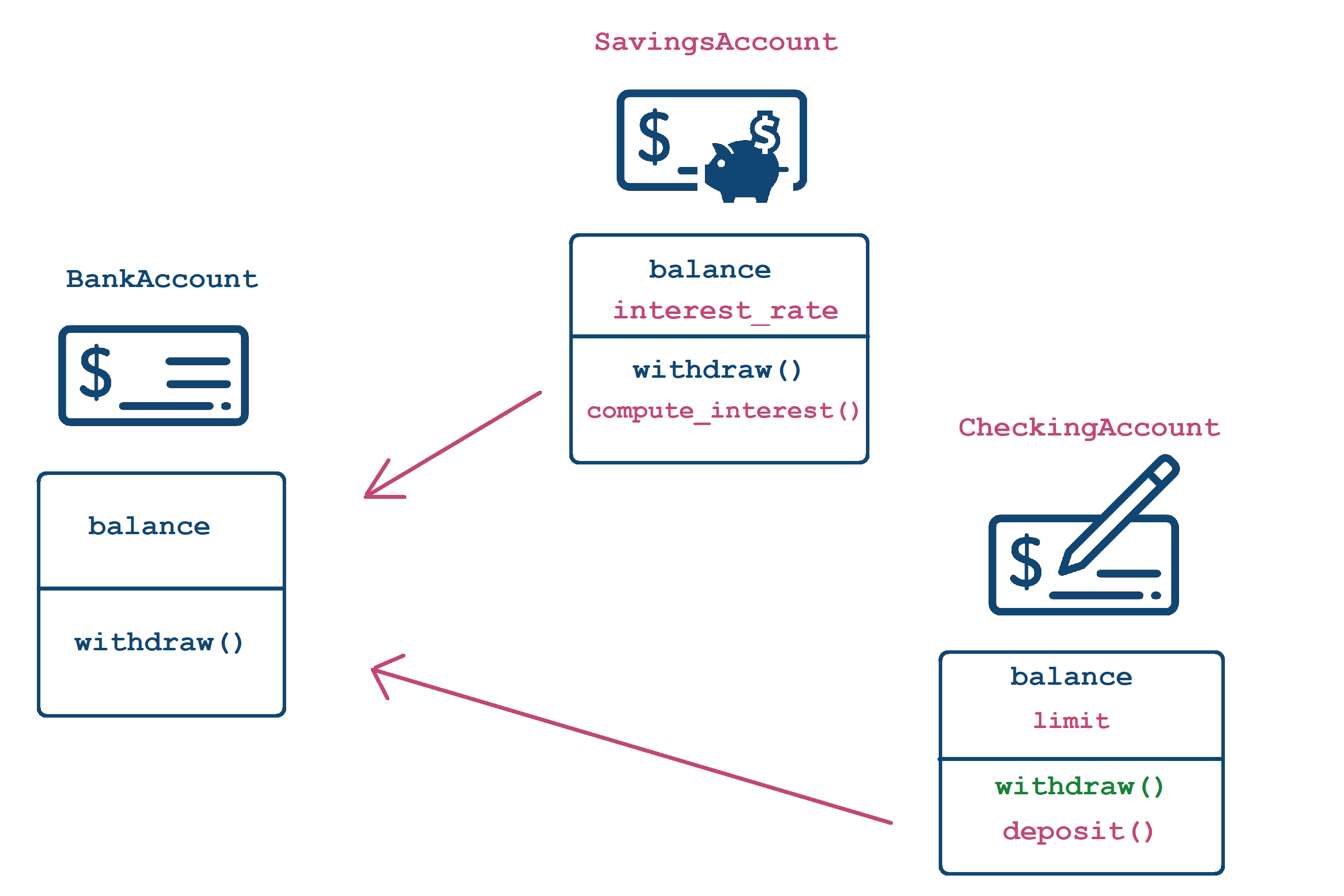
ลำดับชั้นของคลาส account

การเขียนโปรแกรมเชิงวัตถุใน Python

สิ่งที่มีอยู่แล้ว

class BankAccount:
    def __init__(self, balance):
       self.balance = balance

    def withdraw(self, amount):
       self.balance -=amount

# Empty class inherited from BankAccount
class SavingsAccount(BankAccount):
    pass
การเขียนโปรแกรมเชิงวัตถุใน Python

การปรับแต่ง constructor

class SavingsAccount(BankAccount):    

    # Constructor specifically for SavingsAccount with an additional parameter
    def __init__(self, balance, interest_rate):  

# Call the parent constructor using ClassName.__init__() BankAccount.__init__(self, balance) # <--- self is a SavingsAccount but also a BankAccount
# Add more functionality self.interest_rate = interest_rate
  • เรียก constructor ของคลาสแม่ก่อนได้ด้วย Parent.__init__(self, args...)
  • เพิ่มฟังก์ชันการทำงานได้อีก
  • ไม่จำเป็นต้องเรียก constructor ของคลาสแม่
การเขียนโปรแกรมเชิงวัตถุใน Python

สร้างออบเจกต์ด้วย constructor ที่ปรับแต่งแล้ว

# Construct the object using the new constructor
acct = SavingsAccount(1000, 0.03)
acct.interest_rate
0.03
การเขียนโปรแกรมเชิงวัตถุใน Python

การเพิ่มฟังก์ชันการทำงาน

  • เพิ่ม method ได้ตามปกติ
  • ใช้ข้อมูลจากทั้งคลาสแม่และคลาสลูกได้
class SavingsAccount(BankAccount):    

  def __init__(self, balance, interest_rate): 
     BankAccount.__init__(self, balance) 
     self.interest_rate = interest_rate
  # New functionality
  def compute_interest(self, n_periods = 1):
     return self.balance * ( (1 + self.interest_rate) ** n_periods - 1)

การเขียนโปรแกรมเชิงวัตถุใน Python

ลำดับชั้นของคลาส account

การเขียนโปรแกรมเชิงวัตถุใน Python

การปรับแต่งฟังก์ชันการทำงาน

class CheckingAccount(BankAccount):

def __init__(self, balance, limit): BankAccount.__init__(self, balance) self.limit = limit
def deposit(self, amount): self.balance += amount
def withdraw(self, amount, fee=0):
if fee <= self.limit: BankAccount.withdraw(self, amount + fee) else: BankAccount.withdraw(self, amount + self.limit)
  • เปลี่ยน signature ได้ (เพิ่มพารามิเตอร์)
  • ใช้ Parent.method(self, args...) เพื่อเรียก method จากคลาสแม่
การเขียนโปรแกรมเชิงวัตถุใน Python
check_acct = CheckingAccount(1000, 25)

# Will call withdraw from CheckingAccount
check_acct.withdraw(200)
# Will call withdraw from CheckingAccount
check_acct.withdraw(200, fee=15)
bank_acct = BankAccount(1000)

# Will call withdraw from BankAccount
bank_acct.withdraw(200)
# Will produce an error
bank_acct.withdraw(200, fee=15)
TypeError: withdraw() got an unexpected
 keyword argument 'fee'
การเขียนโปรแกรมเชิงวัตถุใน Python

มาฝึกกันเถอะ!

การเขียนโปรแกรมเชิงวัตถุใน Python

Preparing Video For Download...