การจัดการประเภท input ใน FastAPI

การ Deploy AI สู่ Production ด้วย FastAPI

Matt Eckerle

Software and Data Engineering Leader

ร้านอาหาร vs API
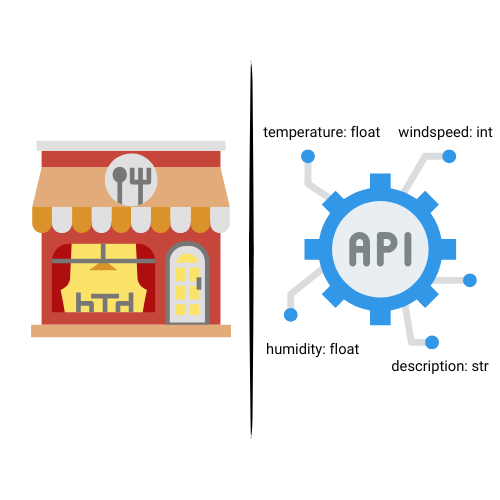
การเปรียบเทียบร้านอาหารกับ input ของ API

การ Deploy AI สู่ Production ด้วย FastAPI

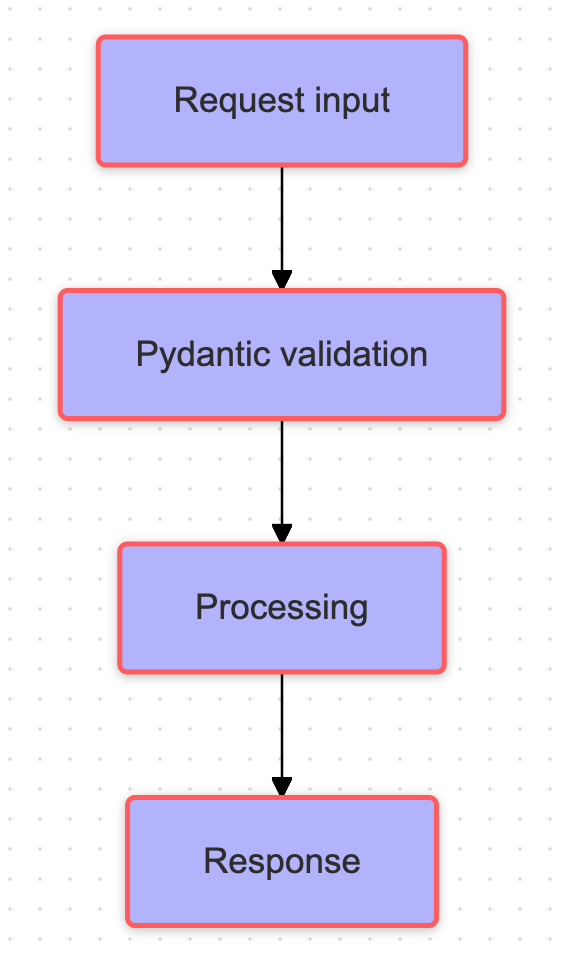
ขั้นตอนการตรวจสอบความถูกต้อง


  • รับข้อมูลผ่าน request
  • ตรวจสอบความถูกต้องของ input ด้วย Pydantic
  • ประมวลผลข้อมูลแต่ละประเภทตามที่โมเดลต้องการ
  • ส่ง input ที่ผ่านการประมวลผลไปยังโมเดล

ผังแสดงการตรวจสอบ request

การ Deploy AI สู่ Production ด้วย FastAPI

ระบบกลั่นกรองความคิดเห็น


class CommentMetrics(BaseModel):
    length: int           
    user_karma: int     
    report_count: int

class CommentText(BaseModel): content: str

ไอคอนกล่องความคิดเห็น

การ Deploy AI สู่ Production ด้วย FastAPI

Endpoint สำหรับตัวเลขทศนิยม

app = FastAPI()

@app.post("/predict")
def predict_score(data: CommentMetrics):
features = np.array([ data.length, data.user_karma, data.report_count ])
model = CommentScorer() prediction = model.predict(features)
return {"prediction": round(prediction, 2), "input": data.dict()}
การ Deploy AI สู่ Production ด้วย FastAPI

Endpoint สำหรับข้อมูลข้อความ

@app.post("/analyze_text")

def analyze(comment: CommentText):
forbidden = ["spam", "hate", "free" "fake", "sign up"]
text_lower = comment.lower()
issues = [word for word in forbidden if word in text_lower]
return { "issues": issues, "needs_moderation": len(issues) }

ผลลัพธ์สำหรับความคิดเห็น: Sign up for free

{
    "issues": ["free", "sign up"],
    "needs_moderation": 2
}
การ Deploy AI สู่ Production ด้วย FastAPI

มาฝึกกันเถอะ!

การ Deploy AI สู่ Production ด้วย FastAPI

Preparing Video For Download...