GET และ POST requests สำหรับ AI

การ Deploy AI สู่ Production ด้วย FastAPI

Matt Eckerle

Software and Data Engineering Leader

ผู้สอน

 

Matt Eckerle


Matt Eckerle

  • ผู้นำด้าน Software และ Data Engineering
  • Enterprise Data Manager ที่ Inari
  • ใช้ FastAPI สำหรับ ML ตั้งแต่ปี 2019
การ Deploy AI สู่ Production ด้วย FastAPI

ภาพรวมคอร์ส


  • พื้นฐาน FastAPI
  • การจัดการ Request และการเชื่อมต่อ
  • การตรวจสอบ Input และความปลอดภัย
  • สร้างและดูแล API ที่พร้อมใช้งานจริง


โลโก้ FastAPI

การ Deploy AI สู่ Production ด้วย FastAPI

ก่อนเริ่มเรียน

✓ Python เบื้องต้น: ฟังก์ชัน คลาส โมดูล และโครงสร้างข้อมูล

โลโก้ Python

การ Deploy AI สู่ Production ด้วย FastAPI

ก่อนเริ่มเรียน

✓ Python เบื้องต้น: ฟังก์ชัน คลาส โมดูล และโครงสร้างข้อมูล

✓ แนวคิด HTTP & REST API

โลโก้ Python และ HTTP

การ Deploy AI สู่ Production ด้วย FastAPI

ก่อนเริ่มเรียน

✓ Python เบื้องต้น: ฟังก์ชัน คลาส โมดูล และโครงสร้างข้อมูล

✓ แนวคิด HTTP & REST API

✓ การใช้ FastAPI framework

  • การจัดการ GET และ POST requests
  • การใช้ Pydantic models

✓ พื้นฐาน Machine Learning

โลโก้ Python, HTTP และ FastAPI

การ Deploy AI สู่ Production ด้วย FastAPI

GET request คืออะไร

  • ใช้สำหรับดึงข้อมูล
  • Path parameter — ข้อมูลที่อยู่ใน URL
  • ไม่เปลี่ยนแปลงสถานะของเซิร์ฟเวอร์

เมนู

GET https://example.com/?item_id=1

แผนภาพอธิบาย GET request

การ Deploy AI สู่ Production ด้วย FastAPI

การสร้าง GET ด้วย path parameters

from fastapi import FastAPI

app = FastAPI()

@app.get("/item/{item_id}")
async def read_item(item_id: int):
    return {"item_id": item_id}
  • `@app.get` decorator กำหนด endpoint
  • {item_id} คือ path parameter
  • Type hint (int) สำหรับการตรวจสอบอัตโนมัติ
การ Deploy AI สู่ Production ด้วย FastAPI

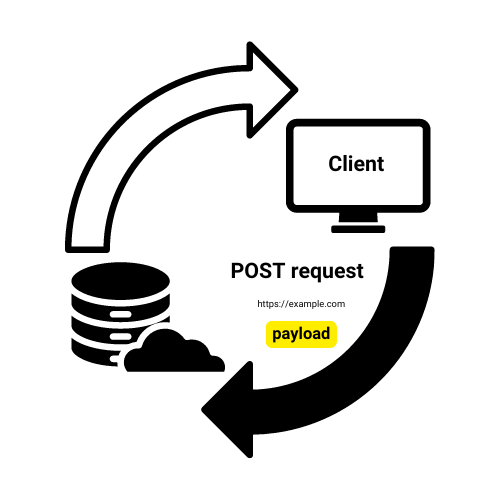
POST request คืออะไร

  • ใช้สำหรับส่งข้อมูลไปยังเซิร์ฟเวอร์
  • ข้อมูลอยู่ใน request body (โดยทั่วไปเป็น JSON)
  • อาจเปลี่ยนแปลงสถานะของเซิร์ฟเวอร์

ออเดอร์อาหารในร้าน

POST https://example.com

แผนภาพอธิบาย POST request

การ Deploy AI สู่ Production ด้วย FastAPI

การสร้าง POST ด้วยข้อมูล JSON

from fastapi import FastAPI
from pydantic import BaseModel

app = FastAPI()
db = {}

class Item(BaseModel): name: str price: float
@app.post("/items", status_code=201)
def create_item(item: Item): db[item.name] = item.model_dump() return {"message": f"Created {item.name}"}


  • Pydantic model กำหนดโครงสร้างข้อมูล
  • @app.post สำหรับ POST endpoint
  • แปลงและตรวจสอบ JSON อัตโนมัติ
การ Deploy AI สู่ Production ด้วย FastAPI

HTTP status codes


  • 200 OK: ค่าเริ่มต้นสำหรับความสำเร็จ
  • 404 Not Found: ไม่พบทรัพยากร
  • 201 Success: สร้างออบเจกต์สำเร็จ

HTTP status code 200 แสดงว่า request สำเร็จ

การ Deploy AI สู่ Production ด้วย FastAPI

การ raise HTTP exceptions

from fastapi import FastAPI, HTTPException
app = FastAPI()

@app.get("/item/{item_id}")
async def read_item(item_id: int):
    if item_id == 4242: #An invalid order number
        raise HTTPException(status_code=404, detail="Item not found")
    return {"item_id": item_id}

@app.post("/items") async def create_item(item: Item): # Simulating item creation return {"message": f"Created {item.name}"}, 201
การ Deploy AI สู่ Production ด้วย FastAPI

มาฝึกกันเถอะ!

การ Deploy AI สู่ Production ด้วย FastAPI

Preparing Video For Download...