การจัดกลุ่มเอกสาร

การวิเคราะห์กลุ่มข้อมูลใน Python

Shaumik Daityari

Business Analyst

การจัดกลุ่มเอกสาร: แนวคิด

  1. ทำความสะอาดข้อมูลก่อนประมวลผล
  2. วัดความสำคัญของคำในเอกสาร (TF-IDF matrix)
  3. จัดกลุ่ม TF-IDF matrix
  4. ค้นหาคำและเอกสารหลักในแต่ละกลุ่ม
การวิเคราะห์กลุ่มข้อมูลใน Python

ทำความสะอาดและแบ่ง token ข้อมูล

  • แปลงข้อความเป็น token และทำความสะอาดข้อมูลสำหรับการประมวลผล
from nltk.tokenize import word_tokenize
import re

def remove_noise(text, stop_words = []):
    tokens = word_tokenize(text)

cleaned_tokens = [] for token in tokens: token = re.sub('[^A-Za-z0-9]+', '', token)
if len(token) > 1 and token.lower() not in stop_words: # Get lowercase cleaned_tokens.append(token.lower()) return cleaned_tokens
remove_noise("It is lovely weather we are having. I hope the weather continues.")
['lovely', 'weather', 'hope', 'weather', 'continues']
การวิเคราะห์กลุ่มข้อมูลใน Python

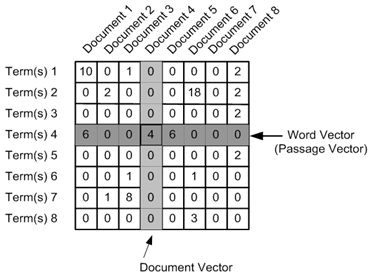
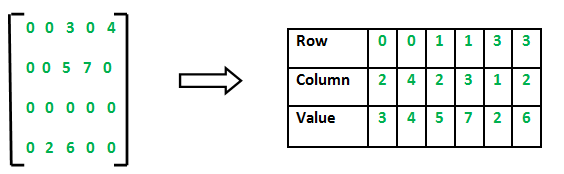
Document term matrix และ sparse matrix

  • สร้าง document term matrix
  • ส่วนใหญ่ของ matrix เป็นศูนย์

Source

  • สร้าง sparse matrix

Source

การวิเคราะห์กลุ่มข้อมูลใน Python

TF-IDF (Term Frequency - Inverse Document Frequency)

  • ค่าถ่วงน้ำหนักที่ใช้วัดความสำคัญของคำในเอกสารภายในคอลเล็กชัน
from sklearn.feature_extraction.text import TfidfVectorizer

tfidf_vectorizer = TfidfVectorizer(max_df=0.8, max_features=50, min_df=0.2, tokenizer=remove_noise)
tfidf_matrix = tfidf_vectorizer.fit_transform(data)
การวิเคราะห์กลุ่มข้อมูลใน Python

การจัดกลุ่มด้วย sparse matrix

  • kmeans() ใน SciPy ไม่รองรับ sparse matrix
  • ใช้ .todense() เพื่อแปลงเป็น matrix
cluster_centers, distortion = kmeans(tfidf_matrix.todense(), num_clusters)
การวิเคราะห์กลุ่มข้อมูลใน Python

คำหลักในแต่ละกลุ่ม

  • จุดศูนย์กลางกลุ่ม: รายการที่มีขนาดเท่ากับจำนวน term
  • แต่ละค่าในจุดศูนย์กลางแสดงถึงความสำคัญของ term นั้น
  • สร้าง dictionary และแสดง term หลัก
terms = tfidf_vectorizer.get_feature_names_out()

for i in range(num_clusters):
    center_terms = dict(zip(terms, list(cluster_centers[i])))

sorted_terms = sorted(center_terms, key=center_terms.get, reverse=True)
print(sorted_terms[:3])
['room', 'hotel', 'staff']

['bad', 'location', 'breakfast']
การวิเคราะห์กลุ่มข้อมูลใน Python

ข้อควรพิจารณาเพิ่มเติม

  • รองรับ hyperlink, อีโมติคอน ฯลฯ
  • ทำให้คำเป็นรูปแบบมาตรฐาน (run, ran, running -> run)
  • .todense() อาจใช้ไม่ได้กับชุดข้อมูลขนาดใหญ่
การวิเคราะห์กลุ่มข้อมูลใน Python

ถัดไป: แบบฝึกหัด!

การวิเคราะห์กลุ่มข้อมูลใน Python

Preparing Video For Download...