การพัฒนาโมเดล Machine Learning สำหรับ Production
Sinan Ozdemir
Data Scientist, Entrepreneur, and Author
วิธีการแพ็กเกจ
Serialization — บันทึกและเรียกโมเดล ML กลับมาใช้งาน
Environment packaging — สภาพแวดล้อมที่สม่ำเสมอและทำซ้ำได้สำหรับโมเดล ML
Containerization — แพ็กโมเดล dependencies และสภาพแวดล้อมไว้ใน "container" เดียว
Serialize โมเดล sklearn ด้วย pickle:
import pickle
model = ... # Train the scikit-learn model
# Serialize the model to a file
with open('model.pkl', 'wb') as f:
pickle.dump(model, f)
# Load the serialized model from the file
with open('model.pkl', 'rb') as f:
model = pickle.load(f)
Serialize โมเดล sklearn ในรูปแบบ HDF5:
import h5py
import numpy as np
from sklearn.externals import joblib
model = ... # Train the scikit-learn model
# Serialize the model to an HDF5 file
with h5py.File('model.h5', 'w') as f:
f.create_dataset('model_weights',
data=joblib.dump(model))
# Load the serialized model from the HDF5 file
with h5py.File('model.h5', 'r') as f:
model = joblib.load(f['model_weights'][:])
Serialize โมเดล PyTorch:
import torch
# Train a PyTorch model and store it in a variable
trained_model = ...
# Serialize the trained model to a file
serialized_model_path = 'model.pt'
torch.save(trained_model.state_dict(), serialized_model_path)
# Load the serialized model from a file
loaded_model = ... # Initialize the model
loaded_model.load_state_dict(
torch.load(serialized_model_path))
Serialize โมเดล TensorFlow:
import tensorflow as tf
# Train a Tensorflow model
trained_model = ...
# Save the trained model to a directory
saved_model_directory = 'model/'
tf.saved_model.save
(trained_model, saved_model_directory)
# Load the saved model from the directory
loaded_model = tf.saved_model.load(
saved_model_directory)

# Use an existing image as the base image
FROM python:3.8-slim
# Set the working directory
WORKDIR /app
# Copy the requirements file to the image
COPY requirements.txt .
# Install the required dependencies
RUN pip install -r requirements.txt
# Copy the ML model and its dependencies to the image
COPY model/ .
# Set the entrypoint to run the model
ENTRYPOINT ["python", "run_model.py"]
<---- Use Python 3.8 base image
<---- Set the working directory
<---- Copy the requirmentes.txt file
<---- Install the model's dependent packages
<---- Copy the model into the continer
<---- Tell the container how to start up
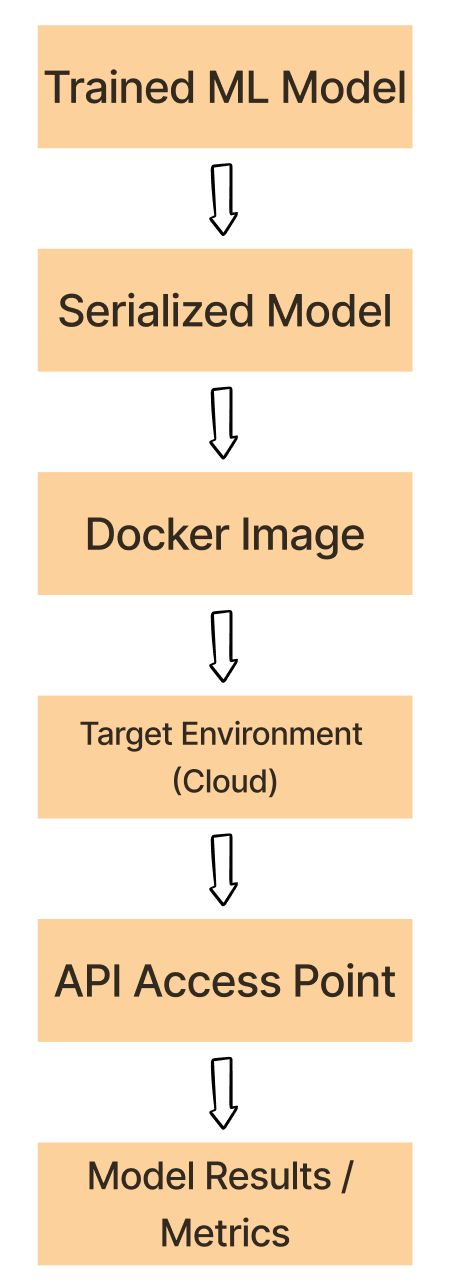
Serialize โมเดล ML ที่เทรนแล้วในรูปแบบ เช่น pickle, HDF5 หรือ PyTorch
Containerize โมเดล ML ที่ serialize แล้ว พร้อม dependencies และสภาพแวดล้อม
Deploy Docker image ไปยัง environment เป้าหมาย เช่น cloud platform
Run Docker container จาก Docker image ที่ deploy แล้ว และรันโมเดล ML
Use โมเดลภายใน container ผ่าน API หรือช่องทางเข้าถึงอื่น

การพัฒนาโมเดล Machine Learning สำหรับ Production