การตั้งค่า DVC Remotes

การจัดการเวอร์ชันข้อมูลด้วย DVC เบื้องต้น

Ravi Bhadauria

Machine Learning Engineer

ทบทวน

  • การเริ่มต้น DVC repository
    • รัน dvc init
    • Repo ใน workspace (/path/to/my-project)
  • การตั้งค่า DVC cache
    • พื้นที่พักไฟล์ชั่วคราวใน .dvc directory
      • /path/to/my-project/.dvc/cache
    • พักไฟล์ชั่วคราวด้วย dvc add
  • ต่อไป: DVC Remotes
    • ที่จัดเก็บข้อมูลภายนอก
    • ติดตามและแชร์ไฟล์
การจัดการเวอร์ชันข้อมูลด้วย DVC เบื้องต้น

ทำไมต้องใช้ DVC Remotes

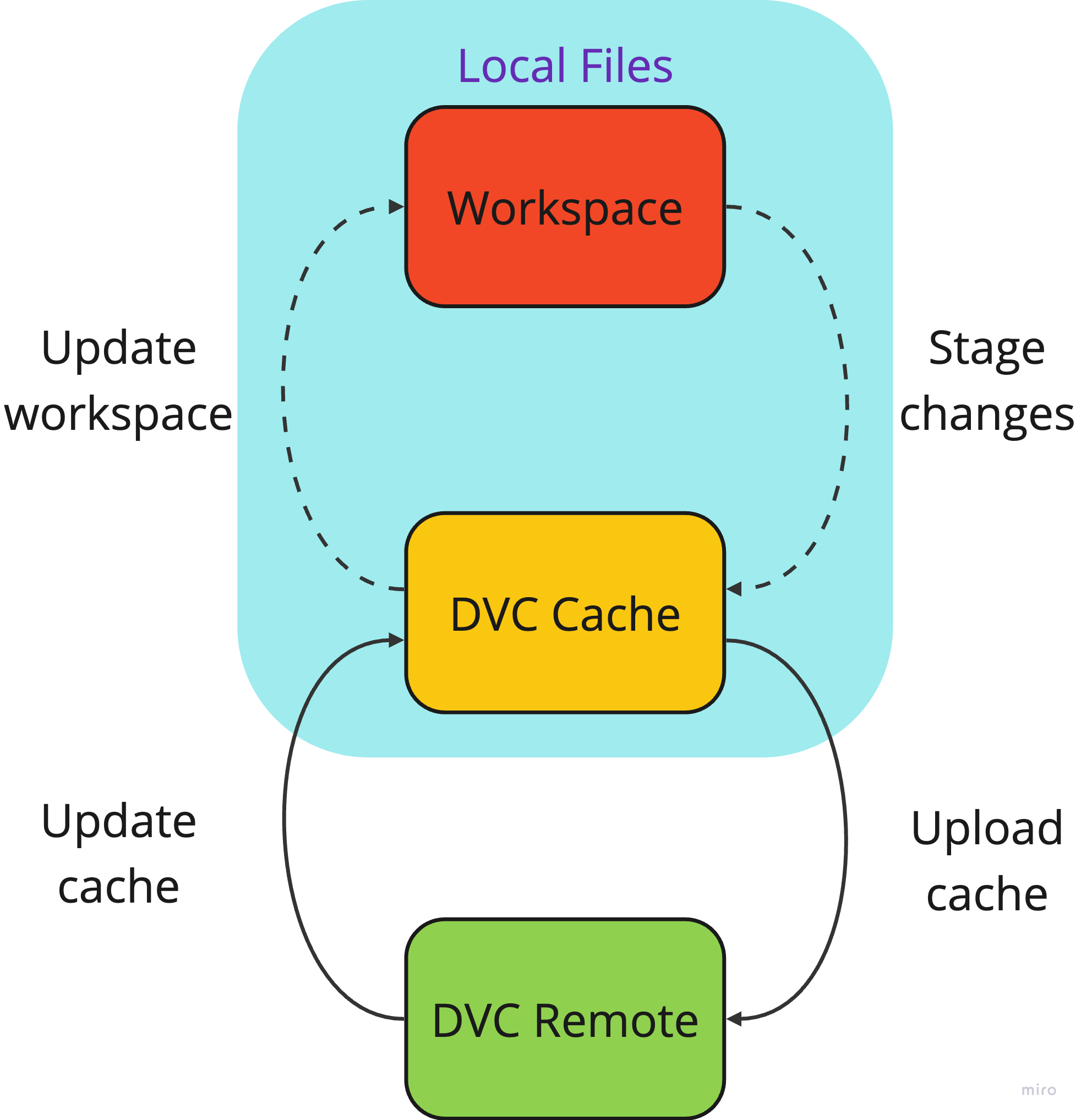
  • DVC Remotes: ที่จัดเก็บข้อมูล
  • คล้าย Git remotes แต่สำหรับข้อมูลที่ แคชไว้
  • ประโยชน์ของการใช้ remotes
    • ซิงค์ไฟล์และไดเรกทอรีขนาดใหญ่
    • รวมศูนย์หรือกระจายการจัดเก็บข้อมูล
    • ประหยัดพื้นที่ในเครื่อง

แผนภาพแสดงการไหลของข้อมูลจาก DVC workspace ไปยัง cache และ remote

การจัดการเวอร์ชันข้อมูลด้วย DVC เบื้องต้น

ประเภท Storage ที่รองรับ

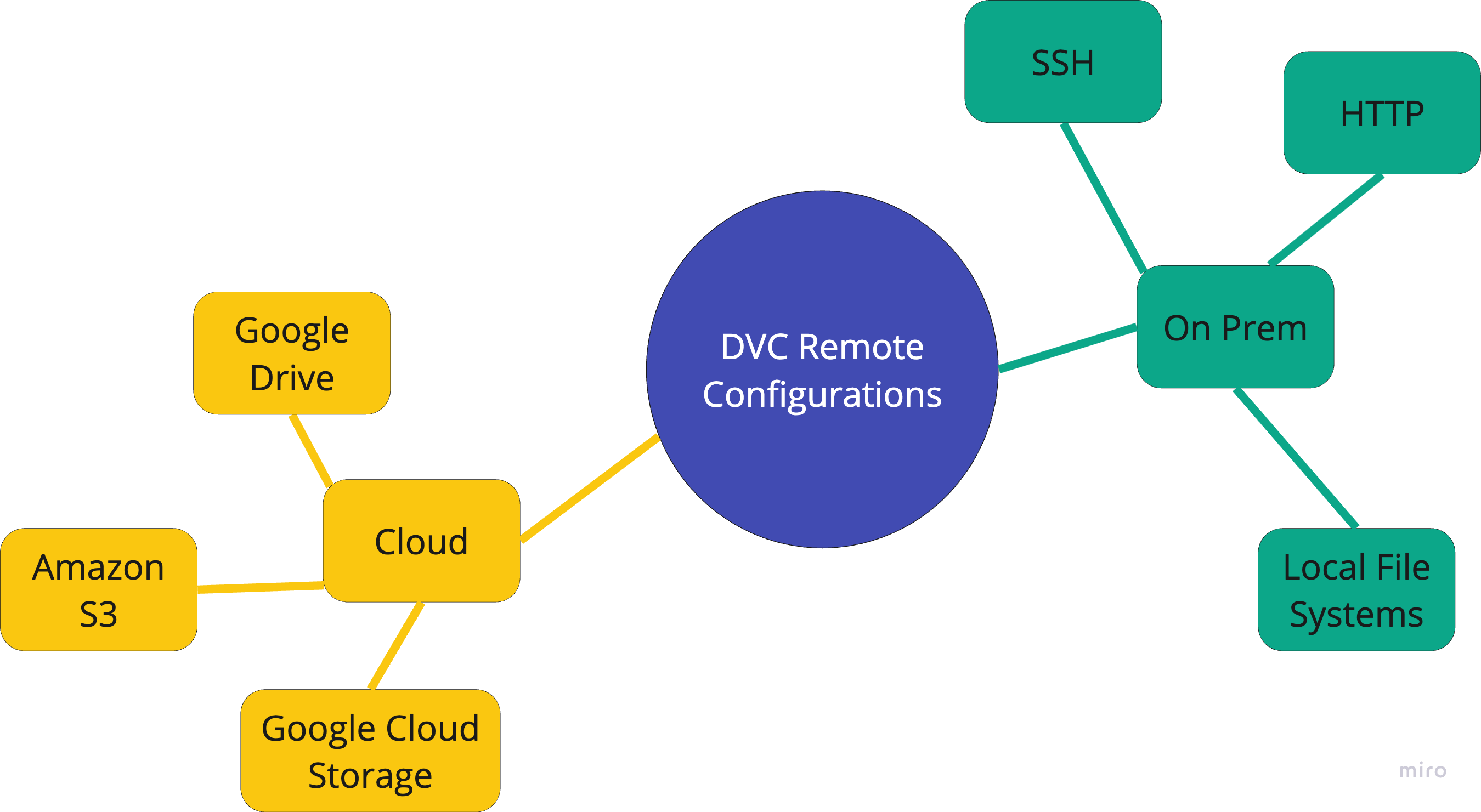
กราฟิกแสดงประเภท storage ที่ DVC รองรับ

การจัดการเวอร์ชันข้อมูลด้วย DVC เบื้องต้น

การตั้งค่า Remotes

  • การตั้งค่า remotes

    • dvc remote add <name> <location>
  • S3 bucket

$ dvc remote add s3_remote \
   s3://mys3bucket
  • การเปลี่ยนแปลงการตั้งค่า DVC
 ['remote "s3_remote"']
     url = s3://mys3bucket
  • GCP bucket
$ dvc remote add gcp_remote \
   gs://myGCPbucket
  • Azure
$ dvc remote add azure_remote \
   azure://mycontainer/path
การจัดการเวอร์ชันข้อมูลด้วย DVC เบื้องต้น

Local Remotes

  • Local remotes ใช้สำหรับ rapid prototyping
  • ใช้ไดเรกทอรีในระบบหรือ Network Attached Storage
$ dvc remote add mylocalremote /tmp/dvc
  • กำหนด default remote ด้วย flag -d
$ dvc remote add -d mylocalremote /tmp/dvc
  • Default remote ถูกกำหนดในส่วน core ของ .dvc/config
[core]
remote = mylocalremote
การจัดการเวอร์ชันข้อมูลด้วย DVC เบื้องต้น

การดูรายการ Remotes

  • การดูรายการ remotes
$ dvc remote list
s3_remote    s3://mys3bucket
local_remote /tmp/dvcremote
  • อ่านข้อมูลจาก .dvc/config
 ['remote "s3_remote"']
     url = s3://mys3bucket
 ['remote "local_remote"']
     url = /tmp/dvcremote
การจัดการเวอร์ชันข้อมูลด้วย DVC เบื้องต้น

การแก้ไขการตั้งค่า Remote

  • ปรับแต่งการตั้งค่าด้วย dvc remote modify
$ dvc remote modify s3_remote connect_timeout 300
  • การเปลี่ยนแปลงในไฟล์ config ของ DVC
 ['remote "s3_remote"']
     url = s3://mys3bucket
     connect_timeout = 300
การจัดการเวอร์ชันข้อมูลด้วย DVC เบื้องต้น

สรุป

  • DVC remotes ใช้แชร์ข้อมูลและโมเดล ML
  • รองรับ storage ทั้งในเครื่องและบนคลาวด์หลายประเภท
  • เพิ่ม remote: dvc remote add
    • ใช้ flag -d เพื่อกำหนดเป็น default
  • ดูรายการ remotes: dvc remote list
  • แก้ไข remote: dvc remote modify
การจัดการเวอร์ชันข้อมูลด้วย DVC เบื้องต้น

มาฝึกกันเถอะ!

การจัดการเวอร์ชันข้อมูลด้วย DVC เบื้องต้น

Preparing Video For Download...