การดำเนินการขั้นสูง

TensorFlow เบื้องต้นใน Python

Isaiah Hull

Visiting Associate Professor of Finance, BI Norwegian Business School

ภาพรวมของการดำเนินการขั้นสูง

  • ได้เรียนการดำเนินการพื้นฐานใน TensorFlow แล้ว
    • add(), multiply(), matmul() และ reduce_sum()
  • บทเรียนนี้จะสำรวจการดำเนินการขั้นสูง
    • gradient(), reshape() และ random()
TensorFlow เบื้องต้นใน Python

ภาพรวมของการดำเนินการขั้นสูง

การดำเนินการ การใช้งาน
gradient() คำนวณความชันของฟังก์ชัน ณ จุดหนึ่ง
reshape() เปลี่ยนรูปร่างของเทนเซอร์ (เช่น 10x10 เป็น 100x1)
random() สร้างเทนเซอร์ที่มีค่าจากการแจกแจงความน่าจะเป็น
TensorFlow เบื้องต้นใน Python

การหาค่าที่เหมาะสมที่สุด

  • ในหลายปัญหา เราต้องการหาค่าที่เหมาะสมที่สุดของฟังก์ชัน

    • ค่าต่ำสุด: ค่าต่ำสุดของฟังก์ชัน loss
    • ค่าสูงสุด: ค่าสูงสุดของฟังก์ชันวัตถุประสงค์
  • ทำได้โดยใช้การดำเนินการ gradient()

    • ค่าที่เหมาะสม: หาจุดที่ gradient = 0
    • ค่าต่ำสุด: การเปลี่ยนแปลงของ gradient > 0
    • ค่าสูงสุด: การเปลี่ยนแปลงของ gradient < 0
TensorFlow เบื้องต้นใน Python

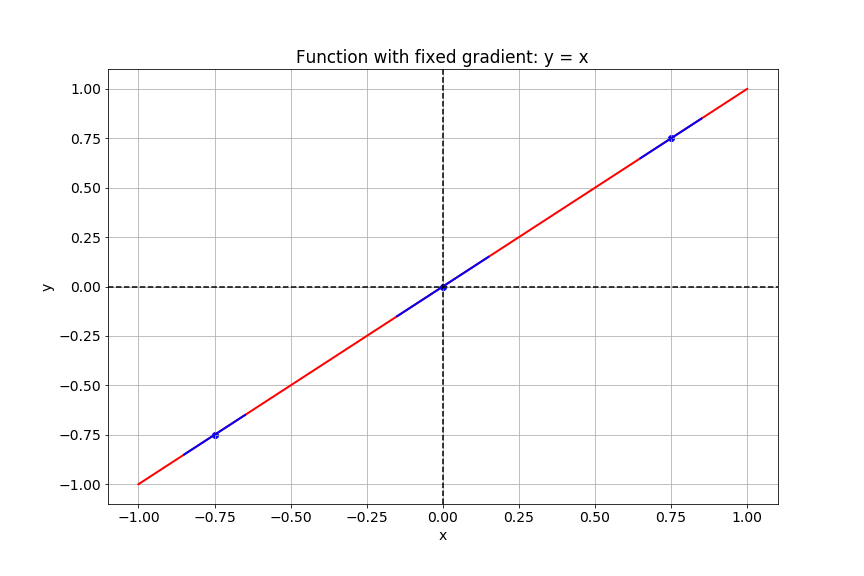
การคำนวณ gradient

สไลด์นี้แสดงกราฟของฟังก์ชัน y เท่ากับ x

TensorFlow เบื้องต้นใน Python

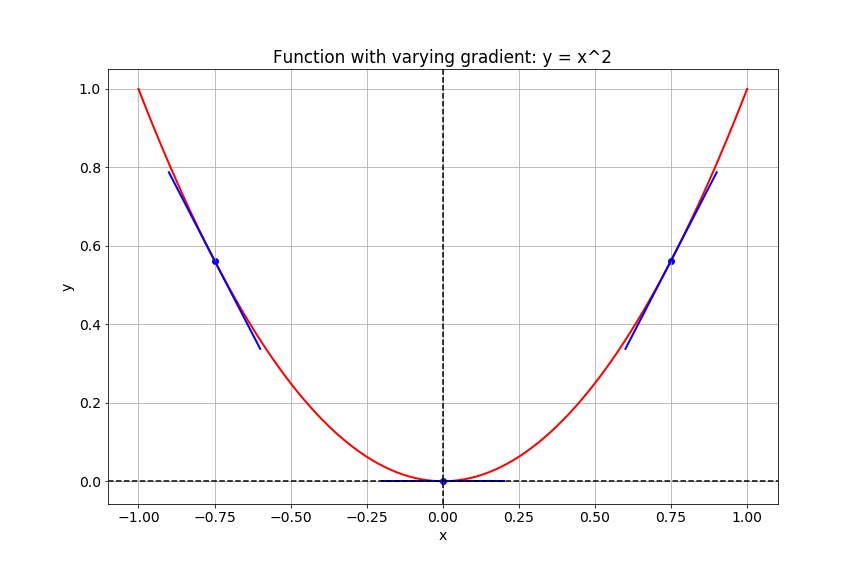
การคำนวณ gradient

สไลด์นี้แสดงกราฟของฟังก์ชัน y เท่ากับ x ยกกำลังสอง

TensorFlow เบื้องต้นใน Python

Gradient ใน TensorFlow

# Import tensorflow under the alias tf
import tensorflow as tf

# Define x
x = tf.Variable(-1.0)
# Define y within instance of GradientTape
with tf.GradientTape() as tape:
    tape.watch(x)
    y = tf.multiply(x, x)
# Evaluate the gradient of y at x = -1
g = tape.gradient(y, x)
print(g.numpy())
-2.0
TensorFlow เบื้องต้นใน Python

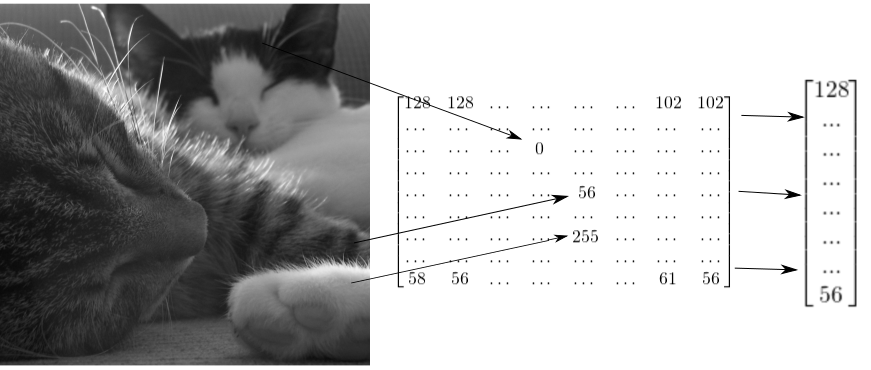
ภาพในรูปแบบเทนเซอร์

สไลด์แสดงให้เห็นว่าภาพแมวสองตัวสามารถแทนด้วยเทนเซอร์ 2 มิติ ซึ่งสามารถ reshape เป็นเวกเตอร์ 1 มิติได้

TensorFlow เบื้องต้นใน Python

วิธี reshape ภาพโทนสีเทา

# Import tensorflow as alias tf
import tensorflow as tf

# Generate grayscale image
gray = tf.random.uniform([2, 2], maxval=255, dtype='int32')

# Reshape grayscale image
gray = tf.reshape(gray, [2*2, 1])
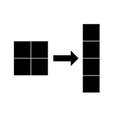
ภาพแสดงการ reshape ภาพโทนสีเทาขนาด 2x2 เป็นเวกเตอร์ขนาด 4x1

TensorFlow เบื้องต้นใน Python

วิธี reshape ภาพสี

# Import tensorflow as alias tf
import tensorflow as tf

# Generate color image
color = tf.random.uniform([2, 2, 3], maxval=255, dtype='int32')

# Reshape color image
color = tf.reshape(color, [2*2, 3])
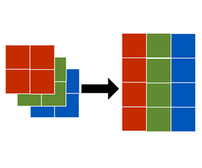
ภาพแสดงการ reshape ภาพสีขนาด 2x2x3 เป็นเมทริกซ์ขนาด 2x3

TensorFlow เบื้องต้นใน Python

มาฝึกกันเถอะ!

TensorFlow เบื้องต้นใน Python

Preparing Video For Download...