การปรับรูปร่างด้วยเมธอด pivot

การจัดรูปแบบข้อมูลด้วย pandas

Maria Eugenia Inzaugarat

Data Scientist

จาก long เป็น wide

  • แสดงความสัมพันธ์ระหว่างสองคอลัมน์
  • การดำเนินการกับ time series ตามตัวแปร
  • การดำเนินการที่ต้องการให้คอลัมน์เป็นตัวแปรที่ไม่ซ้ำกัน
1 https://pandas.pydata.org/docs/user_guide/reshaping.html
การจัดรูปแบบข้อมูลด้วย pandas

จาก long เป็น wide

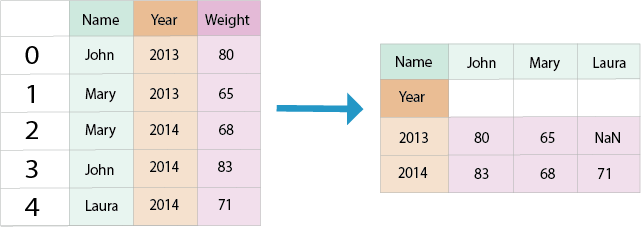
DataFrame ในรูปแบบ long

การจัดรูปแบบข้อมูลด้วย pandas

เมธอด pivot

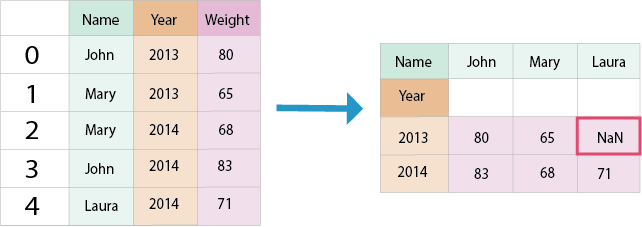
ลูกศรชี้จากรูปแบบ long ไปยัง wide


การเรียกใช้เมธอด pivot ของ pandas

การจัดรูปแบบข้อมูลด้วย pandas

เมธอด pivot

ลูกศรชี้จากรูปแบบ long ไปยัง wide


การเรียก pivot พร้อม argument

การจัดรูปแบบข้อมูลด้วย pandas

เมธอด pivot

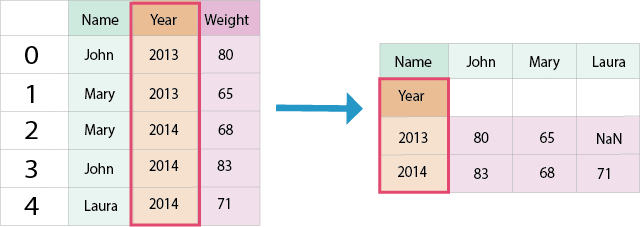
DataFrame แบบ long และ wide ที่ไฮไลต์คอลัมน์และ index


argument index ที่ไฮไลต์พร้อมชื่อคอลัมน์

การจัดรูปแบบข้อมูลด้วย pandas

เมธอด pivot

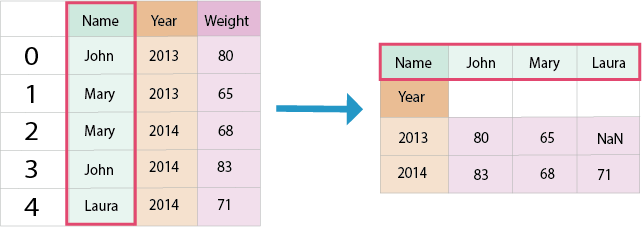
DataFrame แบบ long และ wide ที่ไฮไลต์คอลัมน์และชื่อคอลัมน์


argument columns ที่ไฮไลต์พร้อมชื่อคอลัมน์

การจัดรูปแบบข้อมูลด้วย pandas

เมธอด pivot

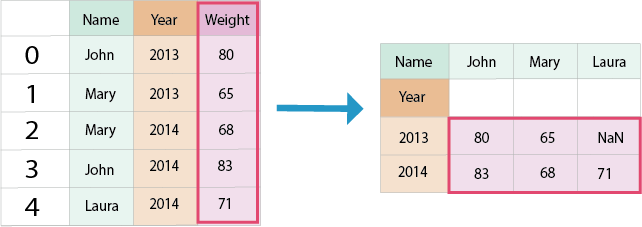
DataFrame แบบ long และ wide ที่ไฮไลต์คอลัมน์และค่า


argument values ที่ไฮไลต์พร้อมชื่อคอลัมน์

การจัดรูปแบบข้อมูลด้วย pandas

เมธอด pivot

ค่าเซลล์ NaN ที่ถูกไฮไลต์


argument ที่ไฮไลต์พร้อมชื่อคอลัมน์

การจัดรูปแบบข้อมูลด้วย pandas

การ pivot ชุดข้อมูล

fifa = pd.read_csv('fifa_players.csv')
fifa.head()
                 name    variable  metric_system  imperial_system
0   Cristiano Ronaldo      weight             83           183.00
1            J. Oblak      weight             87           191.00
2   Cristiano Ronaldo      height            187             6.13
3     J. Oblak             height            188             6.16
การจัดรูปแบบข้อมูลด้วย pandas

การ pivot ชุดข้อมูล

fifa.pivot(index='name'                                            )
การจัดรูปแบบข้อมูลด้วย pandas

การ pivot ชุดข้อมูล

fifa.pivot(index='name', columns='variable'                        )
การจัดรูปแบบข้อมูลด้วย pandas

การ pivot ชุดข้อมูล

fifa.pivot(index='name', columns='variable', values='metric_system')
         variable  height   weight
             name        
Cristiano Ronaldo     187       83
         J. Oblak     188       87
การจัดรูปแบบข้อมูลด้วย pandas

การ pivot หลายคอลัมน์

fifa.pivot(index='name', columns='variable', values=['metric_system', 'imperial_system'])
                     metric_system     imperial_system       
         variable   height  weight     height   weight
             name                                                         
Cristiano Ronaldo      187      83       6.13    183.0
         J. Oblak      188      87       6.16    191.0
การจัดรูปแบบข้อมูลด้วย pandas

การ pivot หลายคอลัมน์


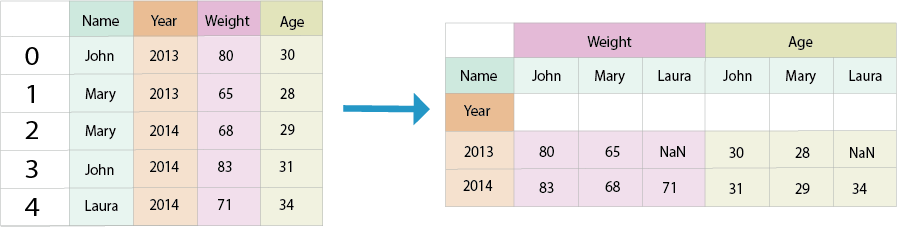
ลูกศรชี้จากรูปแบบ long ไปยัง wide พร้อม column index แบบลำดับชั้น


argument index และ columns ที่ไฮไลต์พร้อมชื่อคอลัมน์

การจัดรูปแบบข้อมูลด้วย pandas

การ pivot หลายคอลัมน์

fifa.pivot(index="name", columns="variable")
                     metric_system     imperial_system       
         variable   height  weight     height   weight
             name                                                         
Cristiano Ronaldo      187      83       6.13    183.0
         J. Oblak      188      87       6.16    191.0
การจัดรูปแบบข้อมูลด้วย pandas

ข้อผิดพลาดจากข้อมูลซ้ำ

another_fifa.head()
                 name    variable  metric_system  imperial_system
0   Cristiano Ronaldo      weight             83           183.00
1            J. Oblak      weight             87           191.00
2   Cristiano Ronaldo      height            187             6.13
3            J. Oblak      height            188             6.16
4   Cristiano Ronaldo      height            187             6.14
การจัดรูปแบบข้อมูลด้วย pandas

ข้อผิดพลาดจากข้อมูลซ้ำ

another_fifa.head()
                 name    variable  metric_system  imperial_system
0   Cristiano Ronaldo      weight             83           183.00
1            J. Oblak      weight             87           191.00
  2   Cristiano Ronaldo      height            187             6.13 <--
3            J. Oblak      height            188             6.16
  4   Cristiano Ronaldo      height            187             6.14 <--
การจัดรูปแบบข้อมูลด้วย pandas

ข้อผิดพลาดจากข้อมูลซ้ำ

another_fifa.pivot(index="name", columns="variable")
ValueError: Index contains duplicate entries, cannot reshape


another_fifa = another_fifa.drop(4, axis=0)
another_fifa.pivot(index="name", columns="variable")
                     metric_system     imperial_system       
         variable   height  weight     height   weight
             name                                                         
Cristiano Ronaldo      187      83       6.13    183.0
         J. Oblak      188      87       6.16    191.0
การจัดรูปแบบข้อมูลด้วย pandas

มาฝึกกันเถอะ!

การจัดรูปแบบข้อมูลด้วย pandas

Preparing Video For Download...