Speech-to-text

ระบบ Multi-Modal ด้วย OpenAI API

James Chapman

Curriculum Manager, DataCamp

ที่จะเรียนต่อไป...

$$

เป้าหมายของคอร์ส
  • โมเดลเสียงของ OpenAI
  • การกลั่นกรองข้อความ
  • กรณีศึกษา: แชทบอตฝ่ายบริการลูกค้า

ภาพแสดงโมเดลเสียง การกลั่นกรองข้อความ และกรณีศึกษา

ระบบ Multi-Modal ด้วย OpenAI API

ทบทวน...

from openai import OpenAI


# Create the OpenAI client client = OpenAI(api_key="<OPENAI_API_TOKEN>")
# Create a request to the Chat Completions endpoint response = client.chat.completions.create(
model="gpt-4o-mini", messages=[{"role": "user", "content": "What is the OpenAI API?"}]
)
  • ไม่ต้องใส่ API key—ตั้งค่าไว้ให้แล้ว 🎉
ระบบ Multi-Modal ด้วย OpenAI API

ทบทวน...

# Extract the content from the response
print(response.choices[0].message.content)
The OpenAI API is a cloud-based service provided by OpenAI that allows developers
to integrate advanced AI models into their applications.

$$

  • OpenAI API ทำได้มากกว่าแค่ข้อความ 🚀
ระบบ Multi-Modal ด้วย OpenAI API

โมเดลเสียงของ OpenAI

ความสามารถ Speech-to-text:

  • ถอดเสียงเป็นข้อความ
  • แปลเสียงภาษาอื่นที่ไม่ใช่ภาษาอังกฤษ
  • รองรับ mp3, mp4, mpeg, mpga, m4a, wav และ webm (จำกัด 25 MB)


ตัวอย่างการใช้งาน:

  • ถอดเสียงการประชุม
  • คำบรรยายวิดีโอ

ไอคอนแสดงการบันทึกเสียงและบล็อกข้อความ

  • ประมวลผลสายโทรลูกค้า
ระบบ Multi-Modal ด้วย OpenAI API

โหลดไฟล์เสียง


ตัวอย่าง: ถอดเสียง meeting_recording.mp3

audio_file = open("meeting_recording.mp3", "rb")

$$

หากไฟล์อยู่ใน ไดเรกทอรีอื่น

audio_file = open("path/to/file/meeting_recording.mp3", "rb")
ระบบ Multi-Modal ด้วย OpenAI API

สร้างการถอดเสียง

  • Audio endpoint
audio_file= open("meeting_recording.mp3", "rb")

response = client.audio.transcriptions.create(
model="whisper-1",
file=audio_file
)
print(response)
Transcription(text="Welcome everyone to the June product monthly. We'll get started in...)
1 https://platform.openai.com/docs/guides/speech-to-text
ระบบ Multi-Modal ด้วย OpenAI API

ข้อความที่ถอดเสียงได้

print(response.text)
Welcome everyone to the June product monthly. We'll get started in just a minute.
Alright, let's get started. Today's agenda will start with a spotlight from Chris
on the new mobile user onboarding flow, then we'll review how we're tracking on
our quarterly targets, and finally, we'll finish with another spotlight from Katie
who will discuss the upcoming branding updates...
ระบบ Multi-Modal ด้วย OpenAI API

ถอดเสียงภาษาอื่นที่ไม่ใช่ภาษาอังกฤษ

ไอคอนแสดงการบันทึกเสียงและบล็อกข้อความ

ขั้นตอนการถอดเสียง:

  1. open() ไฟล์เสียง
  2. ส่งคำขอถอดเสียง
  3. ดึงข้อความออกมา
ระบบ Multi-Modal ด้วย OpenAI API

สร้างการแปลภาษา

audio_file = open("non_english_audio.m4a", "rb")


response = client.audio.translations.create(
model="whisper-1",
file=audio_file
)
print(response.text)
The search volume for keywords like A I has increased rapidly since the launch of
Cha GTP.
ระบบ Multi-Modal ด้วย OpenAI API

ประสิทธิภาพการถอดเสียง


  • ประสิทธิภาพอาจแตกต่างกันมาก ขึ้นอยู่กับ:
    • คุณภาพของเสียง
    • ภาษาในไฟล์เสียง
    • ความรู้ของโมเดลในหัวข้อนั้น

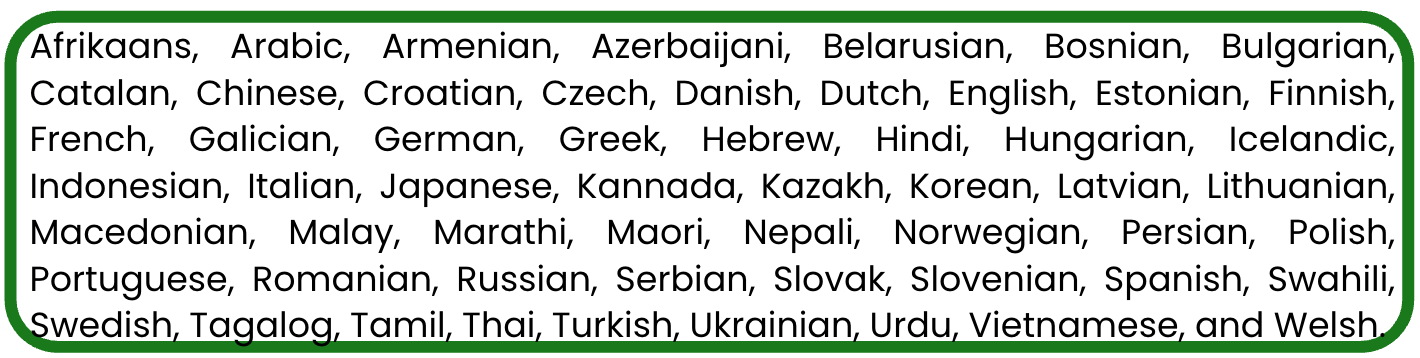
ภาษาต่าง ๆ ทั่วโลก

ระบบ Multi-Modal ด้วย OpenAI API

มาฝึกกันเถอะ!

ระบบ Multi-Modal ด้วย OpenAI API

Preparing Video For Download...