Lexical graphs

Graph RAG ด้วย LangChain และ Neo4j

Adam Cowley

Manager, Developer Education at Neo4j

สรุปทบทวน
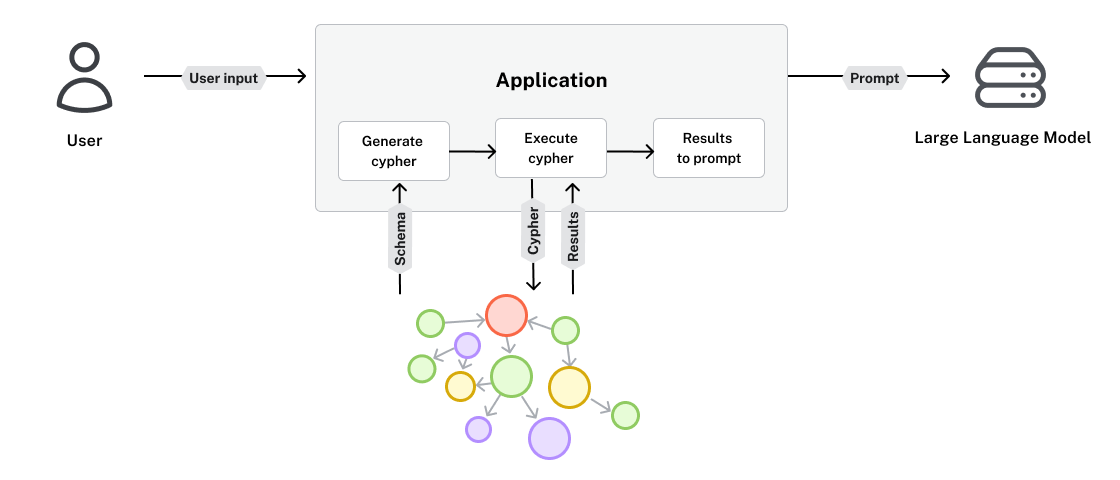
ผลลัพธ์ถูกนำเข้า prompt เพื่อส่งต่อไปยัง LLM

Graph RAG ด้วย LangChain และ Neo4j

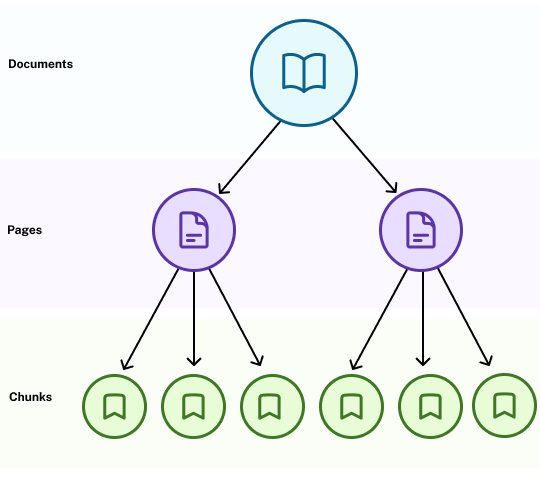
Lexical graphs


  • การแสดงข้อความและเอกสารที่ไม่มีโครงสร้างในรูปแบบกราฟ
  • เก็บโครงสร้างแบบลำดับชั้นของหนังสือ บทความวิจัย ฯลฯ
  • ระดับย่อยสุดเก็บข้อความดิบ

ไดอะแกรมแสดงลำดับชั้นของเอกสาร ที่มีความสัมพันธ์แบบหนึ่งต่อหลายกับหน้า และแต่ละหน้ามีโหนด chunk หลายโหนดเชื่อมอยู่

Graph RAG ด้วย LangChain และ Neo4j

Romeo and Juliet

บทนำ:

The Project Gutenberg eBook of Romeo and Juliet

This ebook is for the use of anyone anywhere in the United States and
most other parts of the world at no cost and with almost no restrictions

Title: Romeo and Juliet
Author: William Shakespeare

ข้อมูลตัวละคร:

Dramatis Personæ

ESCALUS, Prince of Verona.
MERCUTIO, kinsman to the Prince, and friend to Romeo.
PARIS, a young Nobleman, kinsman to the Prince.
Page to Paris.
...

บทพูดเปิดเรื่อง:

 Enter Chorus.

CHORUS.
Two households, both alike in dignity,
In fair Verona, where we lay our scene,
From ancient grudge break to new mutiny,
...

องก์และฉาก:

ACT I
SCENE I. A public place.
 Enter Sampson and Gregory armed with swords and bucklers.

SAMPSON.
Gregory, on my word, we'll not carry coals.

GREGORY.
No, for then we should be colliers...
1 https://gutenberg.org/ebooks/1513
Graph RAG ด้วย LangChain และ Neo4j

Romeo and Juliet ในรูปแบบ knowledge graph
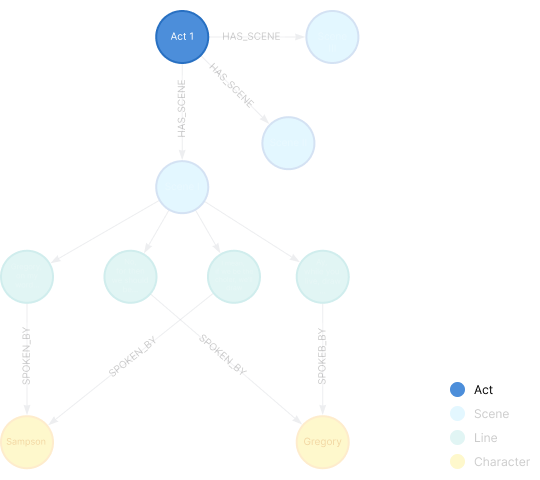
 

  • บทละครประกอบด้วย Acts (องก์)

ไดอะแกรม knowledge graph ที่เน้นโหนด Act

Graph RAG ด้วย LangChain และ Neo4j

Romeo and Juliet ในรูปแบบ knowledge graph
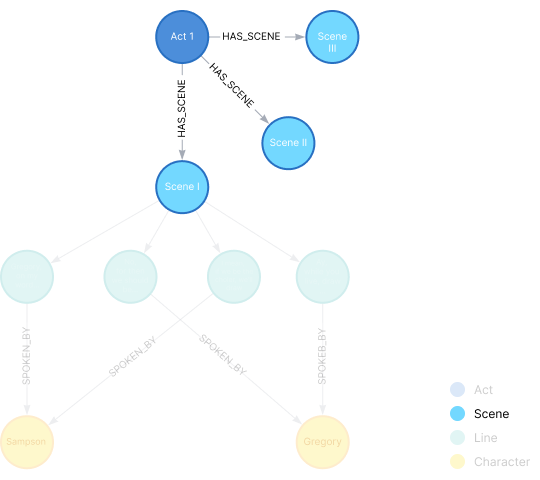
 

  • บทละครประกอบด้วย Acts (องก์)
  • องก์ประกอบด้วย Scenes (ฉาก)

ไดอะแกรม knowledge graph ที่เน้นความสัมพันธ์ HAS_SCENE จากโหนด Act ไปยังโหนด Scene

Graph RAG ด้วย LangChain และ Neo4j

Romeo and Juliet ในรูปแบบ knowledge graph
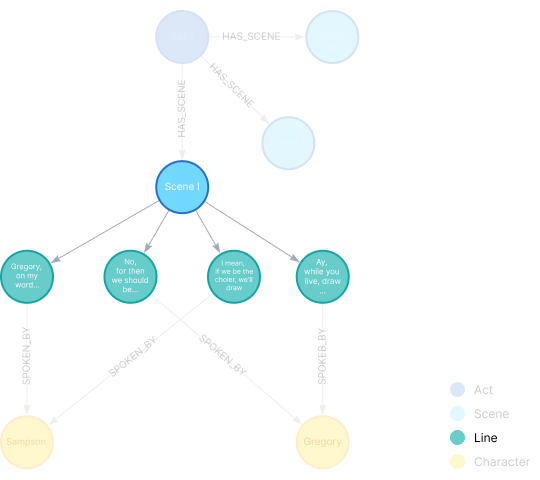
 

  • บทละครประกอบด้วย Acts (องก์)
  • องก์ประกอบด้วย Scenes (ฉาก)
  • ฉากมี Lines (บทพูด)

ไดอะแกรม knowledge graph ที่เน้นความสัมพันธ์ HAS_LINE จากโหนด Scene ไปยังโหนด Line

Graph RAG ด้วย LangChain และ Neo4j

Romeo and Juliet ในรูปแบบ knowledge graph
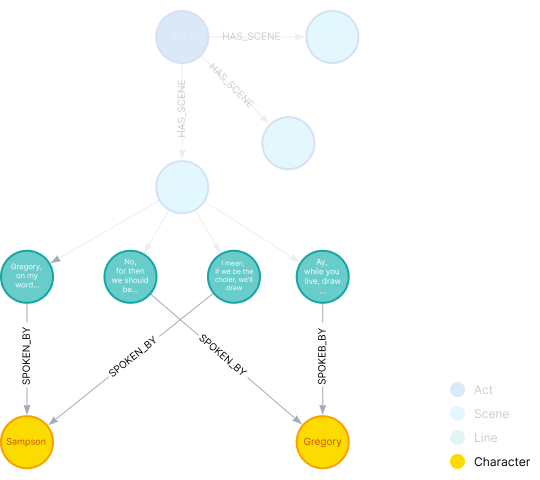
 

  • บทละครประกอบด้วย Acts (องก์)
  • องก์ประกอบด้วย Scenes (ฉาก)
  • ฉากมี Lines (บทพูด)
  • บทพูดกล่าวโดย Characters (ตัวละคร)

ไดอะแกรม knowledge graph ที่เน้นความสัมพันธ์ SPOKEN_BY จากโหนด Line ไปยังโหนด Character

Graph RAG ด้วย LangChain และ Neo4j

Romeo and Juliet ในรูปแบบ knowledge graph
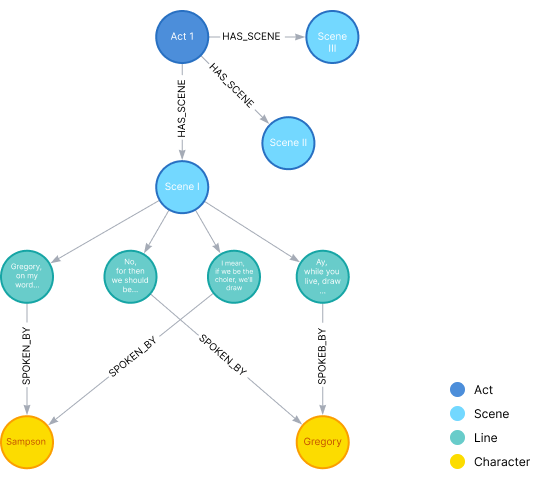
 

  • บทละครประกอบด้วย Acts (องก์)
  • องก์ประกอบด้วย Scenes (ฉาก)
  • ฉากมี Lines (บทพูด)
  • บทพูดกล่าวโดย Characters (ตัวละคร)


→ โหนด Line แต่ละโหนดจะมี property ได้แก่ text และ embedding

ไดอะแกรมกราฟแสดงความสัมพันธ์ต่อไปนี้: Act HAS_SCENE Scene, Scene HAS_LINE Line, Line SPOKEN_BY Character

Graph RAG ด้วย LangChain และ Neo4j

โหลดเอกสาร

โหลดเอกสารเข้าหน่วยความจำโดยใช้ document loader:

# Load the PDF
loader = PyPDFLoader("romeo-and-juliet.pdf")
pages = loader.load()
Graph RAG ด้วย LangChain และ Neo4j

แบ่งเอกสาร

act_splitter = RecursiveCharacterTextSplitter(
    # Split text into acts
    separators=[ r"\n\nTHE PROLOGUE.",  r"\n\nACT", r"\n\n\*\*\* END"],
    is_separator_regex=True
)

scene_splitter = RecursiveCharacterTextSplitter( # Split act into scenes separators=[r"\nSCENE "], is_separator_regex=True )
Graph RAG ด้วย LangChain และ Neo4j

สร้างโหนดและความสัมพันธ์

play = Node(

type="Play",
id="romeo-and-juliet",
properties={ "title": "Romeo and Juliet", "playwright": "William Shakespeare", "genres": ["Romance", "Tragedy"] }
)
# Store in a graph document graph_doc = GraphDocument(nodes=[play], relationships=[])
Graph RAG ด้วย LangChain และ Neo4j

ดึงข้อมูลองก์

parts = act_splitter.split_text(text)

for act in parts: print(act[:20])
THE PROLOGUE...

ACT I
ACT II
ACT III
Graph RAG ด้วย LangChain และ Neo4j

ดึงข้อมูลองก์

parts = act_splitter.split_text(text)

for a, act in enumerate(parts):

first_line = act_text.split("\n")[0].strip()
if first_line.startswith("ACT"):
act_node = Node(
type="Act",
id=first_line,
)
graph_doc.nodes.append(act_node)
Graph RAG ด้วย LangChain และ Neo4j

ดึงข้อมูลองก์

for a, act in enumerate(parts):
    # ...
    # act_node = Node(...)


# Create a relationship relationship = Relationship(
source=play,
target=act_node,
type="HAS_ACT",
properties=dict(order=a)
)
graph_doc.relationships.append(relationship)
Graph RAG ด้วย LangChain และ Neo4j

บันทึกโหนดและความสัมพันธ์

ใช้ออบเจกต์ Neo4jGraph:

graph = Neo4jGraph(
    url=NEO4J_URI, 
    username=NEO4J_USERNAME, 
    password=NEO4J_PASSWORD
)
graph.add_graph_documents([graph_doc])
Graph RAG ด้วย LangChain และ Neo4j

มาฝึกกันเถอะ!

Graph RAG ด้วย LangChain และ Neo4j

Preparing Video For Download...