Graphs และ RAG

Graph RAG ด้วย LangChain และ Neo4j

Adam Cowley

Manager, Developer Education at Neo4j

แนะนำผู้สอน

 

  • Manager, Developer Education ที่ Neo4j
  • Developer Education ผ่าน Neo4j GraphAcademy
  • ประสบการณ์พัฒนาซอฟต์แวร์กว่า 20 ปี
  • ประสบการณ์ด้าน Neo4j กว่า 10 ปี


รูปของ Adam

1 https://graphacademy.neo4j.com
Graph RAG ด้วย LangChain และ Neo4j

R ใน RAG

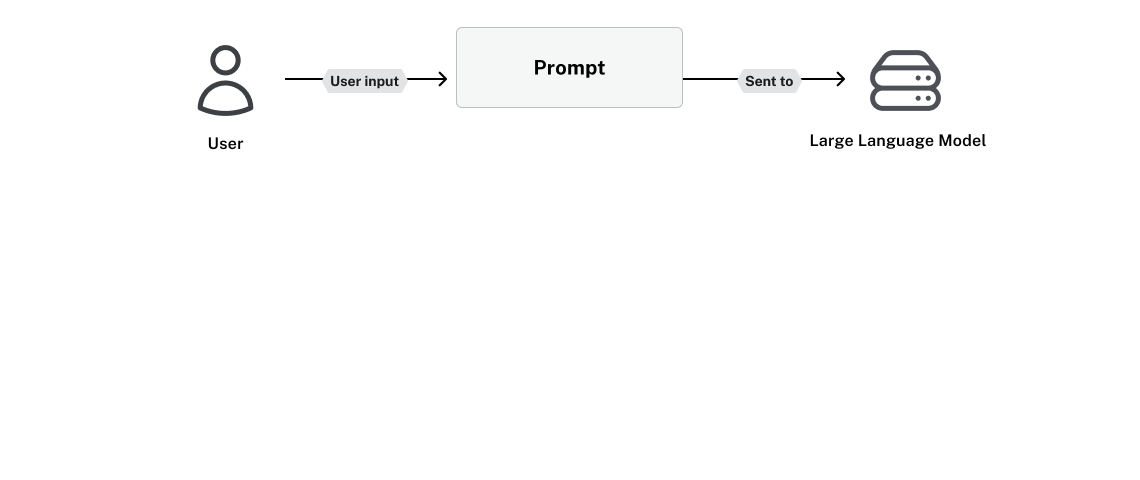
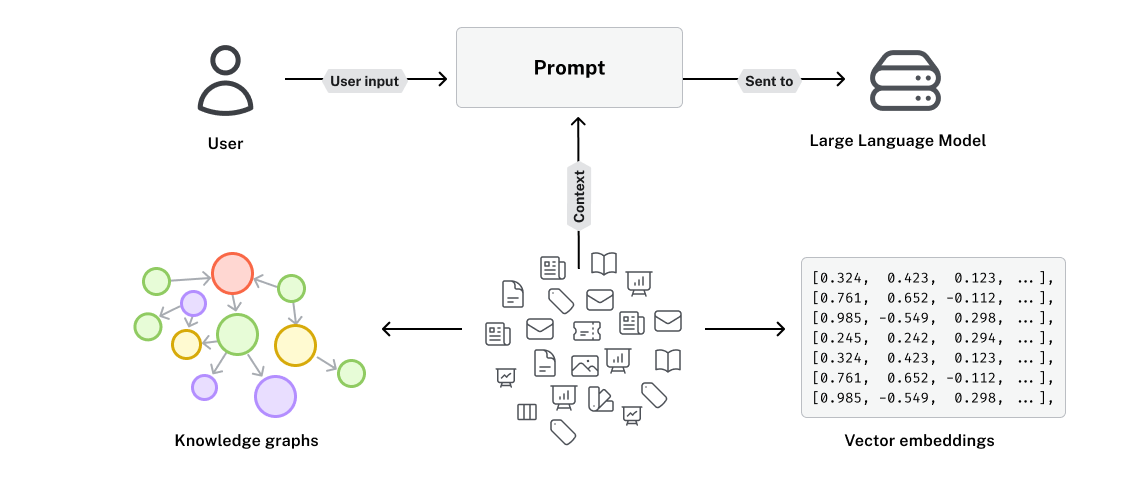
ไดอะแกรมแอปพลิเคชันที่แสดง input ของผู้ใช้ถูกเพิ่มลงใน prompt แล้วส่งไปยัง LLM

Graph RAG ด้วย LangChain และ Neo4j

R ใน RAG

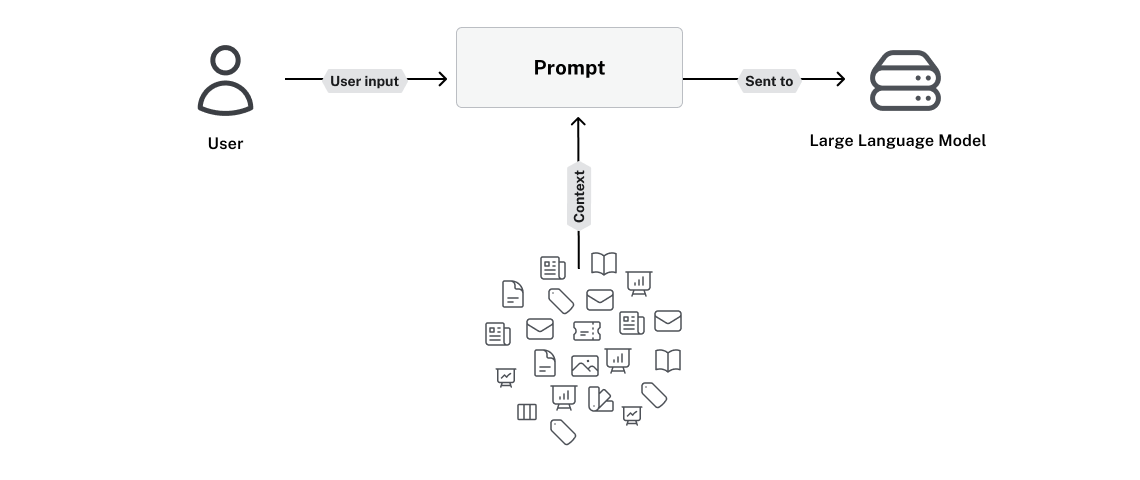
prompt ต้องการ context ที่มาจากเอกสารและแหล่งข้อมูลต่างๆ

Graph RAG ด้วย LangChain และ Neo4j

R ใน RAG

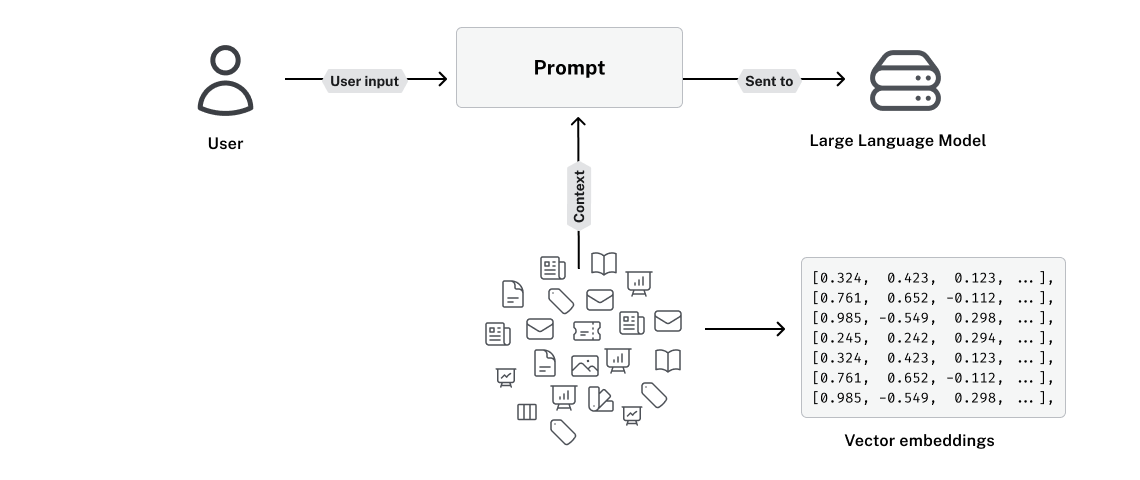
ข้อมูลมักถูกแปลงเป็น vector embeddings

Graph RAG ด้วย LangChain และ Neo4j

Semantic search มีข้อจำกัดอะไรบ้าง?

Vectors เหมาะกับ

  • คำถามแบบเปิดหรือคลุมเครือ

Vectors ไม่เหมาะกับ

  • คำถามเฉพาะเจาะจงหรืออิงข้อเท็จจริง
  • คำถามเชิงตัวเลขหรือต้องการค่าตรงทั้งหมด
  • คำถามเชิงตรรกะ

Paul Graham คิดอย่างไรกับ Generative AI?

Paul Graham ลงทุนใน Generative AI Startups ไปกี่แห่งแล้ว?

Graph RAG ด้วย LangChain และ Neo4j

Vectors เทียบกับ knowledge graphs

ข้อความ Vector Embedding
He's just a city boy born [0.12, -0.34, 0.56, 0.78, ..., -0.91]
born and raised in South Detroit [0.22, 0.45, -0.67, 0.11, ..., 0.33]
He took the midnight train [-0.55, 0.89, 0.12, -0.44, ..., 0.67]
going anywhere [0.78, -0.23, 0.45, 0.91, ..., -0.12]

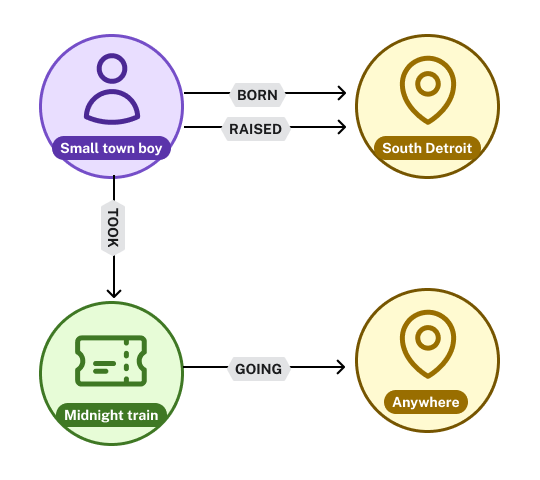
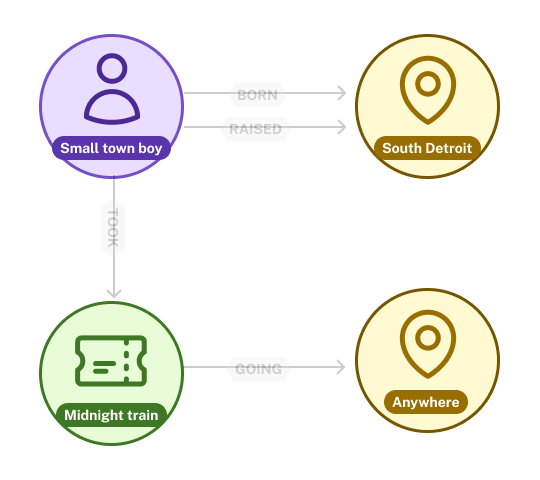
ไดอะแกรม graph แสดง entity ที่ปรากฏในเนื้อเพลง Don't Stop Believin' โดยมี small town boy มีความสัมพันธ์ BORN และ RAISED เชื่อมไปยัง South Detroit

Graph RAG ด้วย LangChain และ Neo4j

Vectors เทียบกับ knowledge graphs

ข้อความ Vector Embedding
He's just a city boy born [0.12, -0.34, 0.56, 0.78, ..., -0.91]
born and raised in South Detroit [0.22, 0.45, -0.67, 0.11, ..., 0.33]
He took the midnight train [-0.55, 0.89, 0.12, -0.44, ..., 0.67]
going anywhere [0.78, -0.23, 0.45, 0.91, ..., -0.12]

โหนดประกอบด้วย บุคคล: Small town boy, สถานที่: South Detroit, รถไฟ: Midnight Train และสถานที่: Anywhere

Graph RAG ด้วย LangChain และ Neo4j

Vectors เทียบกับ knowledge graphs

ข้อความ Vector Embedding
He's just a city boy born [0.12, -0.34, 0.56, 0.78, ..., -0.91]
born and raised in South Detroit [0.22, 0.45, -0.67, 0.11, ..., 0.33]
He took the midnight train [-0.55, 0.89, 0.12, -0.44, ..., 0.67]
going anywhere [0.78, -0.23, 0.45, 0.91, ..., -0.12]

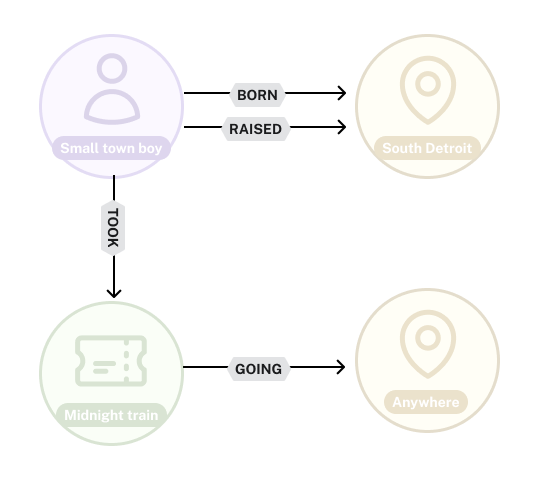
ความสัมพันธ์ BORN และ RAISED ชี้จากบุคคลไปยังสถานที่ ส่วนความสัมพันธ์ GOING ชี้จากโหนด Midnight Train ไปยังโหนด Anywhere

Graph RAG ด้วย LangChain และ Neo4j

Knowledge graphs และ Neo4j


  • Neo4j คือ graph database อันดับ 1 ของโลก
  • ยืดหยุ่น รองรับ schema แบบ optional
  • การเชื่อมต่อ LangChain ด้วย langchain-neo4j
  • LCEL: LangChain Expression Language

โลโก้ neo4j และ langchain

1 https://db-engines.com/en/ranking/graph%20dbms
Graph RAG ด้วย LangChain และ Neo4j

โหนดแทนสิ่งต่างๆ

from langchain_neo4j.graphs.graph_document \
  import Node

book = Node(
type="Book",
id=f"9781098127107",
properties={ "title": "Building Knowledge Graphs" }
)

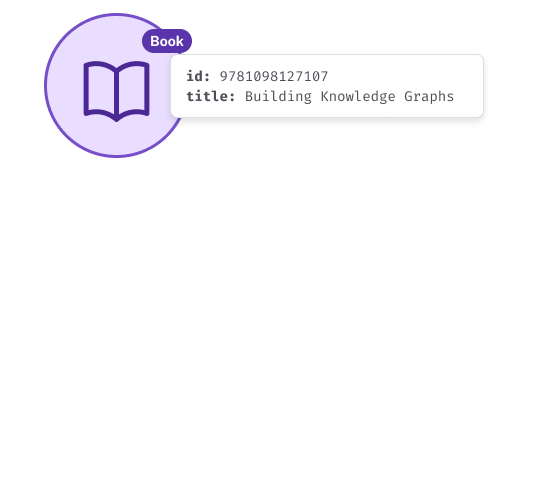
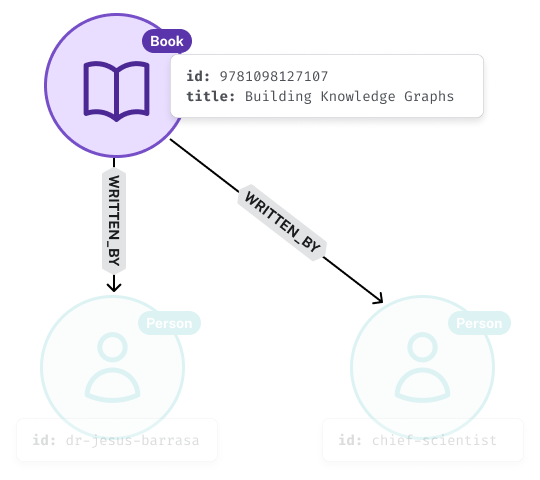
โหนด Book ในไดอะแกรม graph พร้อม property สำหรับ ID และ Title

Graph RAG ด้วย LangChain และ Neo4j

ความสัมพันธ์เชื่อมโหนดเข้าด้วยกัน

from langchain_neo4j.graphs.graph_document \
  import Node, Relationship

book = Node(type="Book", id=f"9781098127107")

jesus = Node(type="Person", id="dr-jesus-barrasa")
jim = Node(type="Person", id="chief-scientist")
for author in [jesus, jim]:
    relationship = Relationship(


)

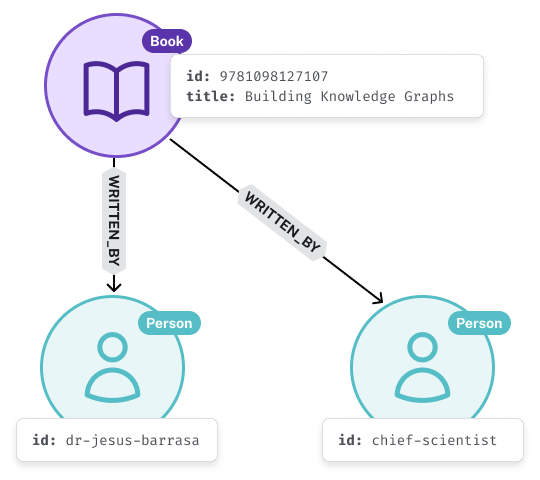
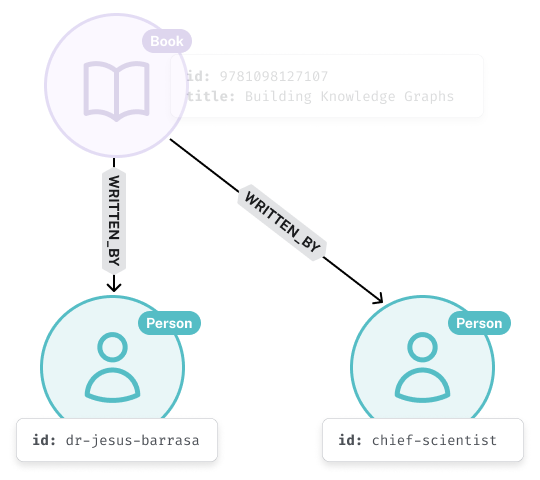
ความสัมพันธ์ WRITTEN_BY สองเส้นชี้จากโหนด Book ไปยังโหนด Person สองโหนดที่แทนผู้แต่ง

Graph RAG ด้วย LangChain และ Neo4j

ความสัมพันธ์เชื่อมโหนดเข้าด้วยกัน

from langchain_neo4j.graphs.graph_document \
  import Node, Relationship

book = Node(type="Book", id=f"9781098127107")

jesus = Node(type="Person", id="dr-jesus-barrasa")
jim = Node(type="Person", id="chief-scientist")
for author in [jesus, jim]:
    relationship = Relationship(

source=book,


)

โหนดต้นทางของความสัมพันธ์ WRITTEN_BY คือโหนด Book

Graph RAG ด้วย LangChain และ Neo4j

ความสัมพันธ์เชื่อมโหนดเข้าด้วยกัน

from langchain_neo4j.graphs.graph_document \
  import Node, Relationship

book = Node(type="Book", id=f"9781098127107")

jesus = Node(type="Person", id="dr-jesus-barrasa")
jim = Node(type="Person", id="chief-scientist")
for author in [jesus, jim]:
    relationship = Relationship(

source=book,
target=author,


)

โหนดปลายทางของความสัมพันธ์ WRITTEN_IN คือโหนด Person

Graph RAG ด้วย LangChain และ Neo4j

ความสัมพันธ์เชื่อมโหนดเข้าด้วยกัน

from langchain_neo4j.graphs.graph_document \
  import Node, Relationship

book = Node(type="Book", id=f"9781098127107")

jesus = Node(type="Person", id="dr-jesus-barrasa")
jim = Node(type="Person", id="chief-scientist")
for author in [jesus, jim]:
    relationship = Relationship(

source=book,
target=author,
type="WRITTEN_BY"
properties=dict(...)
)

ไดอะแกรมโหนดแสดงโหนด Book และความสัมพันธ์ WRITTEN_BY สองเส้นชี้ไปยังผู้แต่ง เพื่อแสดงว่าโหนดสามารถมีได้หลายความสัมพันธ์

Graph RAG ด้วย LangChain และ Neo4j

เชื่อมต่อกับ Neo4j

from langchain_neo4j import Neo4jGraph


graph = Neo4jGraph( url=NEO4J_URI, username=NEO4J_USERNAME, password=NEO4J_PASSWORD )
1 https://neo4j.com/docs/getting-started/
Graph RAG ด้วย LangChain และ Neo4j

บันทึก graph documents

from langchain_neo4j.graphs.graph_document import GraphDocument


# Wrapper for Nodes and Relationships doc = GraphDocument(
nodes=[book, jesus, jim],
relationships=[jesus_wrote_book, jim_wrote_book]
)
# Save nodes and relationships to the database graph.add_graph_documents([graph_document])
Graph RAG ด้วย LangChain และ Neo4j

แล้ว GraphRAG คืออะไร?

ไดอะแกรมก่อนหน้าที่เพิ่ม context จากเอกสารและ embeddings ของเอกสารเหล่านั้น

Graph RAG ด้วย LangChain และ Neo4j

แล้ว GraphRAG คืออะไร?

ไดอะแกรมก่อนหน้าที่เพิ่ม knowledge graph แสดงโหนดและความสัมพันธ์ที่ได้จากเอกสาร

Graph RAG ด้วย LangChain และ Neo4j

มาฝึกกันเถอะ!

Graph RAG ด้วย LangChain และ Neo4j

Preparing Video For Download...