การรักษาความปลอดภัยของออบเจกต์

Python เบื้องต้นสำหรับ AWS Boto

Maksim Pecherskiy

Data engineer

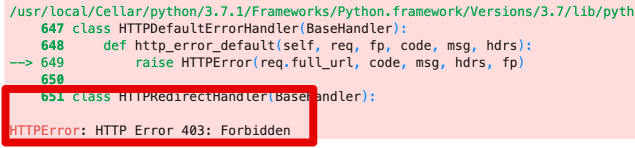
ทำไมต้องสนใจเรื่องสิทธิ์การเข้าถึง?

df = pd.read_csv('https://gid-staging.potholes.csv')
ภาพรวมสิทธิ์การเข้าถึง

Python เบื้องต้นสำหรับ AWS Boto

ทำไมต้องสนใจเรื่องสิทธิ์การเข้าถึง?

อนุญาตสิทธิ์แล้ว!

# Generate the boto3 client for interacting with S3
s3 = boto3.client('s3', region_name='us-east-1', 
                         aws_access_key_id=AWS_KEY_ID, 
                         aws_secret_access_key=AWS_SECRET)

# Use client to download a file s3.download_file( Filename='potholes.csv', Bucket='gid-requests', Key='potholes.csv')
Python เบื้องต้นสำหรับ AWS Boto

ระบบสิทธิ์การเข้าถึงของ AWS

IAM

Bucket Policy

ACL

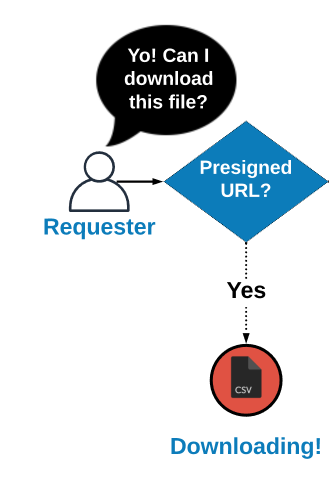
Presigned URL

Python เบื้องต้นสำหรับ AWS Boto

ระบบสิทธิ์การเข้าถึงของ AWS

IAM

Bucket Policy

ACL

Presigned URL

Python เบื้องต้นสำหรับ AWS Boto

ACL

ACL

Python เบื้องต้นสำหรับ AWS Boto

ACL

อัปโหลดไฟล์

s3.upload_file(
  Filename='potholes.csv', Bucket='gid-requests', Key='potholes.csv')

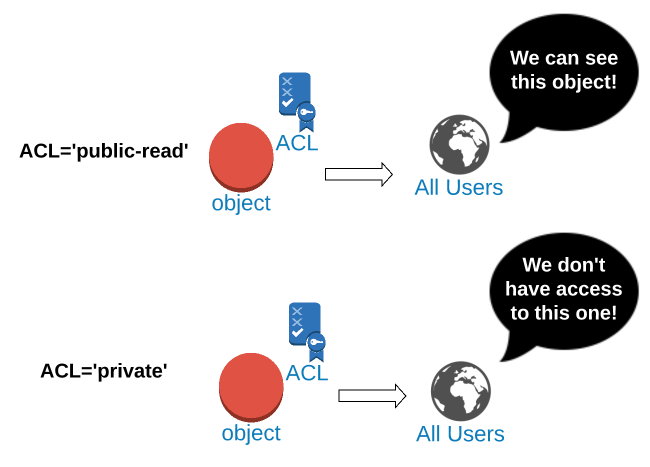
กำหนด ACL เป็น 'public-read'

s3.put_object_acl(
  Bucket='gid-requests', Key='potholes.csv', ACL='public-read')
Python เบื้องต้นสำหรับ AWS Boto

การกำหนด ACL ขณะอัปโหลด

อัปโหลดไฟล์พร้อม ACL 'public-read'

s3.upload_file(
  Bucket='gid-requests', 
  Filename='potholes.csv', 
  Key='potholes.csv', 
  ExtraArgs={'ACL':'public-read'})
Python เบื้องต้นสำหรับ AWS Boto

การเข้าถึงออบเจกต์สาธารณะ

รูปแบบ URL ของออบเจกต์ S3

https://{bucket}.{key}

URL สำหรับ Key='2019/potholes.csv'

https://gid-requests.2019/potholes.csv
Python เบื้องต้นสำหรับ AWS Boto

การสร้าง URL ของออบเจกต์สาธารณะ

สร้างสตริง URL ของออบเจกต์

url = "https://{}.{}".format(
  "gid-requests", 
  "2019/potholes.csv")

'https://gid-requests.2019/potholes.csv'

# Read the URL into Pandas
df = pd.read_csv(url)
Python เบื้องต้นสำหรับ AWS Boto

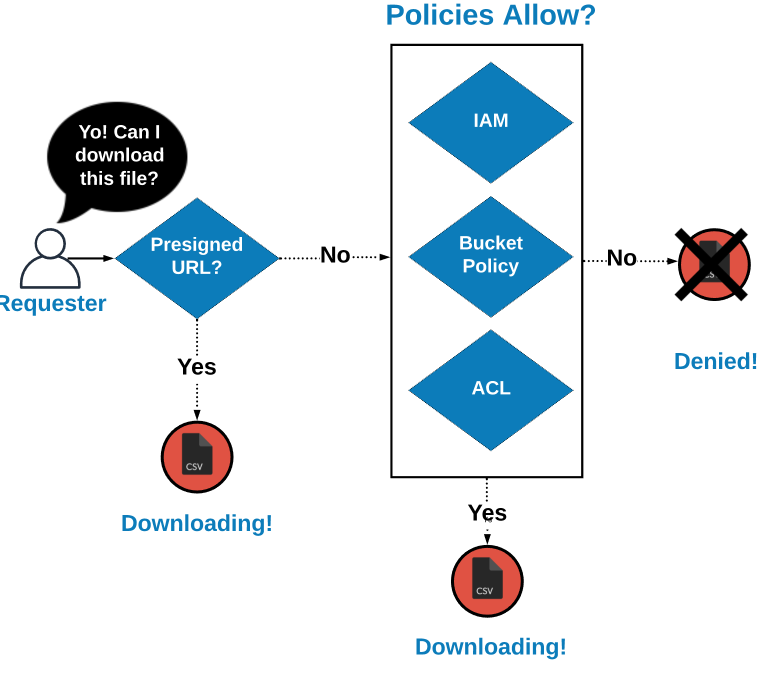
การตัดสินใจเรื่องการเข้าถึง

ลำดับชั้นการเข้าถึง

Python เบื้องต้นสำหรับ AWS Boto

การตัดสินใจเรื่องการเข้าถึง

ลำดับชั้นการเข้าถึง

Python เบื้องต้นสำหรับ AWS Boto

ทบทวน

IAM

Bucket Policy

ACL

Presigned URL

Python เบื้องต้นสำหรับ AWS Boto

ทบทวน

กำหนด ACL เป็น 'public-read'

s3.put_object_acl(
  Bucket='gid-requests', Key='potholes.csv', ACL='public-read')

กำหนด ACL เป็น 'private'

s3.put_object_acl(
  Bucket='gid-requests', Key='potholes.csv', ACL='private')
Python เบื้องต้นสำหรับ AWS Boto

ทบทวน

อัปโหลดไฟล์พร้อม ACL 'public-read'

s3.upload_file(
  Bucket='gid-requests', 
  Filename='potholes.csv', 
  Key='potholes2.csv', 
  ExtraArgs={'ACL':'public-read'})
Python เบื้องต้นสำหรับ AWS Boto

ทบทวน

สร้างสตริง URL ของออบเจกต์

url = "https://{}.{}".format(
  "gid-requests", 
  "2019/potholes.csv")

'https://gid-requests.2019/potholes.csv'

# Read the URL into Pandas
df = pd.read_csv(url)
Python เบื้องต้นสำหรับ AWS Boto

มาฝึกกันเถอะ!

Python เบื้องต้นสำหรับ AWS Boto

Preparing Video For Download...