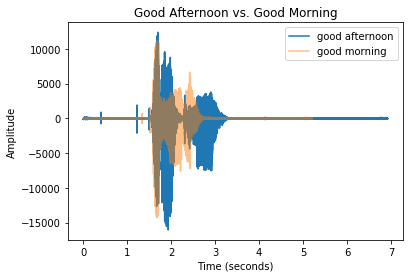
การแสดงภาพคลื่นเสียง

Spoken Language Processing ด้วย Python

Daniel Bourke

Machine Learning Engineer/YouTube Creator

เพิ่มคลื่นเสียงอีกไฟล์

  • ไฟล์เสียงใหม่: good_afternoon.wav
  • ทั้งคู่ใช้ 48 kHz
  • ใช้การแปลงข้อมูลเดียวกันกับไฟล์เสียง ทั้งหมด
Spoken Language Processing ด้วย Python

ตั้งค่ากราฟ

import matplotlib.pyplot as plt

# Initialize figure and setup title plt.title("Good Afternoon vs. Good Morning")
# x and y axis labels plt.xlabel("Time (seconds)") plt.ylabel("Amplitude")
# Add good morning and good afternoon values plt.plot(time_ga, soundwave_ga, label ="Good Afternoon") plt.plot(time_gm, soundwave_gm, label="Good Morning", alpha=0.5)
# Create a legend and show our plot plt.legend() plt.show()
Spoken Language Processing ด้วย Python

คลื่นเสียง good morning เทียบกับ good afternoon

Spoken Language Processing ด้วย Python

มาฝึกกันเถอะ!

Spoken Language Processing ด้วย Python

Preparing Video For Download...