การปรับแต่งไฮเปอร์พารามิเตอร์ด้วย Optuna

Deep Reinforcement Learning ด้วย Python

Timothée Carayol

Principal Machine Learning Engineer, Komment

ไฮเปอร์พารามิเตอร์คืออะไร


  • อัลกอริทึม DRL มีไฮเปอร์พารามิเตอร์จำนวนมาก
  • ส่งผลอย่างมากต่อประสิทธิภาพของโมเดล
  • ความซับซ้อนในการค้นหาเพิ่มขึ้นตามจำนวนไฮเปอร์พารามิเตอร์


ตัวอย่าง
Discount rate
PPO: clipping epsilon, entropy bonus
Experience replay: buffer size, batch size
Decayed epsilon greediness schedule
Fixed Q-targets: $\tau$
Learning rate
จำนวน layer, จำนวน node ต่อ layer...
Deep Reinforcement Learning ด้วย Python

วิธีเลือกค่าไฮเปอร์พารามิเตอร์


เป้าหมาย: ค่าเฉลี่ยของ cumulative rewards

เทคนิคการค้นหาไฮเปอร์พารามิเตอร์:

  • ลองผิดลองถูกด้วยตนเอง
  • Grid search
  • Random search
  • อัลกอริทึมเฉพาะทาง

เครื่องจักรขนาดใหญ่ที่มีปุ่มและหน้าปัดจำนวนมาก

Deep Reinforcement Learning ด้วย Python

โลโก้ของ Optuna


ขั้นตอนการใช้งาน Optuna:

  • กำหนด objective function
  • สร้าง study ของ Optuna
  • ให้ Optuna วนซ้ำผ่าน trial ต่าง ๆ


import optuna

def objective(trial): ...
study = optuna.create_study()
study.optimize(objective, n_trials=100)
study.best_params
{'learning_rate': 0.001292481, 'batch_size': 8}
Deep Reinforcement Learning ด้วย Python

การกำหนด objective function


ใน objective function:

  • กำหนดไฮเปอร์พารามิเตอร์ที่ต้องการ
  • กำหนด metric ที่ต้องการปรับให้เหมาะสม

รองรับการระบุไฮเปอร์พารามิเตอร์ได้อย่างยืดหยุ่น:

  • float
  • integer
  • categorical


def objective(trial: optuna.trial.Trial):

# Hyperparameters x and y between -10 and 10
x = trial.suggest_float('x', -10, 10) y = trial.suggest_float('y', -10, 10)
# Return the metric to minimize return (x - 2) ** 2 + 1.2 * (y + 3) ** 2
Deep Reinforcement Learning ด้วย Python

Optuna study


  • ใช้ sqlite บันทึก study
  • สุ่มตัวอย่าง n_trials ด้วย sampler เริ่มต้น (TPE)
    • เลือกไฮเปอร์พารามิเตอร์แบบสุ่มในช่วงแรก
    • จากนั้นมุ่งเน้นบริเวณที่มีแนวโน้มดี
  • หากไม่ระบุ n_trials: รันต่อเนื่องจนกว่าจะหยุด
  • โหลด study จากฐานข้อมูลได้ภายหลัง


import sqlite
study = optuna.create_study(
                 storage="sqlite:///DRL.db",
                 study_name="my_study")

study.optimize(objective, n_trials=100)
loaded_study = optuna.load_study(
                        study_name="my_study", 
                        storage="sqlite:///DRL.db")
Deep Reinforcement Learning ด้วย Python

สำรวจผลลัพธ์ของ study

optuna.visualization.plot_param_importances(study)
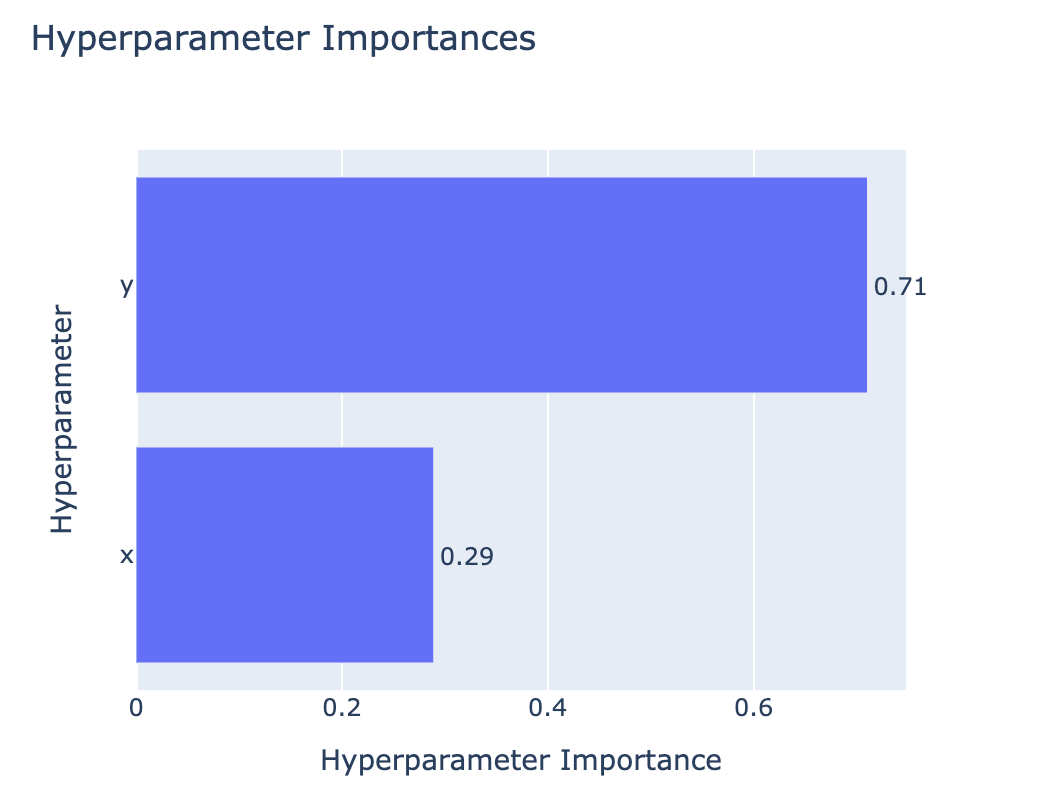
แผนภูมิแท่งแสดงความสำคัญของไฮเปอร์พารามิเตอร์ x และ y โดย y มีค่า 0.71 และ x มีค่า 0.29

optuna.visualization.plot_contour(study)
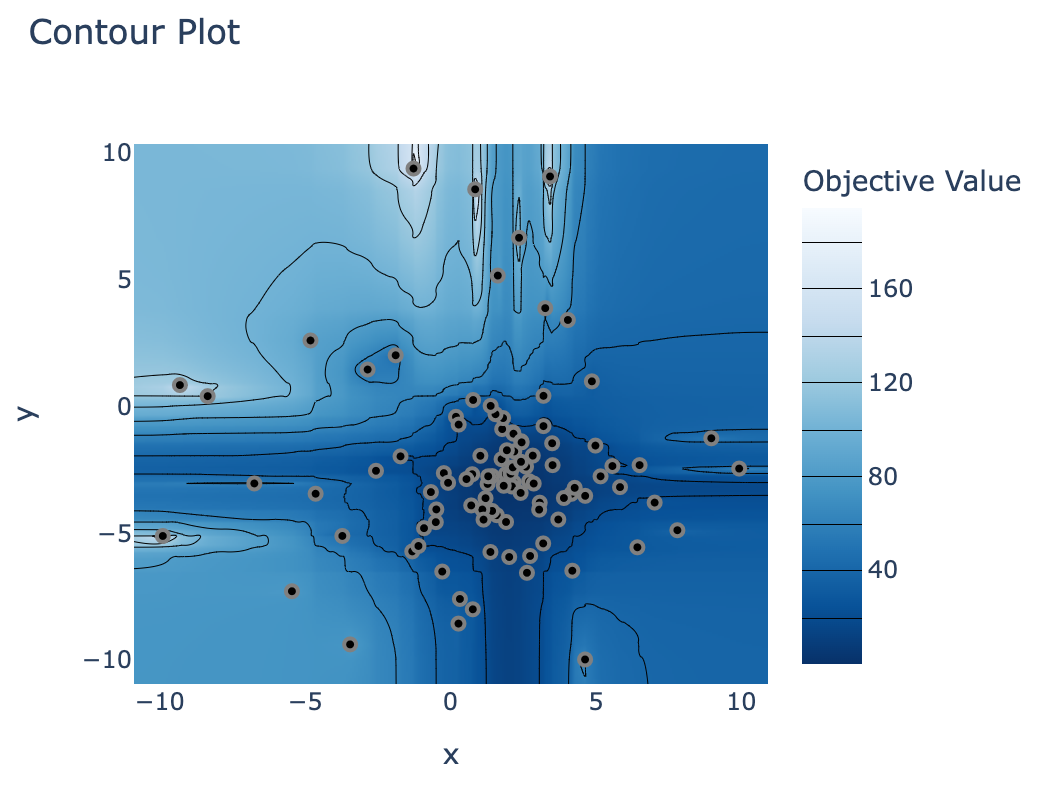
กราฟ contour แสดงจุดหนึ่งจุดต่อหนึ่ง trial โดยจุดส่วนใหญ่กระจุกตัวอยู่บริเวณ x = 2, y = -3

Deep Reinforcement Learning ด้วย Python

มาฝึกกันเถอะ!

Deep Reinforcement Learning ด้วย Python

Preparing Video For Download...