การเตรียมภาพและเสียงสำหรับการฝึกสอน

การเทรน AI Model อย่างมีประสิทธิภาพด้วย PyTorch

Dennis Lee

Data Engineer, Amazon

การเตรียมภาพและเสียง

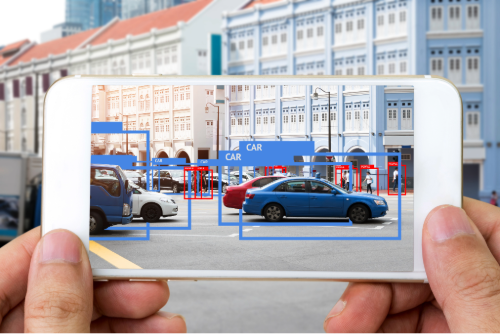
แอปพลิเคชันด้านภาพ

  • การจำแนกภาพเพื่อระบุวัตถุ
  • การแบ่งข้อมูล


ภาพแอปพลิเคชันตรวจจับวัตถุที่แสดงรถยนต์บนถนน โดยแอปพลิเคชันทำงานบนโทรศัพท์ที่ถือไว้หน้าฉากถนน

แอปพลิเคชันด้านเสียง

  • ใช้คำสั่งเสียง
  • ตัวอย่าง: "Turn down the volume"


ภาพเทคโนโลยีช่วยเหลือด้านเสียงสำหรับผู้พิการทางสายตาในการใช้คำสั่งเสียงบนโทรศัพท์

การเทรน AI Model อย่างมีประสิทธิภาพด้วย PyTorch

การจัดการชุดข้อมูลภาพตัวอย่าง

print(dataset)
Dataset({
    features: ['img', 'label'],
    num_rows: 1000
})
print(dataset[0]["img"])
<PIL.JpegImagePlugin.JpegImageFile image mode=RGB size=720x480>
การเทรน AI Model อย่างมีประสิทธิภาพด้วย PyTorch

กำหนดรูปแบบภาพให้เป็นมาตรฐาน

  • กำหนดรูปแบบภาพ: ความกว้าง ความสูง
  • กำหนดค่าพิกเซลให้เป็นมาตรฐาน: ค่าเฉลี่ย ส่วนเบี่ยงเบนมาตรฐาน
  • AutoImageProcessor โหลดขั้นตอนการประมวลผลล่วงหน้าทั้งหมด
from transformers import AutoImageProcessor
model = "microsoft/swin-tiny-patch4-window7-224"

image_processor = AutoImageProcessor.from_pretrained(model)
การเทรน AI Model อย่างมีประสิทธิภาพด้วย PyTorch

กำหนดรูปแบบภาพให้เป็นมาตรฐาน

dataset = dataset.map(
    lambda examples: {

"pixel_values": [
image_processor(image, return_tensors="pt").pixel_values for image in examples["img"] ]}, batched=True)
print(dataset)
Dataset({
    features: ['img', 'label', 'pixel_values'],
    num_rows: 1000
})
การเทรน AI Model อย่างมีประสิทธิภาพด้วย PyTorch

การจัดการชุดข้อมูลเสียงตัวอย่าง

print(dataset)
DatasetDict({
    train: Dataset({

features: ['file', 'audio',
'label'], num_rows: 1000 }), ... })
การเทรน AI Model อย่างมีประสิทธิภาพด้วย PyTorch

กำหนดรูปแบบเสียงให้เป็นมาตรฐาน

  • กำหนดจำนวนตัวอย่างให้เป็นมาตรฐาน
  • อัตราการสุ่มตัวอย่าง: จำนวนตัวอย่างต่อวินาที
  • ระยะเวลาสูงสุด: จำนวนวินาทีของเสียง
sampling_rate = 16000  # 16 kHz

max_duration = 1 # 1 second
max_length = sampling_rate * max_duration
print(f"max_length = {max_length:,} samples")
max_length = 16,000 samples
การเทรน AI Model อย่างมีประสิทธิภาพด้วย PyTorch

กำหนดรูปแบบเสียงให้เป็นมาตรฐาน

from transformers import AutoFeatureExtractor

model = "facebook/wav2vec2-base"
feature_extractor = AutoFeatureExtractor.from_pretrained(model)


def preprocess_function(split_data):
audio_arrays = [x["array"] for x in split_data["audio"]]
inputs = feature_extractor(audio_arrays,
sampling_rate=feature_extractor.sampling_rate, max_length=int(feature_extractor.sampling_rate * max_duration),
truncation=True) return inputs
การเทรน AI Model อย่างมีประสิทธิภาพด้วย PyTorch

นำฟังก์ชันการประมวลผลล่วงหน้าไปใช้

  • แมป preprocess_function กับ dataset
  • remove_columns: ลบคอลัมน์ audio และ file
  • batched: ประมวลผลตัวอย่างใน dataset เป็นชุด
dataset = dataset["train"].map(preprocess_function,

remove_columns=["audio", "file"],
batched=True)
การเทรน AI Model อย่างมีประสิทธิภาพด้วย PyTorch

นำฟังก์ชันการประมวลผลล่วงหน้าไปใช้

print(dataset)
DatasetDict({
    train: Dataset({
        features: ['label', 'input_values'],
        num_rows: 1000
    })
การเทรน AI Model อย่างมีประสิทธิภาพด้วย PyTorch

เตรียมข้อมูลสำหรับการฝึกสอนแบบกระจาย

  • DataLoader: เตรียมข้อมูลสำหรับโหลดและวนซ้ำระหว่างการฝึกสอน
  • accelerator.prepare(): จัดวางข้อมูลบน CPU หรือ GPU ตามความพร้อมใช้งาน
  • การแบ่งข้อมูล: แต่ละ GPU ประมวลผลข้อมูลย่อย เหมือนการแบ่งชิ้นพิซซ่า
  • accelerator.prepare() ทำงานร่วมกับ PyTorch DataLoaders (torch.utils.data.DataLoader)
from accelerate import Accelerator
from torch.utils.data import DataLoader

dataloader = DataLoader(dataset, batch_size=32, shuffle=True)


accelerator = Accelerator() dataloader = accelerator.prepare(dataloader)
การเทรน AI Model อย่างมีประสิทธิภาพด้วย PyTorch

ฝึกปฏิบัติกันเลย!

การเทรน AI Model อย่างมีประสิทธิภาพด้วย PyTorch

Preparing Video For Download...