การวิเคราะห์ข้อมูล IoT ด้วย Python
Matthias Voppichler
IT Developer
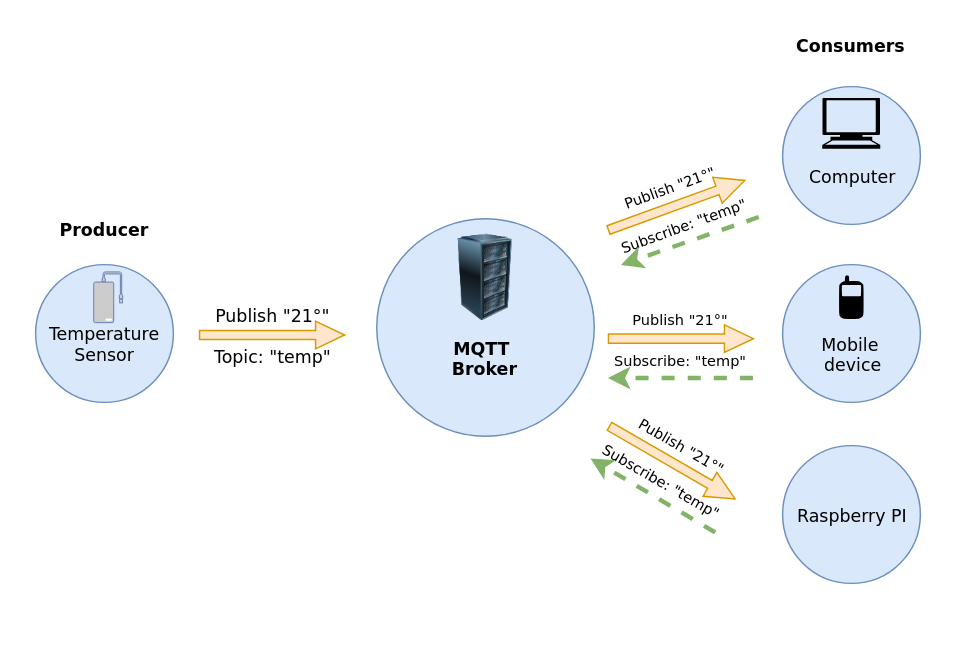
Server -> ทำหน้าที่เป็น Message Broker
Client:
Message Queuing Telemetry Transport
Eclipse Paho™ MQTT Python Client
# Import MQTT library
import paho.mqtt
ข้อมูลเพิ่มเติมและเอกสารอ้างอิงดูได้ที่ GitHub https://github.com/eclipse/paho.mqtt.python
import paho.mqtt.subscribe as subscribe
msg = subscribe.simple("paho/test/simple",
                       hostname="test.mosquitto.org")

print(f"{msg.topic}, {msg.payload}")
import paho.mqtt.subscribe as subscribe msg = subscribe.simple("paho/test/simple", hostname="test.mosquitto.org")
print(f"{msg.topic}, {msg.payload}")
ผลลัพธ์:
paho/test/simple, {"time": 1549481572, "humidity": 77, "temp": 21}
def on_message(client, userdata, message):

    print(f"{message.topic} : {message.payload}")
def on_message(client, userdata, message):
print(f"{message.topic} : {message.payload}")
อาร์กิวเมนต์
client
userdata
message
import paho.mqtt.subscribe as subscribe


subscribe.callback(on_message,
                   topics="datacamp/roomtemp",
                   hostname="test.mosquitto.org")
import paho.mqtt.subscribe as subscribe
subscribe.callback(on_message, topics="datacamp/roomtemp", hostname="test.mosquitto.org")
import paho.mqtt.subscribe as subscribe

def on_message(client, userdata, message):
    print("{} : {}".format(message.topic, message.payload))

subscribe.callback(on_message,
                   topics="datacamp/roomtemp",
                   hostname="test.mosquitto.org")
def on_message(client, userdata, message): print("{} : {}".format(message.topic, message.payload))
datacamp/roomtemp : b'{"time": 1543344857, "hum": 34, "temp": 24}'
datacamp/roomtemp : b'{"time": 1543344858, "hum": 35, "temp": 23}'
datacamp/roomtemp : b'{"time": 1543344860, "hum": 36, "temp": 22}'
datacamp/roomtemp : b'{"time": 1543344946, "hum": 37, "temp": 22}'
datacamp/roomtemp : b'{"time": 1543345010, "hum": 36, "temp": 13}'