การอ่าน ตรวจสอบ และทำความสะอาดข้อมูลจาก CSV
การนำเข้าและจัดการข้อมูลทางการเงินใน Python

Stefan Jansen
Instructor
นำเข้าและทำความสะอาดข้อมูล
- ตรวจสอบว่า
pd.DataFrame()ตรงกับไฟล์ CSV ต้นทาง - รายชื่อหุ้นในตลาด:
amex-listings.csv
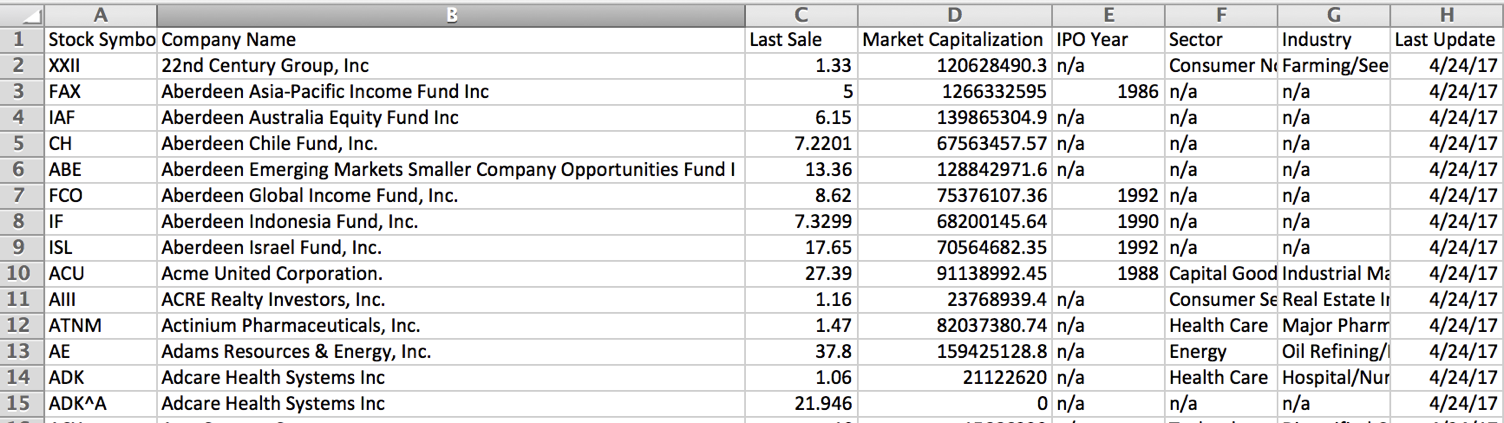
วิธีที่ pandas จัดเก็บข้อมูล
- แต่ละคอลัมน์มีรูปแบบข้อมูล (
dtype) เป็นของตัวเอง dtypeมีผลต่อการคำนวณและการแสดงผล
pandas dtype |
ลักษณะของคอลัมน์ |
|---|---|
object |
ข้อความ หรือข้อมูลผสมระหว่างข้อความและตัวเลข |
int64 |
ตัวเลข: จำนวนเต็ม — 64 บิต ($\le 2^{64}$) |
float64 |
ตัวเลข: ทศนิยม หรือจำนวนเต็มที่มีค่าว่าง |
datetime64 |
ข้อมูลวันที่และเวลา |
นำเข้าและตรวจสอบข้อมูล
import pandas as pdamex = pd.read_csv('amex-listings.csv')amex.info() # To inspect table structure & data types
RangeIndex: 360 entries, 0 to 359
Data columns (total 8 columns):
 #   Column                 Non-Null Count  Dtype
 --  ------                 --------------  -----
 0   Stock Symbol           360 non-null    object
 1   Company Name           360 non-null    object
 2   Last Sale              346 non-null    float64
 3   Market Capitalization  360 non-null    float64
 4   IPO Year               105 non-null    float64
 5   Sector                 238 non-null    object
 6   Industry               238 non-null    object
 7   Last Update            360 non-null    object
dtypes: float64(3), object(5)
การจัดการค่าที่หายไป
# Replace 'n/a' with np.nan amex = pd.read_csv('amex-listings.csv', na_values='n/a')amex.info()
RangeIndex: 360 entries, 0 to 359
Data columns (total 8 columns):
 #   Column                 Non-Null Count  Dtype
 --  ------                 --------------  -----
 0   Stock Symbol           360 non-null    object
 1   Company Name           360 non-null    object
 2   Last Sale              346 non-null    float64
 3   Market Capitalization  360 non-null    float64
 4   IPO Year               105 non-null    float64
 5   Sector                 238 non-null    object
 6   Industry               238 non-null    object
 7   Last Update            360 non-null    object
dtypes: float64(3), object(5)
การแปลงข้อมูลวันที่อย่างถูกต้อง
amex = pd.read_csv('amex-listings.csv', na_values='n/a', parse_dates=['Last Update'])amex.info()
RangeIndex: 360 entries, 0 to 359
Data columns (total 8 columns):
 #   Column                 Non-Null Count  Dtype
 --  ------                 --------------  -----
 0   Stock Symbol           360 non-null    object
 1   Company Name           360 non-null    object
 2   Last Sale              346 non-null    float64
 3   Market Capitalization  360 non-null    float64
 4   IPO Year               105 non-null    float64
 5   Sector                 238 non-null    object
 6   Industry               238 non-null    object
 7   Last Update            360 non-null    datetime64[ns]
dtypes: datetime64[ns](1), float64(3), object(4)
ดูผลลัพธ์ที่ได้
amex.head(2) # Show first n rows (default: 5)
  Stock Symbol   Company Name
0         XXII   22nd Century Group, Inc
1          FAX   Aberdeen Asia-Pacific Income Fund Inc

   Last Sale  Market Capitalization  IPO Year
0     1.3300           1.206285e+08       NaN
1     5.0000           1.266333e+09    1986.0

   Sector        Industry              Last Update
0  Non-Durables  Farming/Seeds/Milling  2017-04-26
1  NaN           NaN                    2017-04-25
มาฝึกกันเถอะ!
การนำเข้าและจัดการข้อมูลทางการเงินใน Python

