Giới thiệu về Tablesaw
Nhập dữ liệu trong Java

Anthony Markham
VP Quant Developer
Import Tablesaw
- Thư viện thao tác dữ liệu
- Cách import phổ biến:
import tech.tablesaw.api.* - Import bổ sung cho chức năng cụ thể, ví dụ:
import tech.tablesaw.api.DoubleColumnimport tech.tablesaw.api.StringColumn
- Phép toán thống kê:
import tech.tablesaw.aggregate.*
1 https://jtablesaw.github.io/tablesaw/
Định dạng bảng (tabular)
- Dữ liệu được tổ chức theo hàng và cột
- Cột = biến/đặc trưng
- Hàng = quan sát/bản ghi
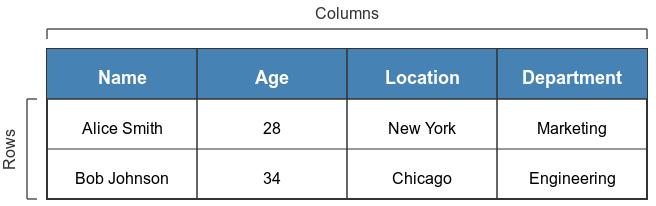
Định dạng bảng (tabular)
- Có thể dùng mảng hoặc collection để lưu dữ liệu
// Cách tiếp cận Java truyền thống (rườm rà)
import java.util.Arrays;
import java.util.List;
List<String> names = Arrays.asList("Anna", "Bob", "Carlos");
List<Integer> ages = Arrays.asList(25, 34, 42);
Tạo một bảng
- Tùy chọn: tạo mới, từ tệp ngoài, hoặc từ cột sẵn có
// Tạo từ đầu
Table employees = Table.create("Employees")
    .addColumns(
        StringColumn.create("Name", "John", "Lisa", "Omar"),
        DoubleColumn.create("Salary", 50000, 60000, 55000)
    );
// Từ các cột sẵn có
StringColumn dept = StringColumn.create("Department",
    "Sales", "Marketing", "Engineering");
Table departments = Table.create("Departments", dept);
- Các phương thức
addColumns()vàcreate()
Siêu dữ liệu của bảng
- Kích thước:
table.shape() - Tên cột:
table.columnNames() - Cấu trúc bảng:
table.structure() - Xem nhanh dữ liệu:
table.first(n),table.last(n)
// In kích thước
System.out.println(data.shape());  // [rows, columns]
[10, 4]
Siêu dữ liệu của bảng
// In tên cột
System.out.println(table.columnNames());
[Day, Temperature, Precipitation]
// In cấu trúc chi tiết
System.out.println(table.structure());
         Structure of table
 Index  |   Column Name   |  Column Type  |
     0  |            Day  |       STRING  |
     1  |    Temperature  |       DOUBLE  |
     2  |  Precipitation  |       DOUBLE  |
Siêu dữ liệu của bảng
// Xem trước ba hàng đầu
System.out.println(table.first(3));
                  table
    Day     |  Temperature  |  Precipitation  |
    Monday  |         22.5  |              0  |
   Tuesday  |           24  |            2.5  |
 Wednesday  |         23.2  |            5.2  |
Thêm cột
- Thêm cột:
table.addColumns(newColumn)
// Thêm một cột mới
DoubleColumn bonus = DoubleColumn.create("Bonus", 1000, 1500, 2000);
employees = employees.addColumns(bonus);
Xóa và đổi tên cột
// Xóa một cột
employees = employees.removeColumns("StartDate");
// Đổi tên một cột
employees.column("Salary").setName("AnnualSalary");
// Lấy kiểu dữ liệu của cột
employees.column("Salary").type();
ColumnType.INTEGER
$$
- Trả về bảng đã được chỉnh sửa 💡
Tóm tắt
| Phương thức/Cú pháp | Mô tả |
|---|---|
Table.create("TableName") |
Tạo một bảng mới với tên cho trước |
StringColumn.create("ColumnName", values) |
Tạo một cột kiểu chuỗi |
table.shape() |
Trả về kích thước dạng [rows, columns] |
table.columnNames() |
Trả về tên các cột trong bảng |
table.structure() |
Hiển thị thông tin cấu trúc bảng |
table.first(n) |
Trả về n hàng đầu của bảng |
table.last(n) |
Trả về n hàng cuối của bảng |
table.addColumns(newColumn) |
Thêm một cột mới vào bảng |
1 https://www.javadoc.io/doc/tech.tablesaw/tablesaw-core
Cùng luyện tập nào!
Nhập dữ liệu trong Java

