ความซับซ้อนของโมเดลและการ overfitting

การออกแบบ Machine Learning Workflows ด้วย Python

Dr. Chris Anagnostopoulos

Honorary Associate Professor

ความซับซ้อนของโมเดลคืออะไร?

RandomForestClassifier() รับอาร์กิวเมนต์เพิ่มเติม เช่น max_depth:

help(RandomForestClassifier)
Help on class RandomForestClassifier in module sklearn.ensemble.forest:
...
 |  max_depth : integer or None, optional (default=None)
 |      The maximum depth of the tree. If None, then nodes are expanded until
 |      all leaves are pure or until all leaves contain less than
 |      min_samples_split samples.
การออกแบบ Machine Learning Workflows ด้วย Python
m2 = RandomForestClassifier(
    max_depth=2)
m2.fit(X_train, y_train)

m2.estimators_[0]

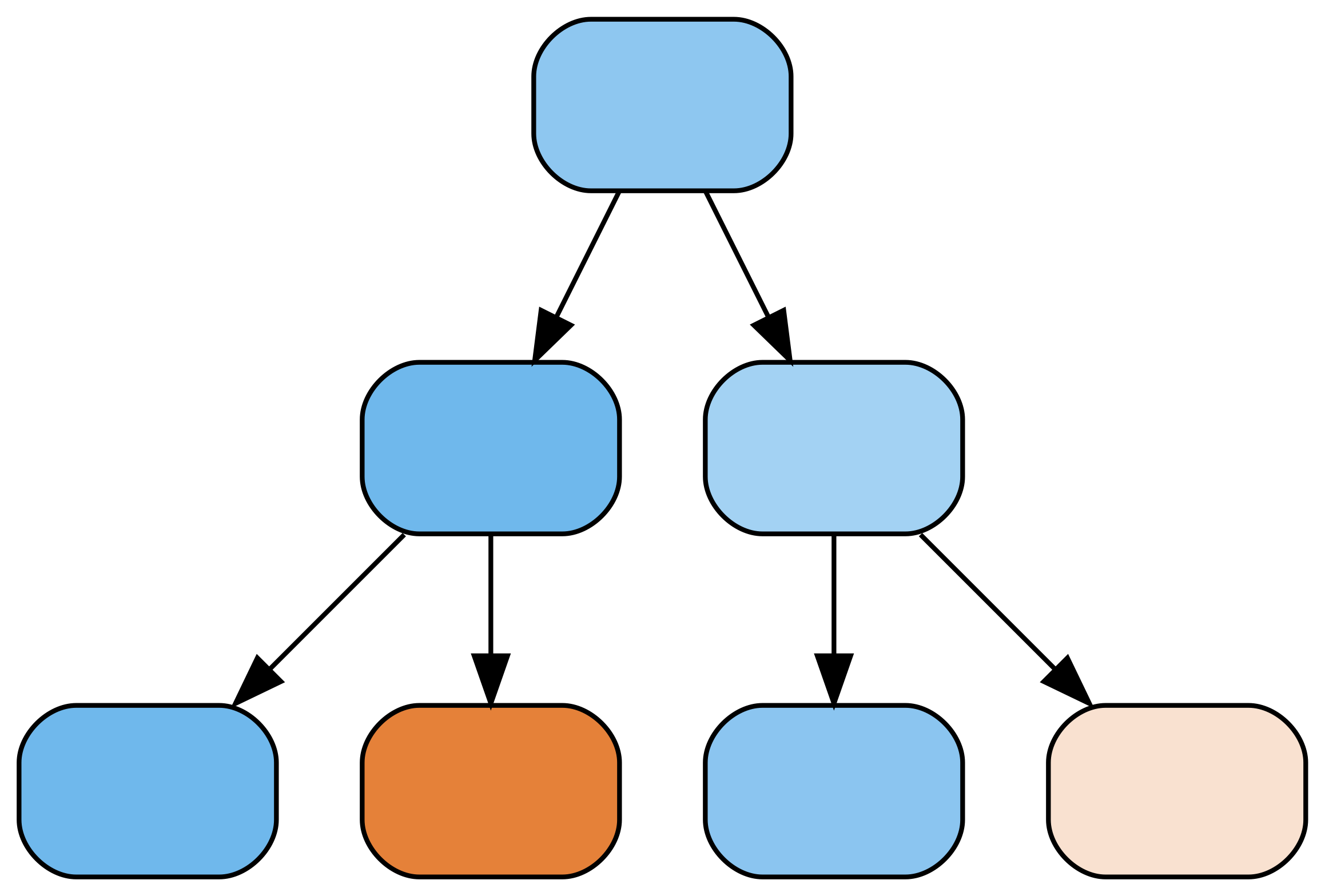
ต้นไม้การตัดสินใจที่มีความลึก 2

m4 = RandomForestClassifier(
    max_depth=4)
m4.fit(X_train, y_train)

m4.estimators_[0]

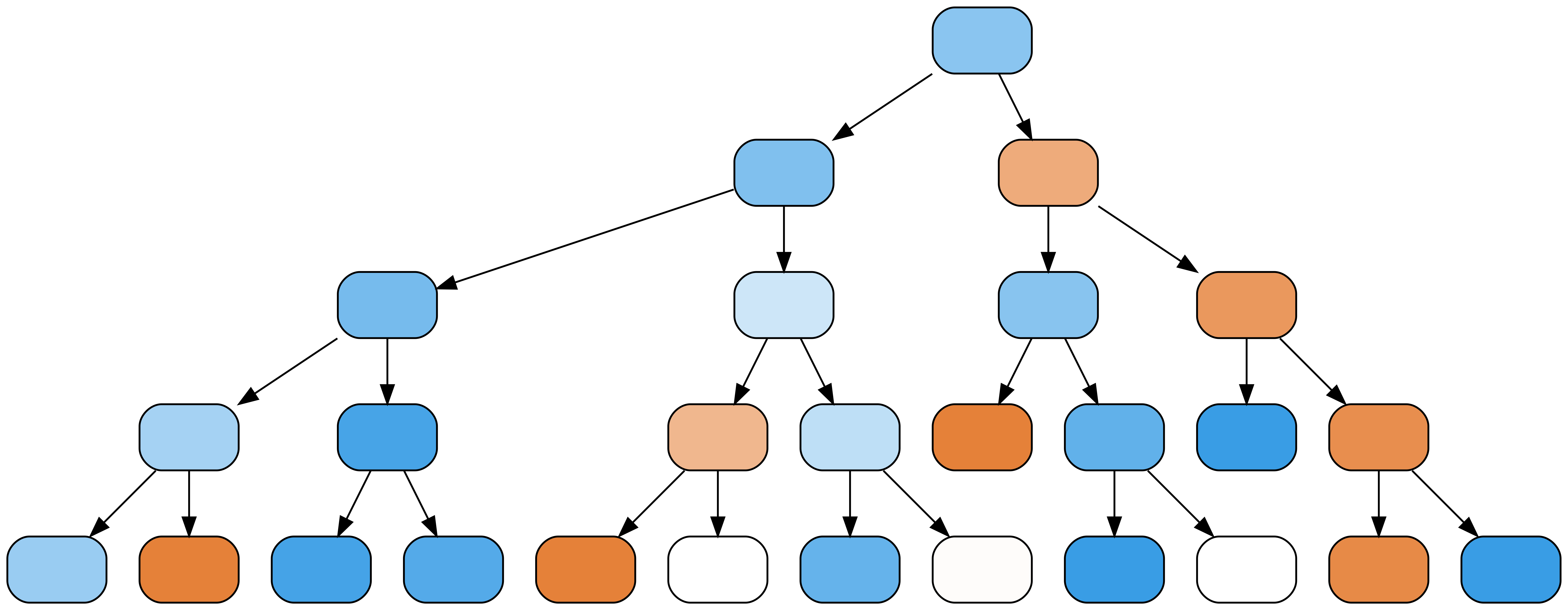
ต้นไม้การตัดสินใจที่มีความลึก 4

การออกแบบ Machine Learning Workflows ด้วย Python

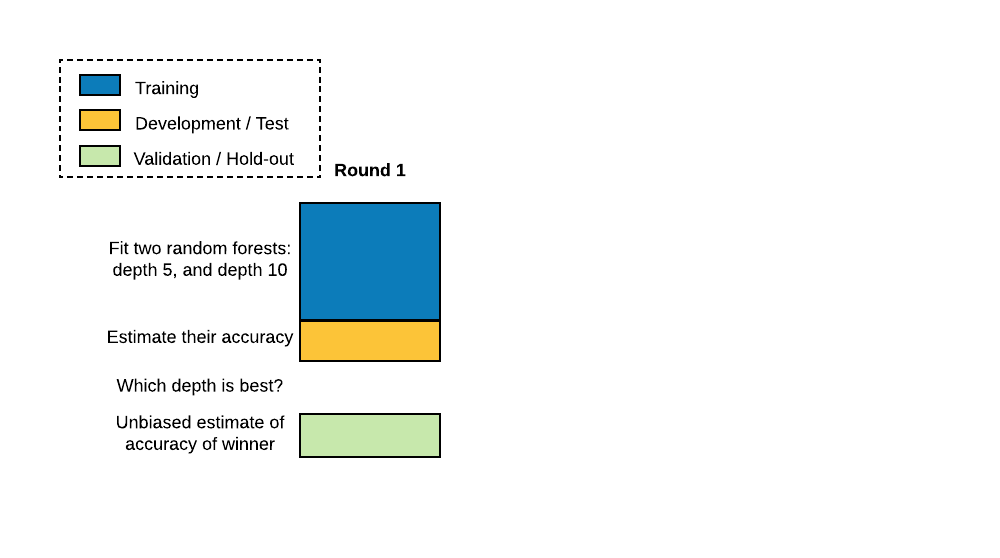
แนวปฏิบัติมาตรฐานคือการแบ่งข้อมูลออกเป็นชุด training, test (หรือ development) และ validation (หรือ hold-out)

การออกแบบ Machine Learning Workflows ด้วย Python

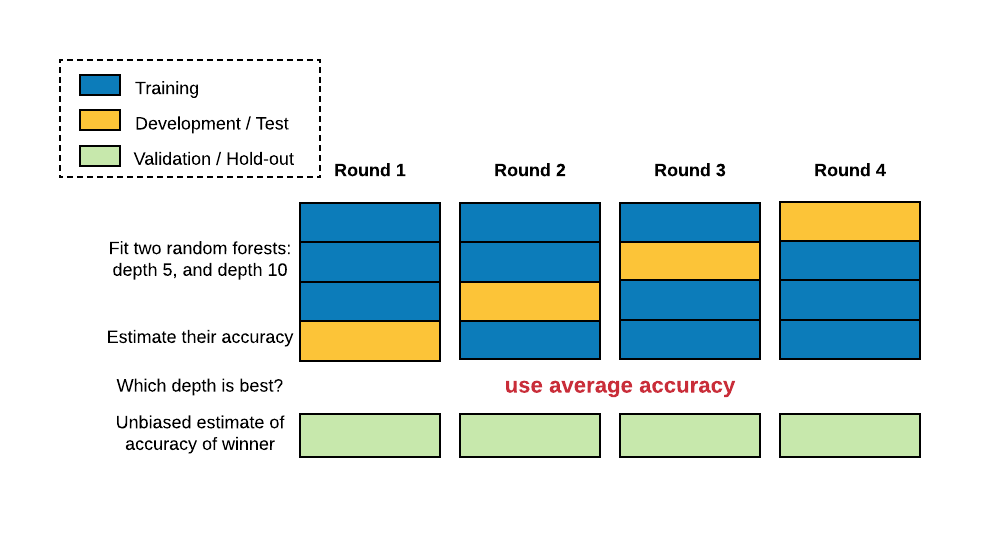
ใน cross-validation การแบ่ง train-test จะทำหลายครั้ง โดยแบ่งชุดข้อมูลเป็น N ส่วน และใช้ N-1 ส่วนสำหรับ training ส่วนที่เหลือใช้สำหรับ test สลับกันในแต่ละรอบ

การออกแบบ Machine Learning Workflows ด้วย Python

Cross-validation

ประเมินความแม่นยำด้วย cross_val_score():

from sklearn.model_selection import cross_val_score

cross_val_score(RandomForestClassifier(), X, y)
array([0.7218 , 0.7682, 0.7866])
numpy.mean(cross_val_score(RandomForestClassifier(), X, y))
0.7589
การออกแบบ Machine Learning Workflows ด้วย Python

การปรับความซับซ้อนของโมเดล

ปรับค่าความลึกของต้นไม้ด้วย GridSearchCV():

from sklearn.model_selection import GridSearchCV
param_grid = {'max_depth':[5,10,20]}
grid = GridSearchCV(RandomForestClassifier(), param_grid)
grid.fit(X,y)
grid._best_params
{'max_depth': 10}
การออกแบบ Machine Learning Workflows ด้วย Python

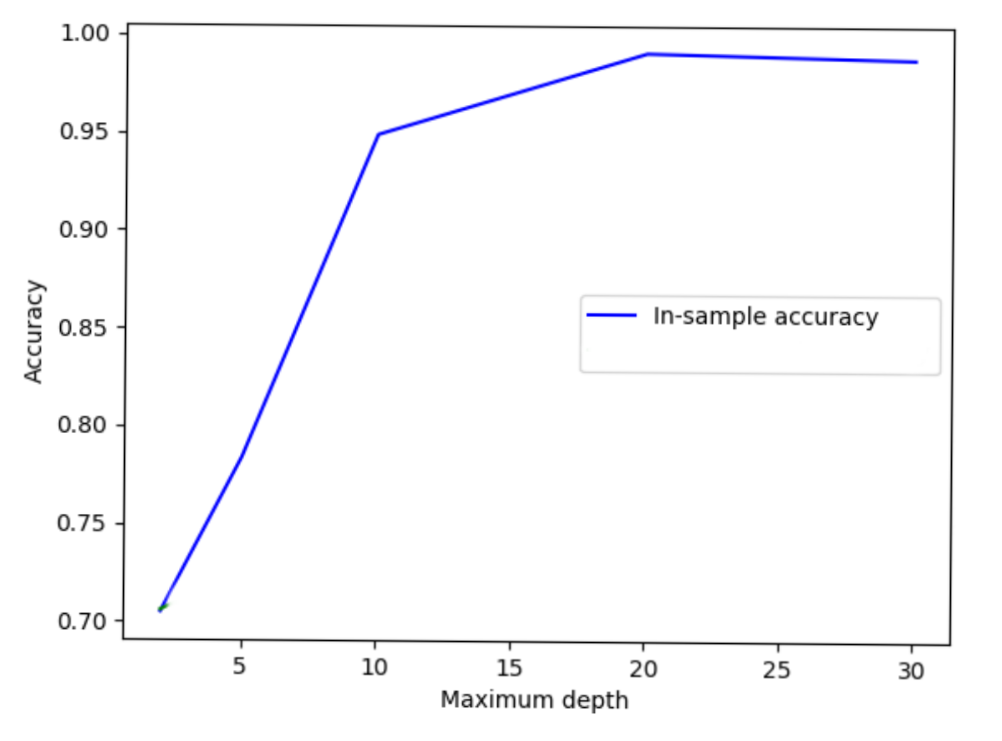
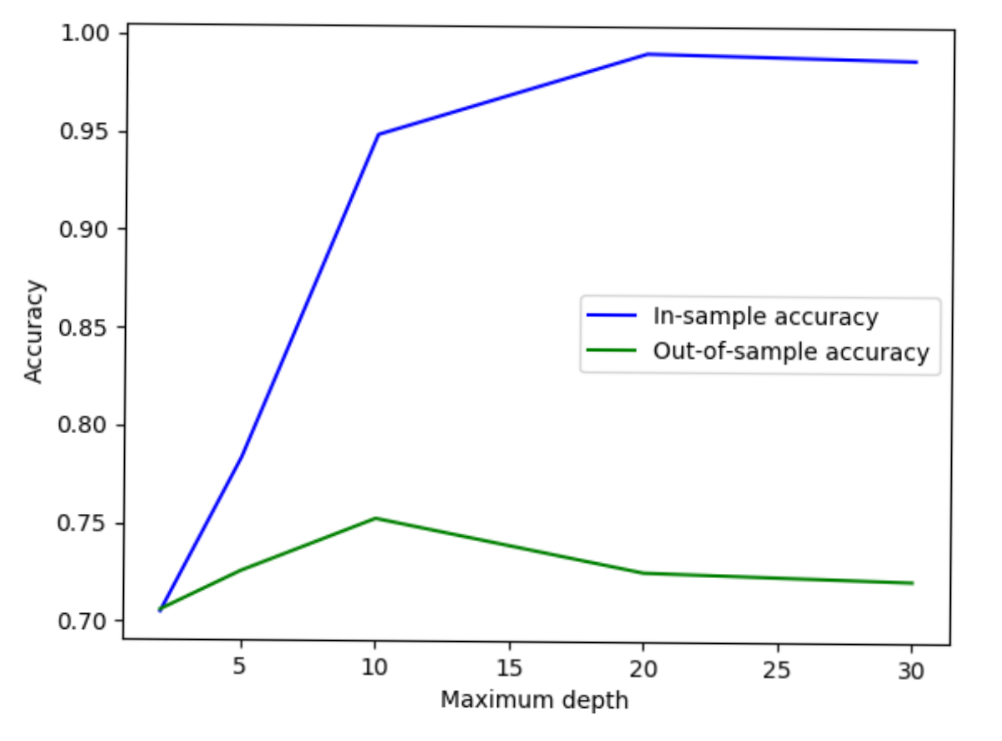
ความแม่นยำ in-sample เริ่มที่ 0.7 เมื่อความลึกสูงสุดเป็น 3 และเพิ่มขึ้นใกล้ 1.0 เมื่อความลึกอยู่ในช่วง 5 ถึง 30

การออกแบบ Machine Learning Workflows ด้วย Python

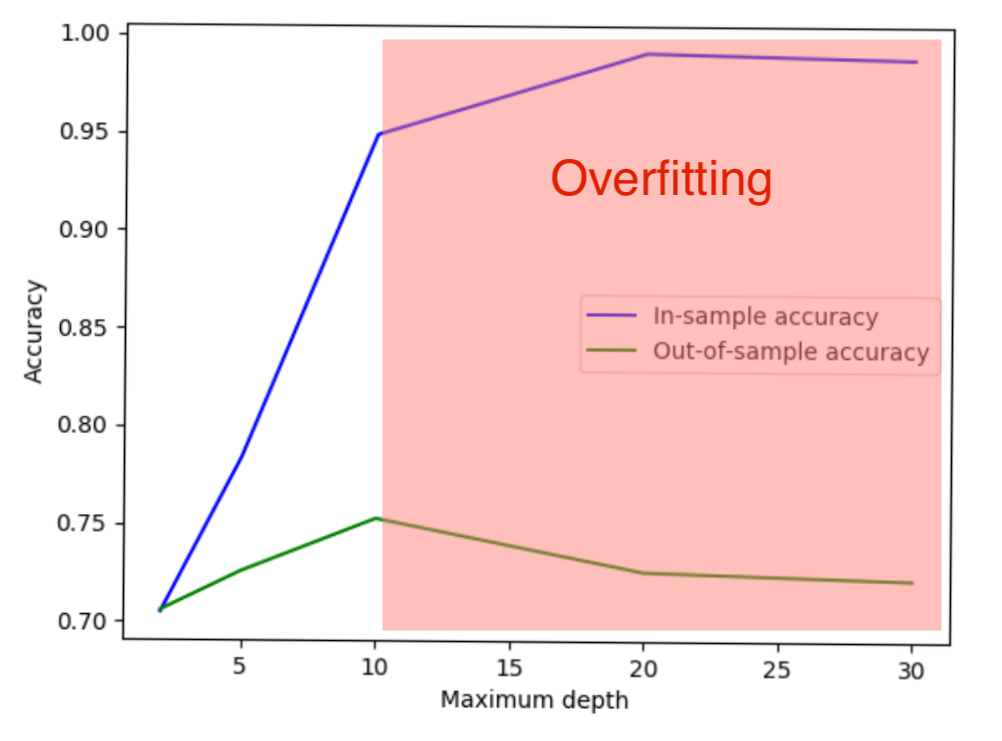
ความแม่นยำ out-of-sample เริ่มที่ 0.7 เช่นกัน ขึ้นสูงสุดที่ 0.75 เมื่อความลึกเป็น 10 จากนั้นลดกลับสู่ 0.7 เมื่อความลึกมากกว่านั้น

การออกแบบ Machine Learning Workflows ด้วย Python

ช่วงตั้งแต่ความลึก 10 เป็นต้นไปถูกแสดงเป็นสีแดง บ่งชี้ว่าเกิด overfitting

การออกแบบ Machine Learning Workflows ด้วย Python

ซับซ้อนมากขึ้นไม่ได้หมายความว่าดีกว่าเสมอไป!

การออกแบบ Machine Learning Workflows ด้วย Python

Preparing Video For Download...