DataFrames และเมธอดต่าง ๆ

Python สำหรับผู้ใช้สเปรดชีต

Chris Cardillo

Data Scientist

ทบทวนจากที่ผ่านมา
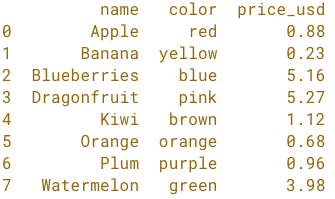
import pandas as pd

fruit = pd.read_excel('fruit.xlsx')

print(fruit)

simple fruit whole dataset.png

Python สำหรับผู้ใช้สเปรดชีต

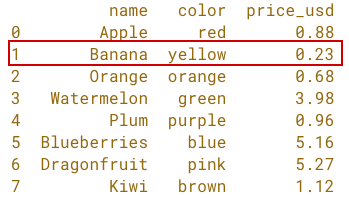
โครงสร้างของ pandas DataFrame

simple fruit whole dataset.png

Python สำหรับผู้ใช้สเปรดชีต

โครงสร้างของ pandas DataFrame

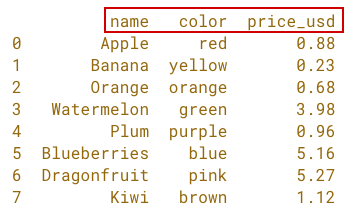
simple fruit df cols.png

Python สำหรับผู้ใช้สเปรดชีต

โครงสร้างของ pandas DataFrame

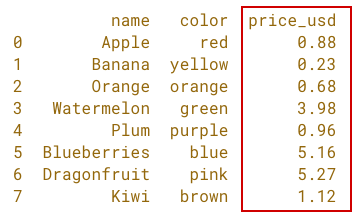
simple fruit df numerical column.png

Python สำหรับผู้ใช้สเปรดชีต

โครงสร้างของ pandas DataFrame

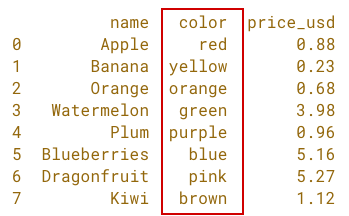
simple fruit df object-character column.png

Python สำหรับผู้ใช้สเปรดชีต

โครงสร้างของ pandas DataFrame

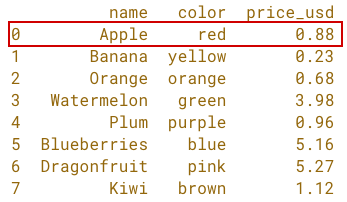
simple fruit df rows 1.png

Python สำหรับผู้ใช้สเปรดชีต

โครงสร้างของ pandas DataFrame

simple fruit df rows 2.png

Python สำหรับผู้ใช้สเปรดชีต

โครงสร้างของ pandas DataFrame

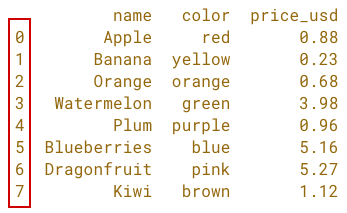
simple fruit df index.png

Python สำหรับผู้ใช้สเปรดชีต

เมธอดของ DataFrame

  • .head()
  • .info()
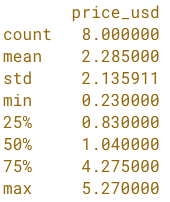
  • .describe()
  • .sort_values()
Python สำหรับผู้ใช้สเปรดชีต

เมธอด .head()

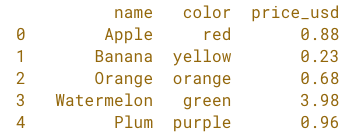
import pandas as pd

fruit = pd.read_excel('fruit.xlsx')

print(fruit.head())

simple fruit df head.png

Python สำหรับผู้ใช้สเปรดชีต

เมธอด .head()

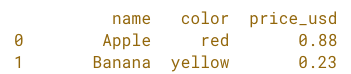
import pandas as pd

fruit = pd.read_excel('fruit.xlsx')

print(fruit.head(2))

simple fruit df head with arg.png

Python สำหรับผู้ใช้สเปรดชีต

เมธอด .info()

import pandas as pd

fruit = pd.read_excel('fruit.xlsx')

print(fruit.info())
<class 'pandas.core.frame.DataFrame'>
RangeIndex: 8 entries, 0 to 7
Data columns (total 3 columns):
 #   Column     Non-Null Count  Dtype  
 --  ------     --------------  -----  
 0   name       8 non-null      object 
 1   color      8 non-null      object 
 2   price_usd  8 non-null      float64
dtypes: float64(1), object(2)
memory usage: 272.0+ bytes
Python สำหรับผู้ใช้สเปรดชีต

เมธอด .describe()

import pandas as pd

fruit = pd.read_excel('fruit.xlsx')

print(fruit.describe())

simple fruit df describe method.png

Python สำหรับผู้ใช้สเปรดชีต

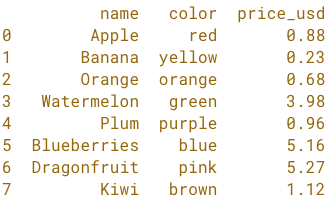
เมธอด .sort_values()

import pandas as pd

fruit = pd.read_excel('fruit.xlsx')

fruit = fruit.sort_values('name')
fruit = fruit.reset_index(drop=True)

print(fruit)

simple fruit df sorted by name asc.png

Python สำหรับผู้ใช้สเปรดชีต

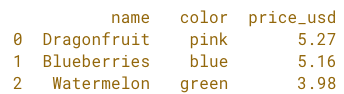
เมธอด .sort_values()

import pandas as pd

fruit = pd.read_excel('fruit.xlsx')

fruit = fruit.sort_values('price_usd', ascending=False)
fruit = fruit.reset_index(drop=True)

print(fruit.head(3))
simple fruit df sorted by price desc head 3.png

Python สำหรับผู้ใช้สเปรดชีต

มาฝึกกันเถอะ!

Python สำหรับผู้ใช้สเปรดชีต

Preparing Video For Download...