ขั้นตอนการทำแผนที่ด้วย tigris และ tidycensus

การวิเคราะห์ข้อมูลสำมะโนประชากรสหรัฐฯ ใน R

Kyle Walker

Instructor
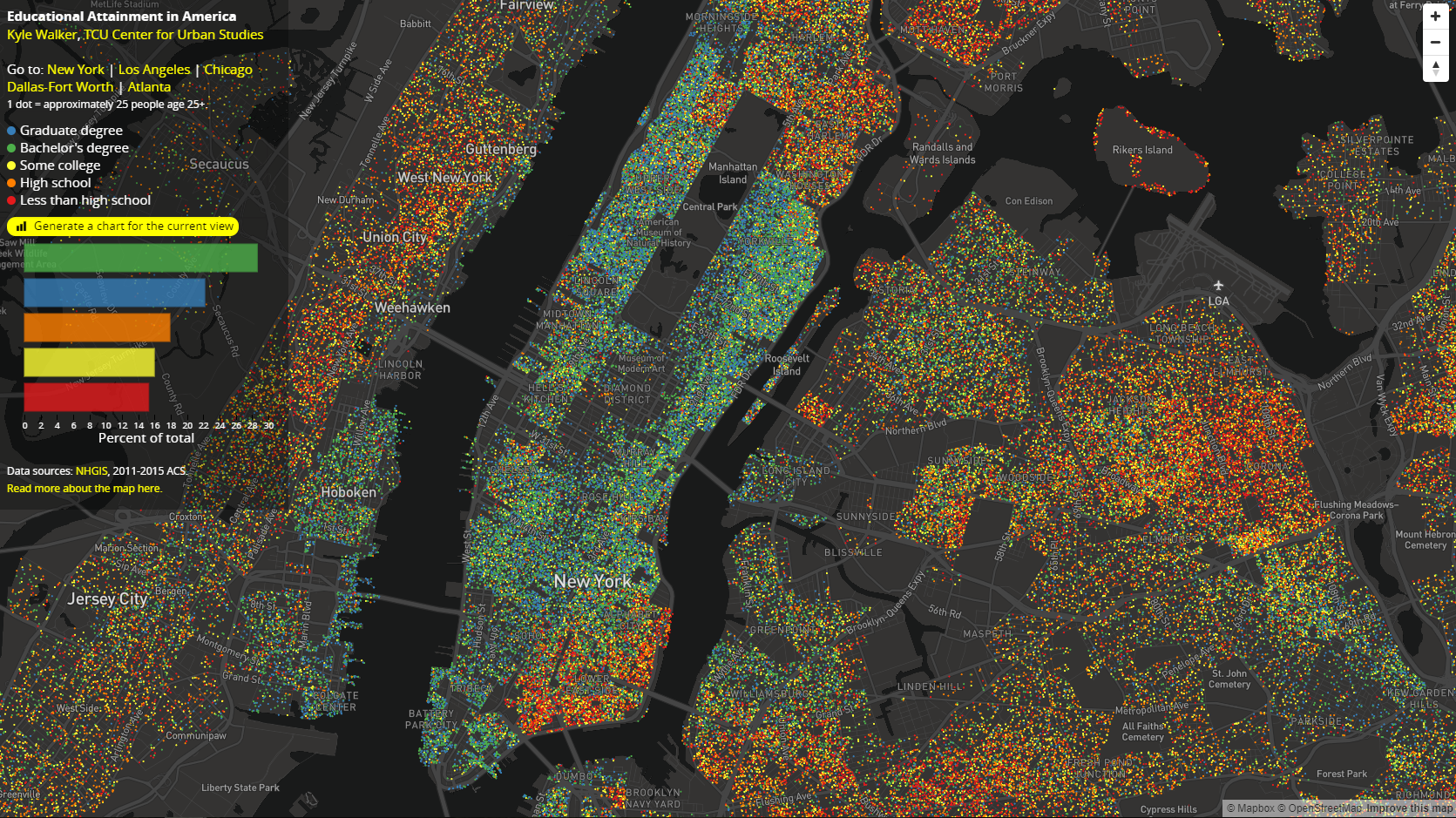
แผนที่จุดด้านการศึกษา

การวิเคราะห์ข้อมูลสำมะโนประชากรสหรัฐฯ ใน R

สร้างจุดแบบสุ่มด้วย sf

ฟังก์ชันหลักสำหรับสร้างจุดแบบสุ่มใน sf: st_sample()

dc_dots <- map(c("White", "Black", "Hispanic", "Asian"), function(group) {
  dc_race %>%
    filter(variable == group) %>%
    st_sample(., size = .$value / 100) %>%
    st_sf() %>%
    mutate(group = group) 
}) %>%
  reduce(rbind)
การวิเคราะห์ข้อมูลสำมะโนประชากรสหรัฐฯ ใน R

ข้อควรพิจารณาในการสร้างจุดแบบสุ่ม

เพื่อให้พล็อตเร็วขึ้น:

dc_dots <- dc_dots %>%
  group_by(group) %>%
  summarize()

เพื่อให้ภาพแสดงผลแม่นยำขึ้น:

dc_dots_shuffle <- sample_frac(dc_dots, size = 1)
การวิเคราะห์ข้อมูลสำมะโนประชากรสหรัฐฯ ใน R

สร้างแผนที่ความหนาแน่นจุดเบื้องต้นด้วย sf

plot(dc_dots_shuffle, key.pos = 1)
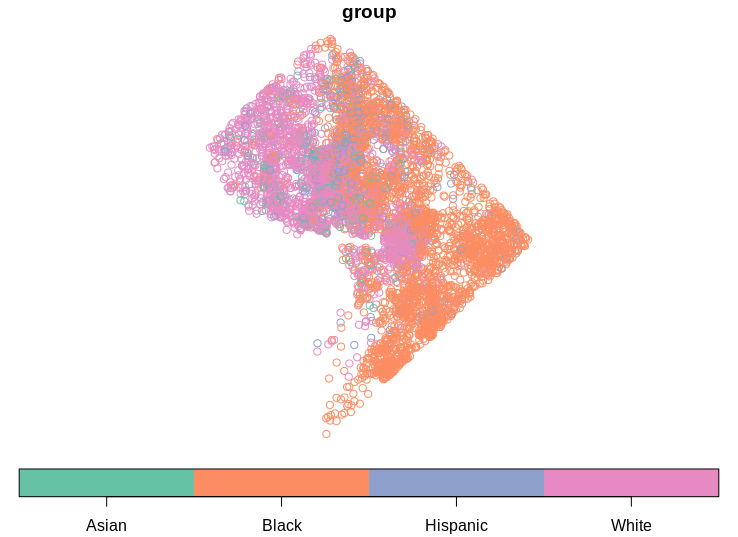
แผนที่ความหนาแน่นจุดเบื้องต้น

การวิเคราะห์ข้อมูลสำมะโนประชากรสหรัฐฯ ใน R

ข้อมูลเสริมด้วย tigris

options(tigris_class = "sf")

dc_roads <- roads("DC", "District of Columbia") %>%
  filter(RTTYP %in% c("I", "S", "U"))

dc_water <- area_water("DC", "District of Columbia")
dc_boundary <- counties("DC", cb = TRUE)
การวิเคราะห์ข้อมูลสำมะโนประชากรสหรัฐฯ ใน R

ข้อมูลเสริมด้วย tigris

plot(dc_water$geometry, col = "lightblue")
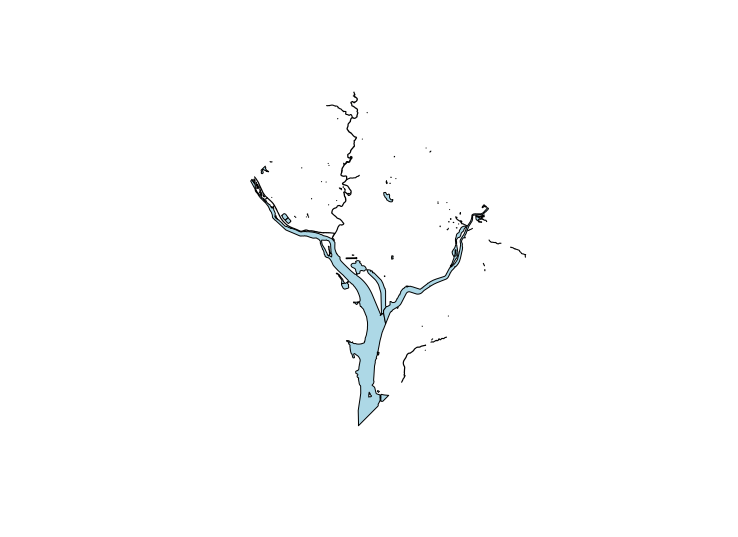
พล็อตแหล่งน้ำใน DC

การวิเคราะห์ข้อมูลสำมะโนประชากรสหรัฐฯ ใน R

สร้างแผนที่ความหนาแน่นจุดด้วย ggplot2

ggplot() + 
  geom_sf(data = dc_boundary, color = NA, fill = "white") + 
  geom_sf(data = dc_dots, aes(color = group, fill = group), size = 0.1) + 
  geom_sf(data = dc_water, color = "lightblue", fill = "lightblue") + 
  geom_sf(data = dc_roads, color = "grey") + 
  coord_sf(crs = 26918, datum = NA) + 
  scale_color_brewer(palette = "Set1", guide = FALSE) +
  scale_fill_brewer(palette = "Set1") +
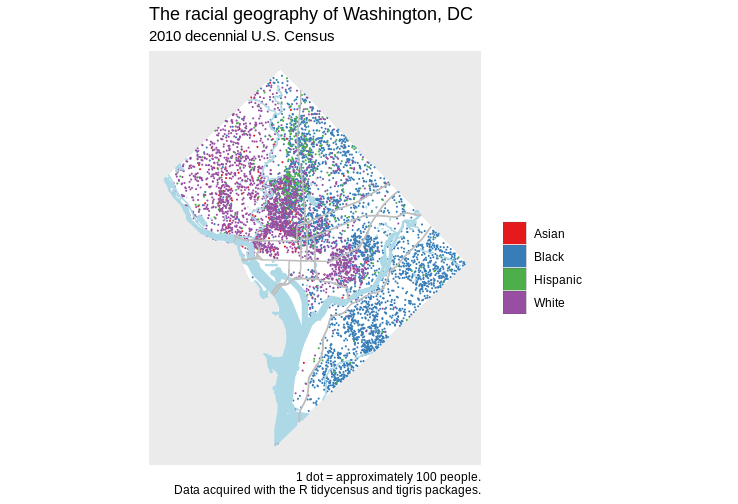
  labs(title = "The racial geography of Washington, DC", 
       subtitle = "2010 decennial U.S. Census", 
       fill = "", 
       caption = "1 dot = approximately 100 people.\nData acquired with 
                  the R tidycensus and tigris packages.")
การวิเคราะห์ข้อมูลสำมะโนประชากรสหรัฐฯ ใน R

แผนที่ความหนาแน่นจุดขั้นสุดท้าย

การวิเคราะห์ข้อมูลสำมะโนประชากรสหรัฐฯ ใน R

ข้อควรพิจารณาสำหรับแผนที่ความหนาแน่นจุด

  • ระวังการตีความแผนที่ความหนาแน่นจุดที่อาจเกิดความเข้าใจผิด
  • เลือกสีเชิงคุณภาพให้เหมาะสม
  • พิจารณาเลือกเลเยอร์ข้อมูลเสริมอย่างรอบคอบ
การวิเคราะห์ข้อมูลสำมะโนประชากรสหรัฐฯ ใน R

มาฝึกกันเถอะ!

การวิเคราะห์ข้อมูลสำมะโนประชากรสหรัฐฯ ใน R

Preparing Video For Download...