ไวยากรณ์ data.table

การ Join ข้อมูลด้วย data.table ใน R

Scott Ritchie

Postdoctoral Researcher in Systems Genomics

ทบทวนไวยากรณ์ data.table

รูปแบบทั่วไปของไวยากรณ์ data.table

DT[i, j, by]
   |  |  |
   |  |  --> grouped by what?
   |  -----> what to do?
   --------> on which rows?
การ Join ข้อมูลด้วย data.table ใน R

การ Join

รูปแบบทั่วไปของการ join ด้วยไวยากรณ์ data.table

DT[i, on]
   |   |
   |   ----> join key columns
   --------> join to which data.table?
การ Join ข้อมูลด้วย data.table ใน R

Right Join

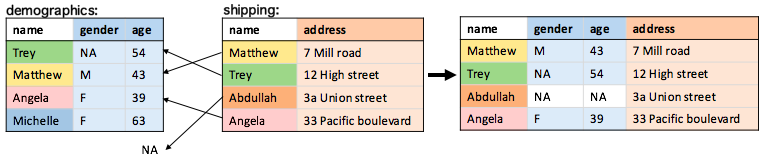
การ join แบบดีฟอลต์คือ right join

demographics[shipping, on = .(name)]
การ Join ข้อมูลด้วย data.table ใน R

อาร์กิวเมนต์ on

ตัวแปรใน list() หรือ .() จะถูกค้นหาจากชื่อคอลัมน์ของทั้งสอง data.table

shipping[demographics, on = list(name)]
shipping[demographics, on = .(name)]

สามารถใช้ character vector ได้เช่นกัน

join_key <- c("name")
shipping[demographics, on = join_key]
การ Join ข้อมูลด้วย data.table ใน R

Left Join

left join คือ right join ที่สลับลำดับตาราง:

shipping[demographics, on = .(name)]

การ Join ข้อมูลด้วย data.table ใน R

Inner Join

กำหนด nomatch = 0 เพื่อทำ inner join:

shipping[demographics, on = .(name), nomatch = 0]

การ Join ข้อมูลด้วย data.table ใน R

Full Join

ไม่รองรับด้วยไวยากรณ์ data.table ให้ใช้ฟังก์ชัน merge() แทน:

merge(demographics, shipping, by = "name", all = TRUE)

การ Join ข้อมูลด้วย data.table ใน R

Anti-Join

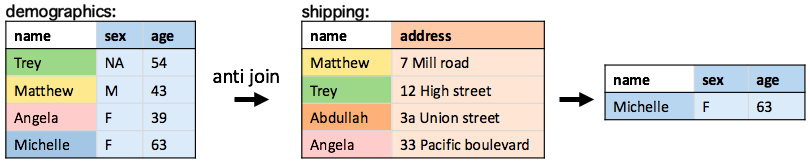
กรองแถวใน data.table ที่ไม่มีคู่ตรงกันในอีก data.table หนึ่ง

demographics[!shipping, on = .(name)]
การ Join ข้อมูลด้วย data.table ใน R

มาฝึกกันเถอะ!

การ Join ข้อมูลด้วย data.table ใน R

Preparing Video For Download...