การเชื่อมต่อ data.tables

การ Join ข้อมูลด้วย data.table ใน R

Scott Ritchie

Postdoctoral Researcher in Systems Genomics

คอลัมน์เหมือนกัน ต่าง data.table

การเชื่อมต่อ data.tables
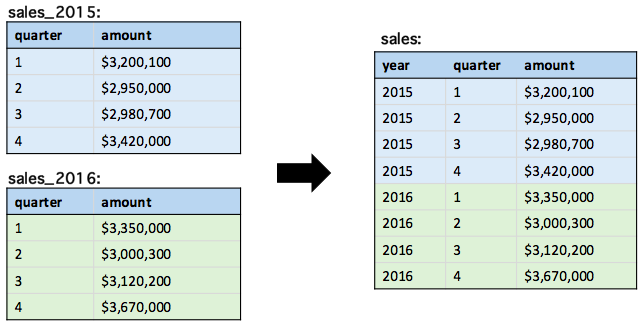
การ Join ข้อมูลด้วย data.table ใน R

ฟังก์ชันสำหรับเชื่อมต่อ

rbind(): เชื่อมแถวจาก data.tables ที่เก็บในตัวแปรต่างๆ

rbindlist(): เชื่อมแถวจาก list ของ data.tables

การ Join ข้อมูลด้วย data.table ใน R

ฟังก์ชัน rbind()

เชื่อมสอง data.table ขึ้นไปที่เก็บเป็นตัวแปร

# ... takes any number of arguments
rbind(...) 
rbind(sales_2015, sales_2016)
   quarter  amount
1:       1 3200100
2:       2 2950000
3:       3 2980700
4:       4 3420000
5:       1 3350000
6:       2 3000300
7:       3 3120200
8:       4 3670000
การ Join ข้อมูลด้วย data.table ใน R

การเพิ่มคอลัมน์ตัวระบุ

อาร์กิวเมนต์ idcol เพิ่มคอลัมน์ระบุแหล่งที่มาของ data.table

rbind("2015" = sales_2015, "2016" = sales_2016, idcol = "year")
   year quarter  amount
1: 2015       1 3200100
2: 2015       2 2950000
3: 2015       3 2980700
4: 2015       4 3420000
5: 2016       1 3350000
6: 2016       2 3000300
7: 2016       3 3120200
8: 2016       4 3670000
การ Join ข้อมูลด้วย data.table ใน R

การเพิ่มคอลัมน์ตัวระบุ

rbind(sales_2015, sales_2016, idcol = "year")
   year quarter  amount
1:    1       1 3200100
2:    1       2 2950000
3:    1       3 2980700
4:    1       4 3420000
5:    2       1 3350000
6:    2       2 3000300
7:    2       3 3120200
8:    2       4 3670000
การ Join ข้อมูลด้วย data.table ใน R

การเพิ่มคอลัมน์ตัวระบุ

rbind(sales_2015, sales_2016, idcol = TRUE)
   .id quarter  amount
1:   1       1 3200100
2:   1       2 2950000
3:   1       3 2980700
4:   1       4 3420000
5:   2       1 3350000
6:   2       2 3000300
7:   2       3 3120200
8:   2       4 3670000
การ Join ข้อมูลด้วย data.table ใน R

การจัดการคอลัมน์ที่ขาดหายไป

rbind("2015" = sales_2015, "2016" = sales_2016, idcol = "year", 
      fill = TRUE)

การ Join ข้อมูลด้วย data.table ใน R

การจัดการคอลัมน์ที่ขาดหายไป

rbind(sales_2015, sales_2016, idcol = "year")
Error in rbindlist(l, use.names, fill, idcol) : 
  Item 2 has 3 columns, inconsistent with item 1 which has 2 columns. 
  If instead you need to fill missing columns, use set argument 'fill' 
  to TRUE.
การ Join ข้อมูลด้วย data.table ใน R

ฟังก์ชัน rbindlist()

เชื่อมแถวจาก list ของ data.tables

# Read in a list of data.tables
table_files <- c("sales_2015.csv", "sales_2016.csv")
list_of_tables <- lapply(table_files, fread)
rbindlist(list_of_tables)
   quarter  amount
1:       1 3200100
2:       2 2950000
3:       3 2980700
4:       4 3420000
5:       1 3350000
6:       2 3000300
7:       3 3120200
8:       4 3670000
การ Join ข้อมูลด้วย data.table ใน R

การเพิ่มคอลัมน์ตัวระบุ

อาร์กิวเมนต์ idcol ดึงชื่อจาก list ที่รับเข้ามา

names(list_of_tables) <- c("2015", "2016")
rbindlist(list_of_tables, idcol = "year")
   year quarter  amount
1: 2015       1 3200100
2: 2015       2 2950000
3: 2015       3 2980700
4: 2015       4 3420000
5: 2016       1 3350000
6: 2016       2 3000300
7: 2016       3 3120200
8: 2016       4 3670000
การ Join ข้อมูลด้วย data.table ใน R

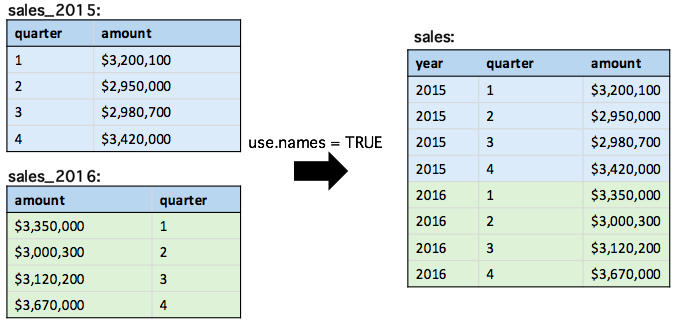
การจัดการคอลัมน์ที่มีลำดับต่างกัน

rbind("2015" = sales_2015, "2016" = sales_2016, idcol = "year", 
      use.names = TRUE)
การ Join ข้อมูลด้วย data.table ใน R

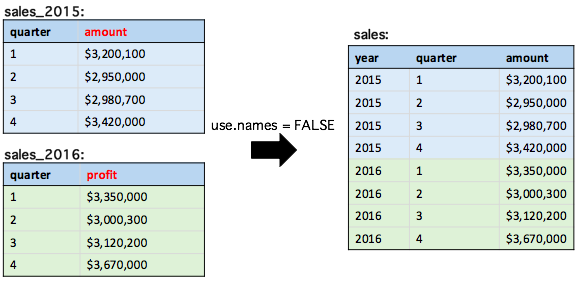
`data.tables` ที่มีชื่อคอลัมน์ต่างกัน

rbind("2015" = sales_2015, "2016" = sales_2016, idcol = "year", 
      use.names = FALSE)
การ Join ข้อมูลด้วย data.table ใน R

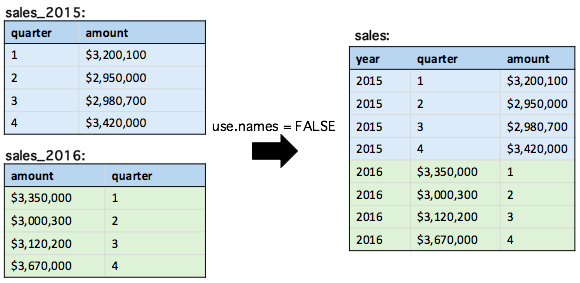
ข้อควรระวังของ `use.names = FALSE`

rbind("2015" = sales_2015, "2016" = sales_2016, idcol = "year", 
      use.names = FALSE)
การ Join ข้อมูลด้วย data.table ใน R

ค่าเริ่มต้นที่แตกต่างกัน

  • ค่าเริ่มต้นของ rbind() คือ use.names = TRUE
  • ค่าเริ่มต้นของ rbindlist() คือ use.names = FALSE ยกเว้นเมื่อใช้ fill = TRUE
การ Join ข้อมูลด้วย data.table ใน R

มาฝึกกันเถอะ!

การ Join ข้อมูลด้วย data.table ใน R

Preparing Video For Download...