การใช้ action sequence สำหรับ workflow ของแอป

Introduction to AI Apps in Sigma

Mandy Gray

Solutions and Enablement Lead, Aimpoint Digital

Action sequence คืออะไร?
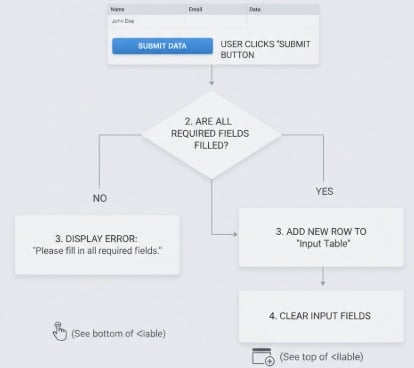
  • คำสั่งแบบ trigger สำหรับ Sigma events
    • เปิด modal
    • นำทางไปยังหน้าอื่น
    • เปลี่ยน control element หรือรูปแบบของชาร์ต

$$

  • ประกอบด้วย
    • Trigger
    • Effect
    • Condition (ไม่บังคับ)

action sequence

Introduction to AI Apps in Sigma

Trigger ของ action sequence

  • Trigger คือสิ่งที่ทำให้เกิด effect

Introduction to AI Apps in Sigma

Trigger ของ action sequence

  • Trigger คือสิ่งที่ทำให้เกิด effect
  • ประเภทต่างๆ:
    • On select
    • On click
      • ระบุว่าผู้ใช้คลิกหรือเลือก (ส่วนหนึ่ง) ของ element
    • On change
      • เชื่อมโยงกับ control element

Introduction to AI Apps in Sigma

Effect ของ action sequence

Effect มี 18 ประเภท แบ่งเป็น:

  • Navigation
  • Export
  • Controls
  • Elements
  • Modals
  • Input tables
  • Advanced effects

ที่ใช้บ่อยที่สุด:

  • เปิดและปิด modal
  • กำหนด/ล้างค่า control
  • อัปเดต input table
  • การนำทาง
Introduction to AI Apps in Sigma

Condition ของ action sequence

  • ไม่บังคับเสมอ
  • ใช้กับ action sequence
Introduction to AI Apps in Sigma

Condition ของ action sequence

  • ไม่บังคับเสมอ
  • ใช้กับ action sequence

ตรรกะการส่งข้อมูล

Introduction to AI Apps in Sigma

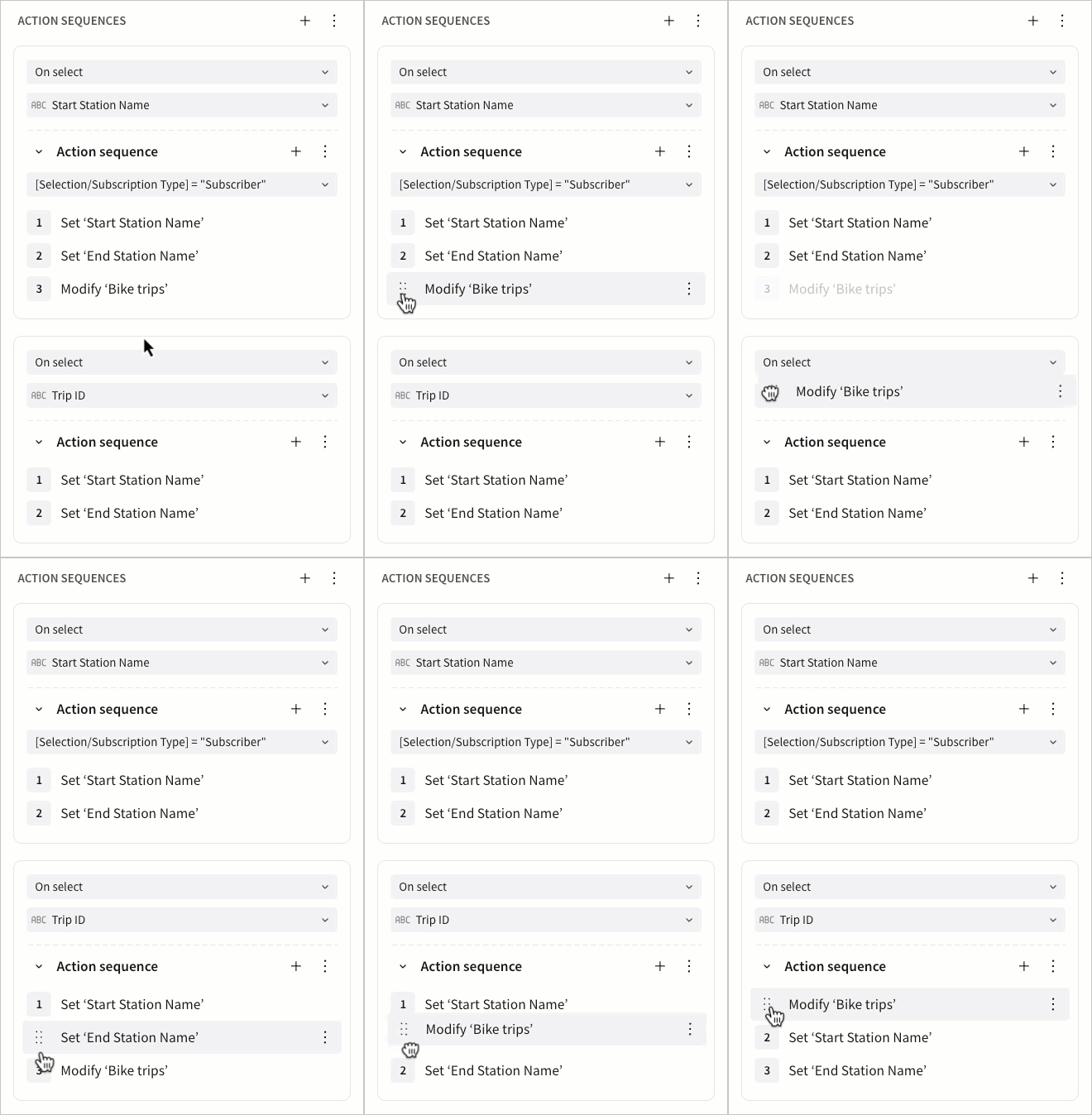
Effect ของ action sequence ทำงานตามลำดับที่กำหนด

สถานการณ์ซับซ้อน:

  • Trigger เดียว -> หลาย effect

$$

  • ควรคำนึงถึงลำดับของ action sequence และ effect

สถานการณ์ซับซ้อน

Introduction to AI Apps in Sigma

มาฝึกกันเถอะ!

Introduction to AI Apps in Sigma

Preparing Video For Download...