การวิเคราะห์ข้อมูลโซเชียลมีเดียด้วย Python
Alex Hanna
Computational Social Scientist
SentimentIntensityAnalyzer()
nltk
from nltk.sentiment.vader import SentimentIntensityAnalyzer

sid = SentimentIntensityAnalyzer()

sentiment_scores = tweets['text'].apply(sid.polarity_scores)
from nltk.sentiment.vader import SentimentIntensityAnalyzer
sid = SentimentIntensityAnalyzer()
sentiment_scores = tweets['text'].apply(sid.polarity_scores)
tweet1 = 'RT @jeffrey_heer: Thanks for inviting me, and thanks
for the lovely visualization of the talk! ...'
print(sid.polarity_scores(tweet1))
{'neg': 0.0, 'neu': 0.496, 'pos': 0.504, 'compound': 0.9041}
tweet2 = 'i am having problems with google play music'
print(sid.polarity_scores(tweet2)
{'neg': 0.267, 'neu': 0.495, 'pos': 0.238, 'compound': -0.0772}
sentiment = sentiment_scores.apply(lambda x: x['compound'])

sentiment_fb = sentiment[check_word_in_tweet('facebook', tweets)]
                    .resample('1 min').mean()
sentiment_gg = sentiment[check_word_in_tweet('google', tweets)]
                    .resample('1 min').mean()
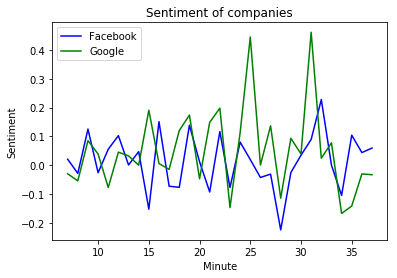
sentiment = sentiment_scores.apply(lambda x: x['compound'])
sentiment_fb = sentiment[check_word_in_tweet('facebook', tweets)] .resample('1 min').mean() sentiment_gg = sentiment[check_word_in_tweet('google', tweets)] .resample('1 min').mean()
plt.plot(
    sentiment_fb.index.minute,
    sentiment_fb, color = 'blue'
    )
plt.plot(
    sentiment_g.index.minute,
    sentiment_gg, color = 'green'
    )
plt.xlabel('Minute')
plt.ylabel('Sentiment')
plt.title('Sentiment of companies')
plt.legend(('Facebook', 'Google'))
plt.show()