pandas로 날짜와 시간 다루기
Python으로 시계열 데이터 다루기

Stefan Jansen
Founder & Lead Data Scientist at Applied Artificial Intelligence
날짜 및 시간 시계열 기능
- 핵심 기반: 날짜 및 시간 데이터 타입
- 특정 시점과 기간을 나타내는 객체
- 시간 관련 정보를 반영하는 속성 및 메서드
- 날짜 및 기간의 시퀀스:
- Series 또는 DataFrame 열
- 인덱스: 객체를 시계열로 변환
- 많은 Series/DataFrame 메서드가 인덱스의 시간 정보를 활용해 시계열 기능을 제공합니다
기본 구성 요소: pd.Timestamp
import pandas as pd # assumed imported going forward from datetime import datetime # To manually create datestime_stamp = pd.Timestamp(datetime(2017, 1, 1))pd.Timestamp('2017-01-01') == time_stamp
True # Understands dates as strings
time_stamp # type: pandas.tslib.Timestamp
Timestamp('2017-01-01 00:00:00')
기본 구성 요소: pd.Timestamp
- Timestamp 객체에는 시간 정보를 저장하는 다양한 속성이 있습니다
time_stamp.year
2017
time_stamp.day_name()
'Sunday'
추가 구성 요소: pd.Period & freq
period = pd.Period('2017-01')period # default: month-end
Period('2017-01', 'M')
period.asfreq('D') # convert to daily
Period('2017-01-31', 'D')
period.to_timestamp().to_period('M')
Period('2017-01', 'M')
- Period 객체는 빈도 정보를 저장하는 freq 속성을 가집니다
pd.Period()와pd.Timestamp()간 상호 변환
추가 구성 요소: pd.Period & freq
period + 2
Period('2017-03', 'M')
pd.Timestamp('2017-01-31', 'M') + 1
Timestamp('2017-02-28 00:00:00', freq='M')
- 빈도 정보를 사용하면 기본적인 날짜 연산이 가능합니다
날짜 및 시간 시퀀스
pd.date_range:start,end,periods,freq
index = pd.date_range(start='2017-1-1', periods=12, freq='M')
index
DatetimeIndex(['2017-01-31', '2017-02-28', '2017-03-31', ...,
               '2017-09-30', '2017-10-31', '2017-11-30', '2017-12-31'],
              dtype='datetime64[ns]', freq='M')
pd.DateTimeIndex: 빈도 정보를 포함한 Timestamp 객체의 시퀀스
날짜 및 시간 시퀀스
index[0]
Timestamp('2017-01-31 00:00:00', freq='M')
index.to_period()
PeriodIndex(['2017-01', '2017-02', '2017-03', '2017-04', ...,
             '2017-11', '2017-12'], dtype='period[M]', freq='M')
시계열 생성: pd.DateTimeIndex
pd.DataFrame({'data': index}).info()
RangeIndex: 12 entries, 0 to 11
Data columns (total 1 columns):
data    12 non-null datetime64[ns]
dtypes: datetime64[ns](1)
시계열 생성: pd.DateTimeIndex
np.random.random:- 난수 범위:
[0,1] - 12행, 2열
- 난수 범위:
data = np.random.random((size=12,2))pd.DataFrame(data=data, index=index).info()
DatetimeIndex: 12 entries, 2017-01-31 to 2017-12-31
Freq: M
Data columns (total 2 columns):
0    12 non-null float64
1    12 non-null float64
dtypes: float64(2)
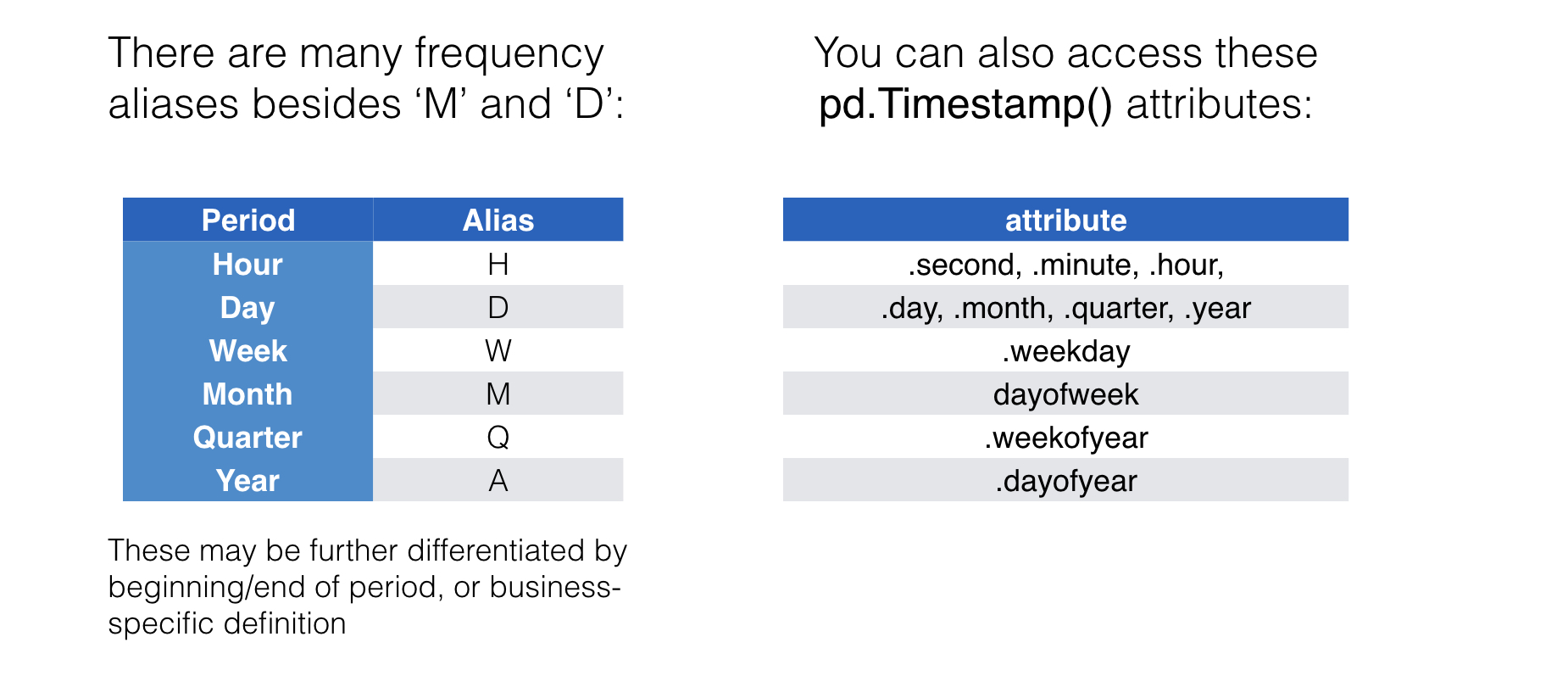
빈도 별칭과 시간 정보
연습해 봅시다!
Python으로 시계열 데이터 다루기

