시계열 인덱싱 및 리샘플링
Python으로 시계열 데이터 다루기

Stefan Jansen
Founder & Lead Data Scientist at Applied Artificial Intelligence
시계열 변환
기본 시계열 변환에는 다음이 포함됩니다:
날짜 문자열 파싱 및
datetime64로 변환특정 기간 선택 및 슬라이싱
DateTimeIndex빈도 설정 및 변경- 업샘플링 vs 다운샘플링
GOOG 주가 데이터 가져오기
google = pd.read_csv('google.csv') # import pandas as pdgoogle.info()
<class 'pandas.core.frame.DataFrame'>
RangeIndex: 504 entries, 0 to 503
Data columns (total 2 columns):
date     504 non-null object
price    504 non-null float64
dtypes: float64(1), object(1)
google.head()
         date   price
0  2015-01-02  524.81
1  2015-01-05  513.87
2  2015-01-06  501.96
3  2015-01-07  501.10
4  2015-01-08  502.68
날짜 문자열을 datetime64로 변환
pd.to_datetime():- 날짜 문자열 파싱
datetime64로 변환
google.date = pd.to_datetime(google.date)google.info()
<class 'pandas.core.frame.DataFrame'>
RangeIndex: 504 entries, 0 to 503
Data columns (total 2 columns):
date     504 non-null datetime64[ns]
price    504 non-null float64
dtypes: datetime64[ns](1), float64(1)
날짜 문자열을 datetime64로 변환
.set_index():- 날짜를 인덱스로 설정
inplace:- 복사본 생성 안 함
google.set_index('date', inplace=True)google.info()
<class 'pandas.core.frame.DataFrame'>
DatetimeIndex: 504 entries, 2015-01-02 to 2016-12-30
Data columns (total 1 columns):
price    504 non-null float64
dtypes: float64(1)
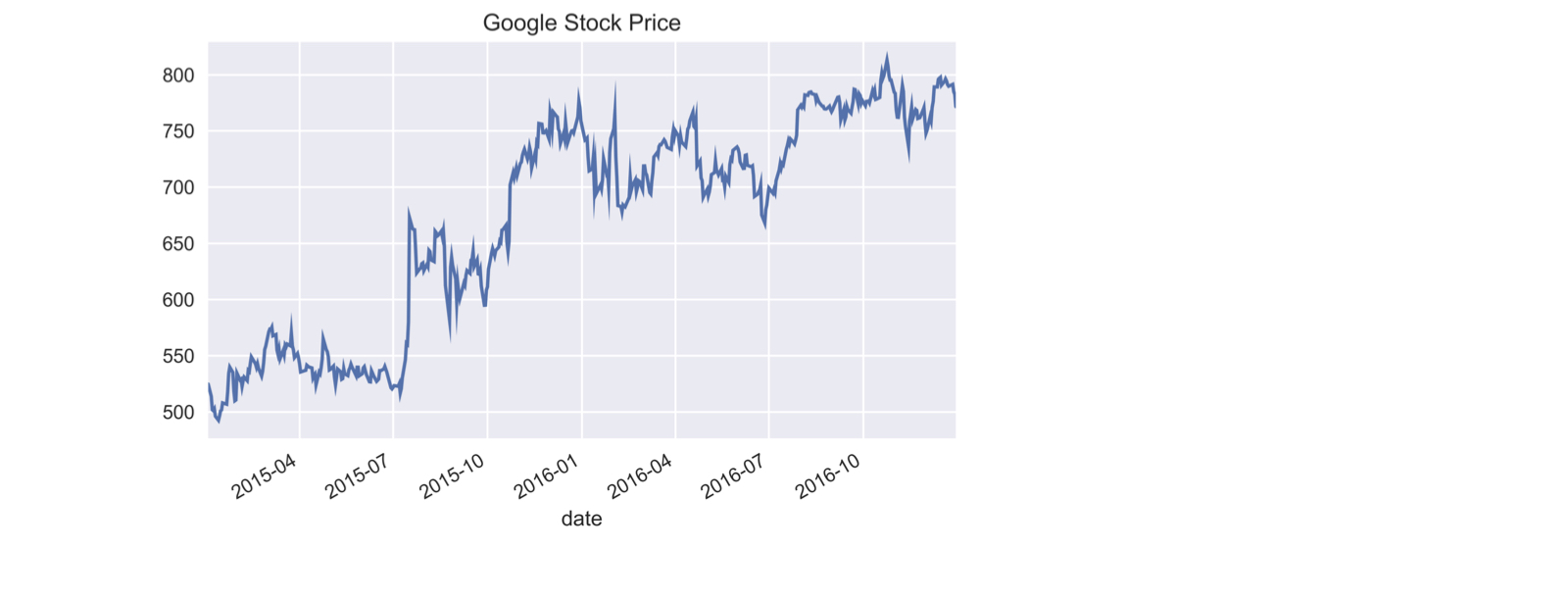
Google 주가 시계열 플로팅
google.price.plot(title='Google Stock Price')plt.tight_layout(); plt.show()
부분 문자열 인덱싱
- 날짜로 파싱 가능한 문자열로 선택/인덱싱
google['2015'].info() # Pass string for part of date
DatetimeIndex: 252 entries, 2015-01-02 to 2015-12-31
Data columns (total 1 columns):
price    252 non-null float64
dtypes: float64(1)
google['2015-3': '2016-2'].info() # Slice includes last month
DatetimeIndex: 252 entries, 2015-03-02 to 2016-02-29
Data columns (total 1 columns):
price    252 non-null float64
dtypes: float64(1)
memory usage: 3.9 KB
부분 문자열 인덱싱
google.loc['2016-6-1', 'price'] # Use full date with .loc[]
734.15
.asfreq(): 빈도 설정
.asfreq('D'):DateTimeIndex를 달력 기준 일별 빈도로 변환
google.asfreq('D').info() # set calendar day frequency
DatetimeIndex: 729 entries, 2015-01-02 to 2016-12-30
Freq: D
Data columns (total 1 columns):
price    504 non-null float64
dtypes: float64(1)
.asfreq(): 빈도 설정
- 업샘플링:
- 빈도가 높아지면 새로운 날짜가 생성되어 결측값이 발생
google.asfreq('D').head()
             price
date
2015-01-02  524.81
2015-01-03     NaN
2015-01-04     NaN
2015-01-05  513.87
2015-01-06  501.96
.asfreq(): 빈도 재설정
.asfreq('B'):DateTimeIndex를 영업일 빈도로 변환
google = google.asfreq('B') # Change to calendar day frequencygoogle.info()
DatetimeIndex: 521 entries, 2015-01-02 to 2016-12-30
Freq: B
Data columns (total 1 columns):
price    504 non-null float64
dtypes: float64(1)
.asfreq(): 빈도 재설정
google[google.price.isnull()] # Select missing 'price' values
            price
date
2015-01-19    NaN
2015-02-16    NaN
...
2016-11-24    NaN
2016-12-26    NaN
- 거래일이 아닌 영업일
연습해 봅시다!
Python으로 시계열 데이터 다루기

