实现 X-Ray 跟踪
AWS 监控与故障排查

John Q. Martin
Principal Consultant
X-Ray SDK 概览
要点:
- 支持语言:Python、Node.js、Java、.NET、Go、Ruby
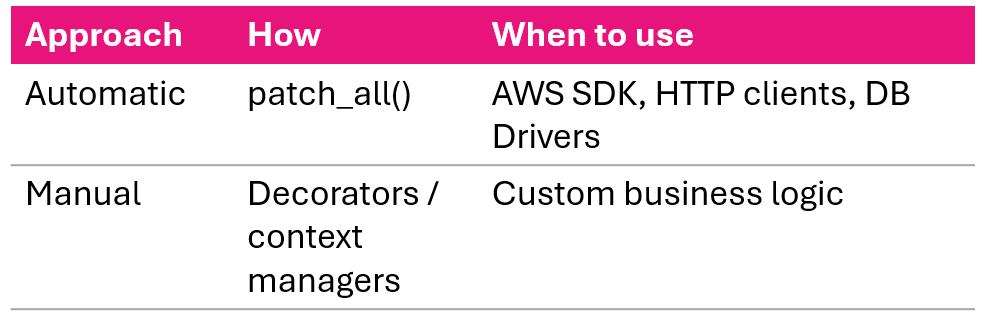
- 两种方式:自动与手动埋点
- SDK 通过 UDP 2000 端口与守护进程通信
- 从不直接调用 X-Ray API
自动 vs 手动:
Python SDK:Flask 配置
from flask import Flask
from aws_xray_sdk.core import xray_recorder
from aws_xray_sdk.ext.flask.middleware import XRayMiddleware

app = Flask(__name__)

xray_recorder.configure(
    service='MyFlaskApp',
    sampling=True,
    context_missing='LOG_ERROR',
    daemon_address='127.0.0.1:2000'
)

XRayMiddleware(app, xray_recorder)
四个记录器设置:
- service——服务图中显示的名称
- sampling——启用/禁用采样
- context_missing——用 LOG_ERROR 防止崩溃
- daemon_address——发送分段的地址
中间件接入后,所有入站请求都会自动跟踪。
自动埋点:Python
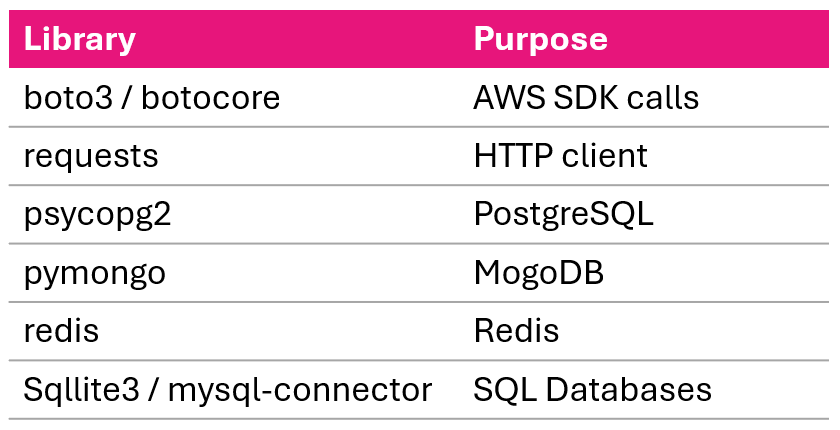
# 为所有受支持的库埋点
from aws_xray_sdk.core import patch_all
patch_all()
# 或选择性埋点
from aws_xray_sdk.core import patch
patch(['boto3', 'requests', 'psycopg2'])
支持的库:
手动埋点:Python
装饰器方式:
@xray_recorder.capture('process_order')
def process_order(order_id):
    order = get_order(order_id)
    return process_payment(order)
上下文管理器方式:
def process_order(order_id):
    with xray_recorder.capture('fetch_order'):
        order = db.query(Order).filter_by(
            id=order_id).first()
    with xray_recorder.capture('process_payment'):
        return payment_service.charge(order.total)
代码中的注解与元数据
添加注解:
xray_recorder.put_annotation(
    'order_id', order_id)
xray_recorder.put_annotation(
    'user_id', user_id)
添加元数据(详细上下文):
xray_recorder.put_metadata(
    'order_details',
    {'items': order.items,
     'total': order.total})
- 注解可建索引,元数据不可
- 注解有类型,元数据为任意 JSON
- 用索引做筛选,用元数据存调试上下文
跟踪中的错误处理
def process_order(order_id):
    try:
        order = get_order(order_id)
        payment = process_payment(order)
        return payment
    except PaymentError as e:
        xray_recorder.put_annotation(
            'error_type', 'payment_failed')
        xray_recorder.put_metadata(
            'error_details',
            {'message': str(e), 'order_id': order_id})
        raise
- 被跟踪函数内的异常会被自动捕获
- 添加错误类型注解,便于在控制台筛选
- 添加元数据以记录完整错误细节
- 始终重新抛出,让应用自身的错误处理继续执行
Node.js SDK:Express 配置
const AWSXRay = require('aws-xray-sdk-core');
const xrayExpress = require('aws-xray-sdk-express');
const app = require('express')();

AWSXRay.config([AWSXRay.plugins.EC2Plugin]);

// 为所有入站请求打开分段
app.use(xrayExpress.openSegment('MyExpressApp'));

app.get('/api/orders/:id', async (req, res) => {
    const order = await fetchOrder(req.params.id);
    res.json({ order });
});

// 响应后关闭分段
app.use(xrayExpress.closeSegment());

// 自动埋点
const AWS = AWSXRay.captureAWS(require('aws-sdk'));
const https = AWSXRay.captureHTTPs(require('https'));
Lambda 实现
from aws_xray_sdk.core import xray_recorder
from aws_xray_sdk.core import patch_all

patch_all()  # 为 AWS SDK 调用埋点

def lambda_handler(event, context):
    xray_recorder.put_annotation(
        'user_id', event['user_id'])

    result = process_user(event['user_id'])

    return {
        'statusCode': 200,
        'body': json.dumps(result)
    }
要点:
- 启用 Active Tracing 时,Lambda 会自动发送基础跟踪,无需 SDK
- 安装 X-Ray SDK 可添加子分段、注解,并为下游调用埋点
- 控制台启用:Configuration → Monitoring tools
- 模板中启用:
Tracing: Active
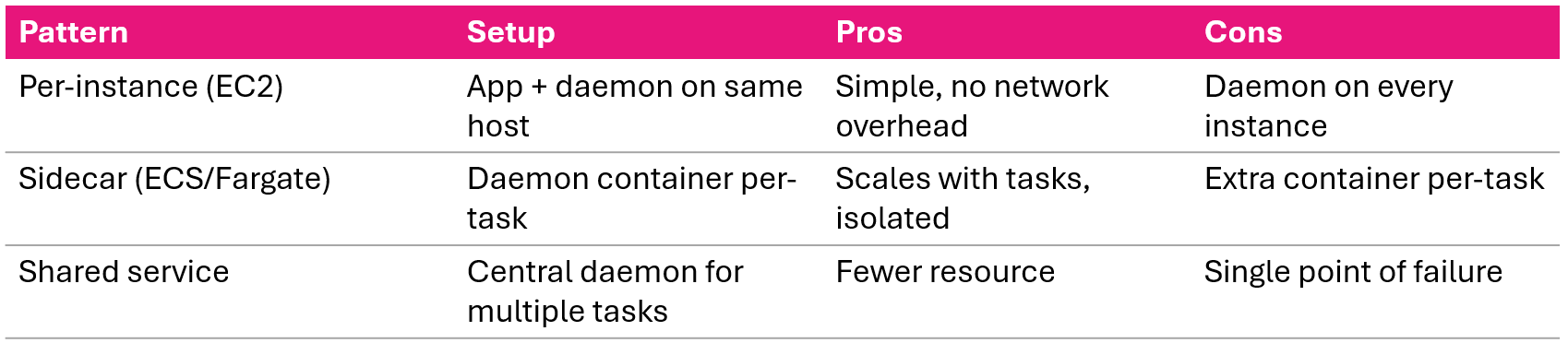
ECS 与 Fargate:sidecar 模式
任务结构:
ECS Task
|_ 应用容器
|   发送到 xray-daemon:2000
|_ X-Ray 守护进程容器
    转发到 X-Ray 服务
应用容器配置:
xray_recorder.configure(
    service='MyECSApp',
    daemon_address='xray-daemon:2000'
)
任务定义包括:
- 守护进程容器:
amazon/aws-xray-daemon镜像,UDP 端口 2000 - 应用容器:环境变量
AWS_XRAY_DAEMON_ADDRESS=xray-daemon:2000
为何用 sidecar?
- 守护进程随任务扩缩
- 故障按任务隔离
安装 X-Ray 守护进程
各平台安装:
- Amazon Linux 2
- sudo yum install -y aws-xray-daemon-3.x.rpm
- Ubuntu
- sudo dpkg -i aws-xray-daemon-3.x.deb
- Windows
- xray.exe -f cfg.yaml install
- Docker
- docker run -p 2000:2000/udp amazon/aws-xray-daemon
安装后:
sudo systemctl start xray
sudo systemctl enable xray
守护进程职责:
- 监听 UDP 2000 端口
- 缓冲并批量发送分段
- 通过 HTTPS 转发到 X-Ray API
- 处理重试,您的应用无需处理
守护进程配置
TotalBufferSizeMB: 24
Concurrency: 8
Region: "us-east-1"
Socket:
  UDPAddress: "127.0.0.1:2000"
  TCPAddress: "127.0.0.1:2000"
Logging:
  LogLevel: "info"
  LogPath: "/var/log/xray/xray-daemon.log"
LocalMode: false
- 缓冲大小,高流量时可增大
- 并发数设置到 X-Ray 的并行连接数
- 容器环境将 UDP 地址设为 0.0.0.0
- 本地模式,本地开发无凭证时设为 true
IAM 权限
{
  "Effect": "Allow",
  "Action": [
    "xray:PutTraceSegments",
    "xray:PutTelemetryRecords",
    "xray:GetSamplingRules",
    "xray:GetSamplingTargets",
    "xray:GetSamplingStatisticSummaries"
  ],
  "Resource": "*"
}
最简方式
使用托管策略 AWSXRayDaemonWriteAccess
附加到:
- EC2 实例角色
- ECS 任务角色
- Lambda 执行角色
权限不正确时,守护进程会运行但无法投递分段且无提示。
守护进程部署模式
课程小结
- SDK:用
patch_all()自动埋点;用装饰器与上下文管理器手动埋点 - 注解(可索引、可搜索)与 元数据(详细、不可索引)
- Lambda:自动发送基础跟踪;安装 SDK 获取子分段与下游调用埋点
- ECS/Fargate:采用 sidecar 守护进程容器模式
- 守护进程:通过 cfg.yaml 配置,需
AWSXRayDaemonWriteAccessIAM 策略 - 部署:EC2 用单实例;容器用 sidecar
实现 X-Ray 跟踪
AWS 监控与故障排查

