X-Ray-tracing implementeren
Monitoring en troubleshooting van AWS

John Q. Martin
Principal Consultant
Overzicht van de X-Ray SDK
Belangrijk:
- Ondersteunde talen: Python, Node.js, Java, .NET, Go, Ruby
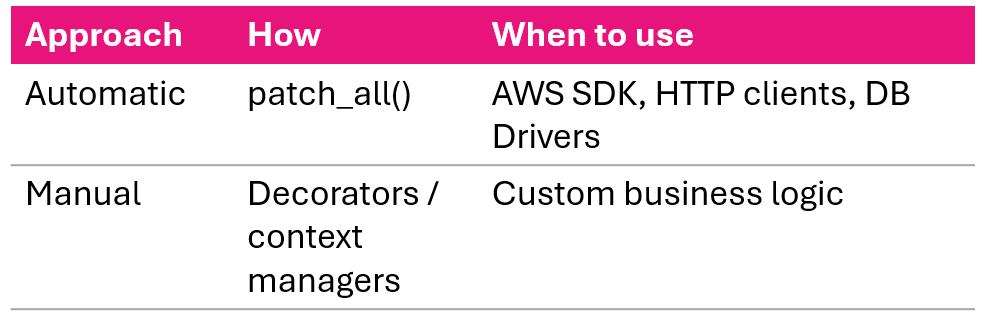
- Twee aanpakken: automatische en handmatige instrumentatie
- SDK praat met de daemon op UDP-poort 2000
- Praat nooit direct met de X-Ray API
Automatisch vs. handmatig:
Python SDK: Flask-setup
from flask import Flask
from aws_xray_sdk.core import xray_recorder
from aws_xray_sdk.ext.flask.middleware import XRayMiddleware

app = Flask(__name__)

xray_recorder.configure(
    service='MyFlaskApp',
    sampling=True,
    context_missing='LOG_ERROR',
    daemon_address='127.0.0.1:2000'
)

XRayMiddleware(app, xray_recorder)
Vier recorder-instellingen:
- service - naam in de servicemap
- sampling - sampling aan/uit
- context_missing - LOG_ERROR voorkomt crashes
- daemon_address - waar segmenten heen gaan
Zodra de middleware is gekoppeld, worden inkomende requests automatisch getraceerd.
Automatische instrumentatie: Python
# Instrumenteer alle ondersteunde libraries
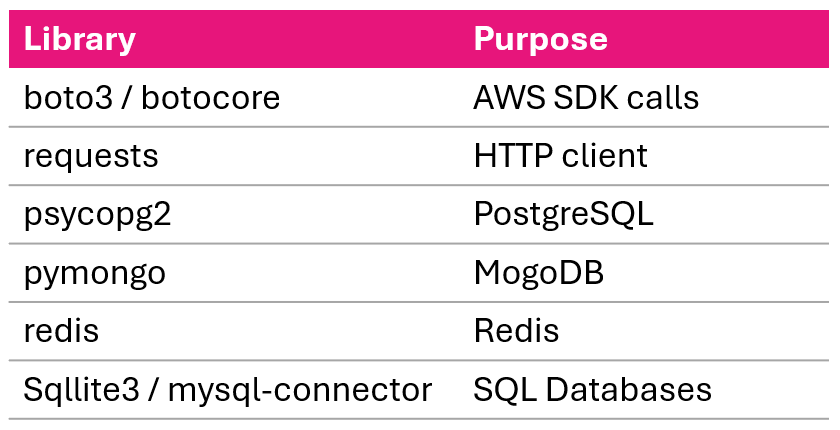
from aws_xray_sdk.core import patch_all
patch_all()
# Of selectief
from aws_xray_sdk.core import patch
patch(['boto3', 'requests', 'psycopg2'])
Ondersteunde libraries:
Handmatige instrumentatie: Python
Decorator-aanpak:
@xray_recorder.capture('process_order')
def process_order(order_id):
    order = get_order(order_id)
    return process_payment(order)
Contextmanager-aanpak:
def process_order(order_id):
    with xray_recorder.capture('fetch_order'):
        order = db.query(Order).filter_by(
            id=order_id).first()
    with xray_recorder.capture('process_payment'):
        return payment_service.charge(order.total)
Annotaties en metadata in code
Annotaties toevoegen:
xray_recorder.put_annotation(
    'order_id', order_id)
xray_recorder.put_annotation(
    'user_id', user_id)
Metadata toevoegen (uitgebreide context):
xray_recorder.put_metadata(
    'order_details',
    {'items': order.items,
     'total': order.total})
- Annotaties zijn indexen, metadata niet
- Annotaties zijn getypeerd, metadata is willekeurige JSON
- Gebruik indexen om te filteren, metadata voor debugcontext
Foutenafhandeling in traces
def process_order(order_id):
    try:
        order = get_order(order_id)
        payment = process_payment(order)
        return payment
    except PaymentError as e:
        xray_recorder.put_annotation(
            'error_type', 'payment_failed')
        xray_recorder.put_metadata(
            'error_details',
            {'message': str(e), 'order_id': order_id})
        raise
- Exceptions binnen getraceerde functies worden automatisch vastgelegd
- Voeg een annotatie toe voor het fouttype om in de console te filteren
- Voeg metadata toe voor alle foutdetails
- Altijd opnieuw raisen: de foutafhandeling van je app moet nog draaien
Node.js SDK: Express-setup
const AWSXRay = require('aws-xray-sdk-core');
const xrayExpress = require('aws-xray-sdk-express');
const app = require('express')();

AWSXRay.config([AWSXRay.plugins.EC2Plugin]);

// Open segment voor alle inkomende requests
app.use(xrayExpress.openSegment('MyExpressApp'));

app.get('/api/orders/:id', async (req, res) => {
    const order = await fetchOrder(req.params.id);
    res.json({ order });
});

// Sluit segment na de response
app.use(xrayExpress.closeSegment());

// Automatische instrumentatie
const AWS = AWSXRay.captureAWS(require('aws-sdk'));
const https = AWSXRay.captureHTTPs(require('https'));
Lambda-implementatie
from aws_xray_sdk.core import xray_recorder
from aws_xray_sdk.core import patch_all

patch_all()  # instrumenteer AWS SDK-calls

def lambda_handler(event, context):
    xray_recorder.put_annotation(
        'user_id', event['user_id'])

    result = process_user(event['user_id'])

    return {
        'statusCode': 200,
        'body': json.dumps(result)
    }
Belangrijk:
- Lambda verstuurt basistraces automatisch met Active Tracing aan; geen SDK nodig daarvoor
- Installeer de X-Ray SDK voor subsegmenten, annotaties en instrumentatie van downstream-calls
- In de console inschakelen: Configuration → Monitoring tools
- Of in template:
Tracing: Active
ECS en Fargate: sidecar-patroon
Taakstructuur:
ECS Task
|_ Application Container
|   stuurt naar xray-daemon:2000
|_ X-Ray Daemon Container
    stuurt door naar X-Ray service
App-containerconfig:
xray_recorder.configure(
    service='MyECSApp',
    daemon_address='xray-daemon:2000'
)
Task definition bevat:
- Daemoncontainer:
amazon/aws-xray-daemon-image, UDP-poort 2000 - Appcontainer: env-var
AWS_XRAY_DAEMON_ADDRESS=xray-daemon:2000
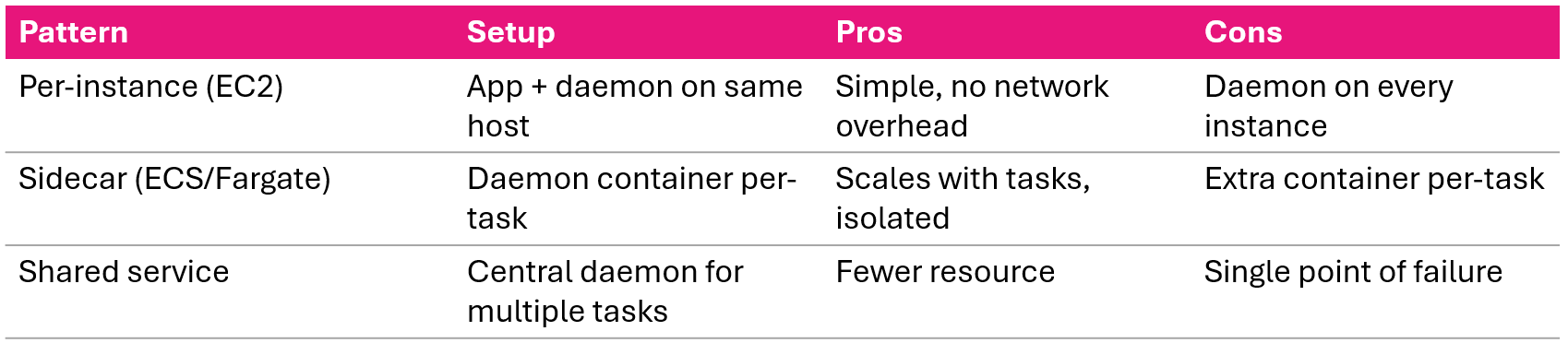
Waarom sidecar?
- Daemon schaalt mee met je tasks
- Storingen geïsoleerd per task
De X-Ray-daemon installeren
Installeren per platform:
- Amazon Linux 2
- sudo yum install -y aws-xray-daemon-3.x.rpm
- Ubuntu
- sudo dpkg -i aws-xray-daemon-3.x.deb
- Windows
- xray.exe -f cfg.yaml install
- Docker
- docker run -p 2000:2000/udp amazon/aws-xray-daemon
Na installatie:
sudo systemctl start xray
sudo systemctl enable xray
Wat de daemon doet:
- Luistert op UDP-poort 2000
- Buffert en bundelt segmenten
- Stuurt door naar de X-Ray API via HTTPS
- Handelt retries af; je app hoeft dat niet
Daemonconfiguratie
TotalBufferSizeMB: 24
Concurrency: 8
Region: "us-east-1"
Socket:
  UDPAddress: "127.0.0.1:2000"
  TCPAddress: "127.0.0.1:2000"
Logging:
  LogLevel: "info"
  LogPath: "/var/log/xray/xray-daemon.log"
LocalMode: false
- Buffergrootte, verhogen bij veel verkeer
- Concurrency bepaalt parallelle verbindingen met X-Ray
- Voor containers: zet UDP-adres op 0.0.0.0
- Local mode: true voor lokale dev zonder credentials
IAM-machtigingen
{
  "Effect": "Allow",
  "Action": [
    "xray:PutTraceSegments",
    "xray:PutTelemetryRecords",
    "xray:GetSamplingRules",
    "xray:GetSamplingTargets",
    "xray:GetSamplingStatisticSummaries"
  ],
  "Resource": "*"
}
Makkelijkste aanpak
Gebruik het beheerde beleid AWSXRayDaemonWriteAccess
Koppel aan:
- EC2-instance-rol
- ECS-taskrol
- Lambda-uitvoeringsrol
Zonder juiste rechten draait de daemon, maar levert hij segmenten stilzwijgend niet af.
Daemon-implementatiepatronen
Samenvatting van de les
- SDK: automatische instrumentatie met
patch_all(), handmatig met decorators en contextmanagers - Annotaties (geïndexeerd, doorzoekbaar) vs. metadata (gedetailleerd, niet-geïndexeerd)
- Lambda: verstuurt basistraces automatisch; installeer SDK voor subsegmenten en downstream-calls
- ECS/Fargate: sidecar-daemoncontainerpatroon
- Daemon: geconfigureerd via cfg.yaml, vereist
AWSXRayDaemonWriteAccessIAM-beleid - Deployment: per instance voor EC2, sidecar voor containers
X-Ray-tracing implementeren
Monitoring en troubleshooting van AWS

