Integracja SNS i SQS z CloudWatch

Monitoring and Troubleshooting AWS

John Q. Martin

Principal Consultant

Łączenie alarmów CloudWatch z SNS
aws cloudwatch put-metric-alarm \
  --alarm-name HighCPUUtilization \
  --metric-name CPUUtilization \
  --namespace AWS/EC2 \
  --statistic Average \
  --period 300 \
  --evaluation-periods 2 \
  --threshold 80 \
  --comparison-operator GreaterThanThreshold \
  --alarm-actions arn:aws:sns:us-east-1:123456789012:production-alerts \
  --ok-actions arn:aws:sns:us-east-1:123456789012:recovery-notifications


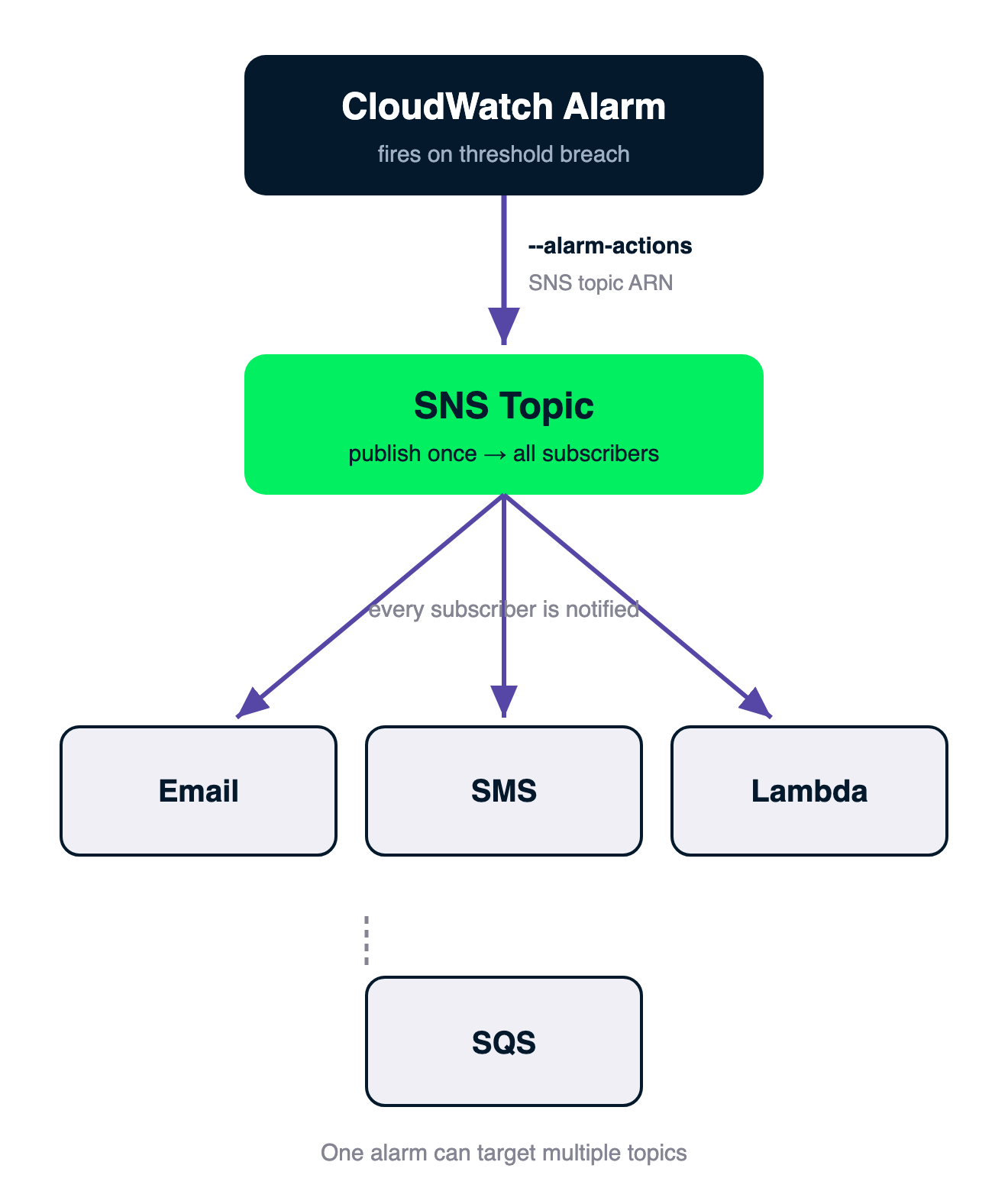
Schemat przepływu: alarm CloudWatch wysyła przez --alarm-actions do tematu SNS, który rozsyła do subskrybentów — Email, SMS, Lambda i SQS

Monitoring and Troubleshooting AWS

Kluczowe pojęcia SNS

Składniki

  • SNS działa w modelu wydawca/subskrybent: tematy, wydawcy, subskrybenci
  • Temat: nazwany kanał; wydawcy wysyłają, subskrybenci odbierają
  • Jedna publikacja — dostarczana jednocześnie do wszystkich subskrybentów

Protokoły subskrybentów (jeden temat, wiele punktów końcowych):

  • Email, SMS
  • HTTP / HTTPS
  • Lambda, SQS
  • Powiadomienia mobilne, Kinesis Firehose
Monitoring and Troubleshooting AWS

Typy tematów SNS


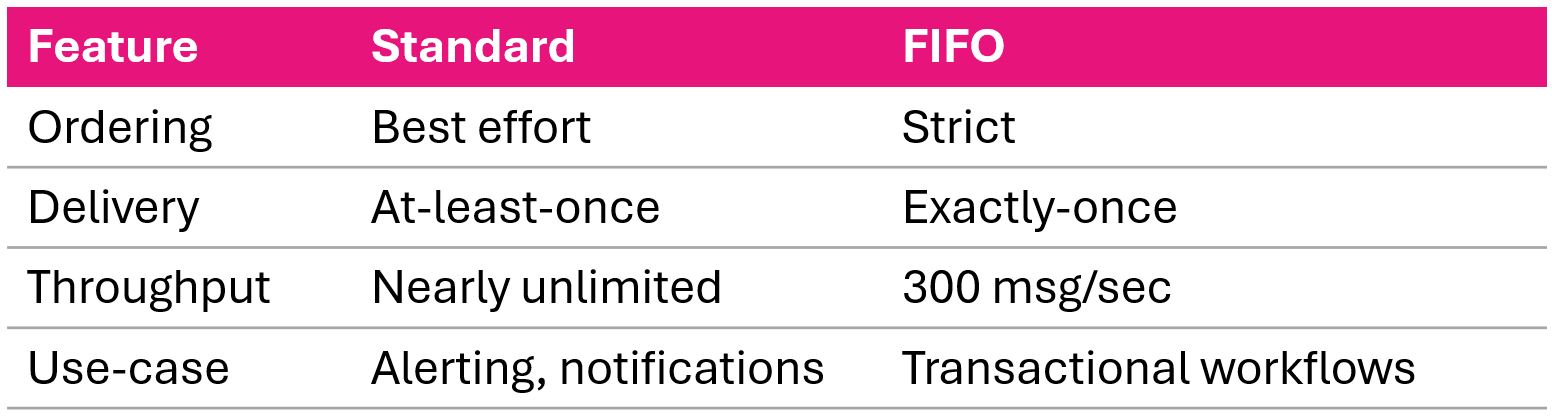
Porównanie typów tematów SNS: Standard i FIFO — kolejność, przepustowość i gwarancje dostarczania

Monitoring and Troubleshooting AWS

Tworzenie tematów SNS: AWS CLI

Temat Standard

aws sns create-topic \
  --name production-alerts

Temat FIFO

aws sns create-topic \
  --name production-alerts.fifo \
  --attributes FifoTopic=true,\
    ContentBasedDeduplication=true

Z szyfrowaniem

aws sns create-topic \
  --name production-alerts \
  --attributes KmsMasterKeyId=alias/aws/sns
Monitoring and Troubleshooting AWS

Dodawanie subskrybentów Lambda i SMS


Lambda

aws sns subscribe \
  --topic-arn arn:aws:sns:us-east-1:123456789012:production-alerts \
  --protocol lambda \
  --notification-endpoint arn:aws:lambda:us-east-1:123456789012:function:ProcessAlert

SMS

aws sns subscribe \
  --topic-arn arn:aws:sns:us-east-1:123456789012:critical-alerts \
  --protocol sms \
  --notification-endpoint +1234567890
Monitoring and Troubleshooting AWS

Format wiadomości SNS z alarmów CloudWatch

{
  "AlarmName": "HighCPUUtilization",
  "NewStateValue": "ALARM",
  "OldStateValue": "OK",
  "NewStateReason": "Threshold Crossed: 2 datapoints [85.0, 90.0] were greater than the threshold (80.0).",
  "StateChangeTime": "2026-03-27T10:30:45.123+0000",
  "Trigger": {
    "MetricName": "CPUUtilization",
    "Namespace": "AWS/EC2",
    "Statistic": "AVERAGE",
    "Period": 300,
    "Threshold": 80.0,
    "ComparisonOperator": "GreaterThanThreshold"
  }
}
Monitoring and Troubleshooting AWS

Filtrowanie wiadomości SNS

aws sns set-subscription-attributes \
  --subscription-arn arn:aws:sns:...:production-alerts:abc123 \
  --attribute-name FilterPolicy \
  --attribute-value '{"AlarmName":["HighCPUUtilization"],"NewStateValue":["ALARM"]}'

aws sns set-subscription-attributes \
  --subscription-arn arn:aws:sns:...:production-alerts:abc123 \
  --attribute-name FilterPolicyScope \
  --attribute-value MessageBody
Monitoring and Troubleshooting AWS

Niestandardowe formatowanie powiadomień za pomocą Lambda
def lambda_handler(event, context):
    alarm = json.loads(event['Records'][0]['Sns']['Message'])

    message = f"""
ALERT: {alarm['AlarmName']}
Status: {alarm['NewStateValue']}
Reason: {alarm['NewStateReason']}
Resource: {alarm['Trigger']['Dimensions'][0]['value']}
Runbook: https://wiki.example.com/runbooks/high-cpu
    """

    sns.publish(
        TopicArn='arn:aws:sns:...:formatted-alerts',
        Subject=f"{alarm['AlarmName']}",
        Message=message
    )


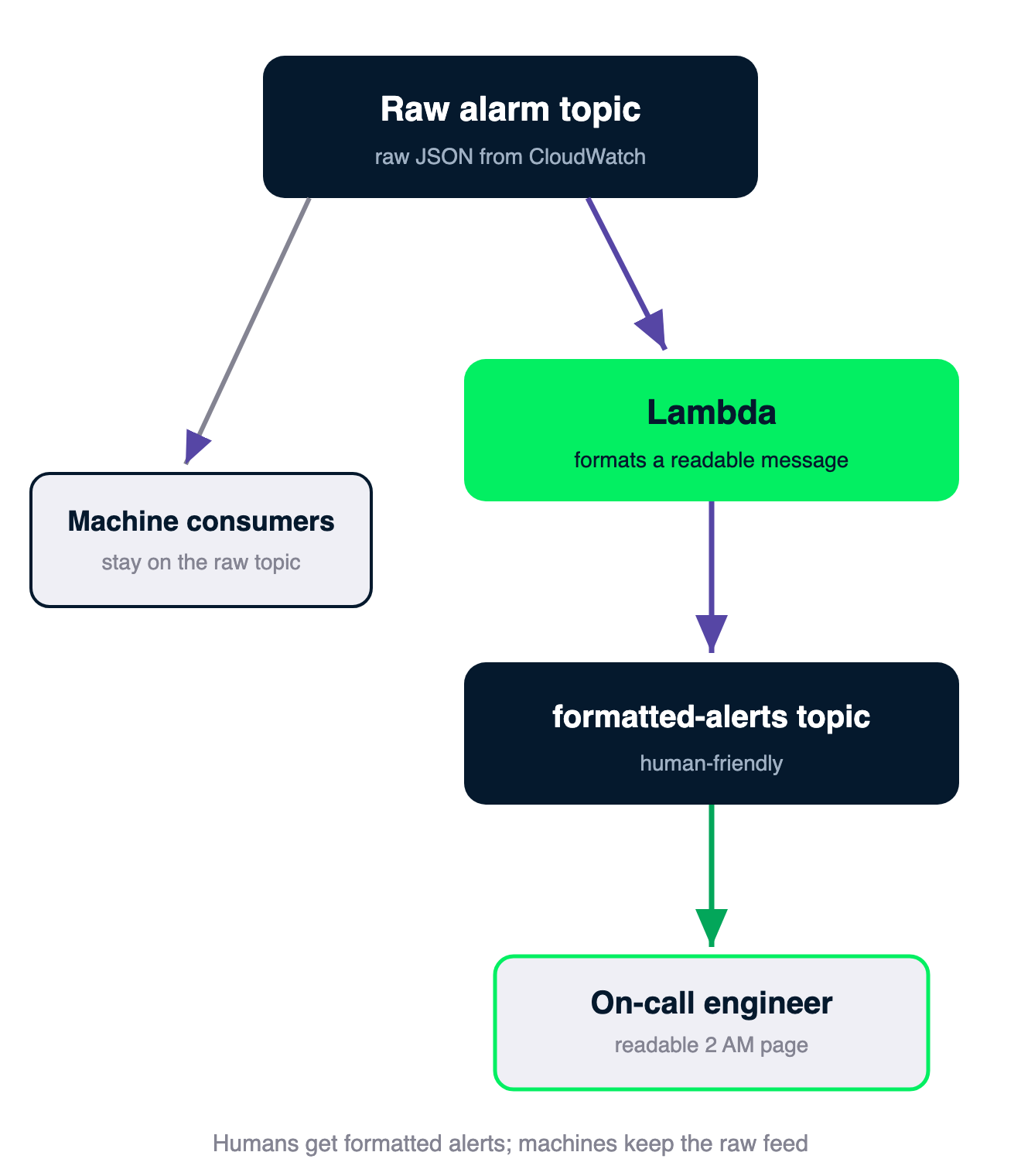
Łańcuch: temat z surowym alarmem trafia do Lambda, która formatuje czytelną wiadomość i publikuje ją do tematu formatted-alerts dla dyżurnego inżyniera; konsumenci maszynowi pozostają na surowym temacie

Monitoring and Troubleshooting AWS

Architektura fan-out z SQS

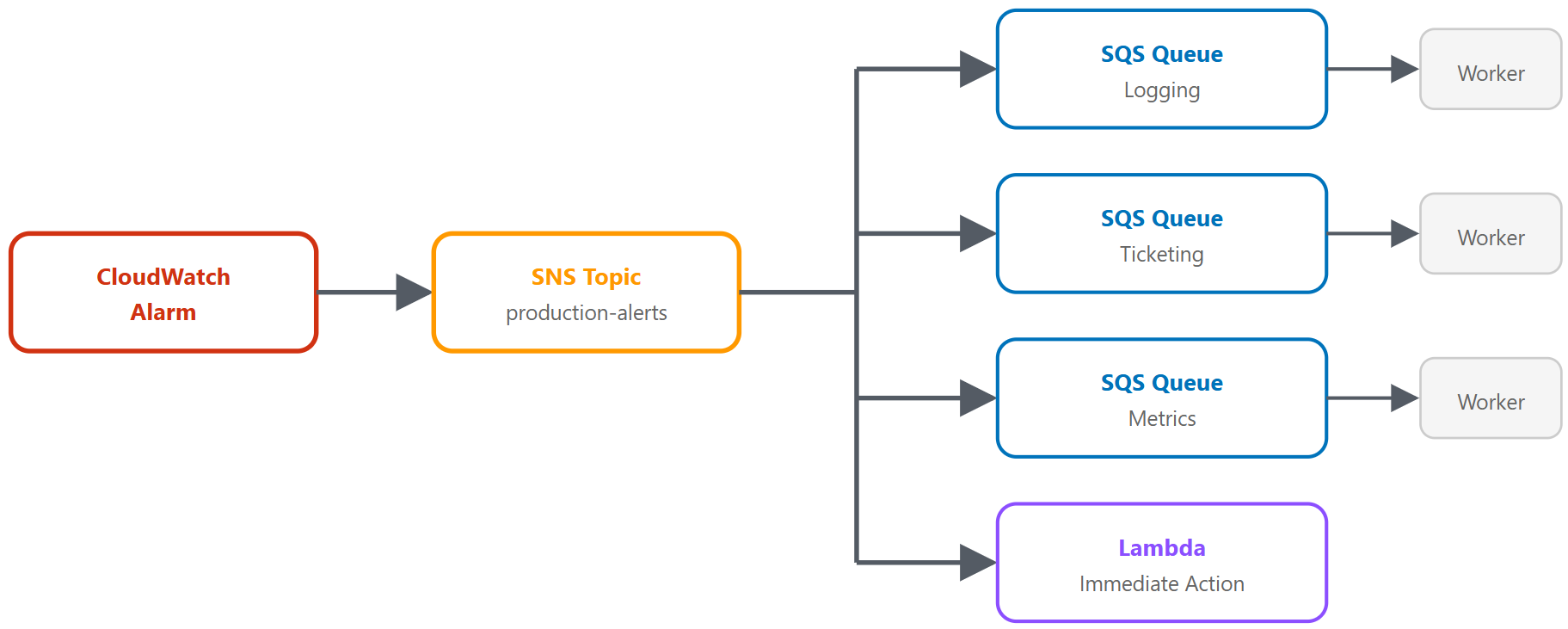
Architektura fan-out: jedna wiadomość SNS trafia do wielu kolejek SQS i do konsumenta Lambda

Monitoring and Troubleshooting AWS

Konfiguracja fan-out

Cztery kroki

  1. Utwórz kolejki SQS (po jednej na konsumenta)
  2. Skonfiguruj polityki kolejek (zezwól SNS na wysyłanie wiadomości)
  3. Subskrybuj kolejki do tematu SNS
  4. Zbuduj konsumentów (pobieranie, przetwarzanie, usuwanie)

Polityka kolejki

{
  "Effect": "Allow",
  "Principal": { "Service": "sns.amazonaws.com" },
  "Action": "sqs:SendMessage",
  "Resource": "arn:aws:sqs:...:alarm-logging-queue",
  "Condition": {
    "ArnEquals": {
      "aws:SourceArn": "arn:aws:sns:...:production-alerts"
    }
  }
}
Monitoring and Troubleshooting AWS

Subskrybowanie kolejek


Subskrybowanie każdej kolejki

aws sns subscribe \
  --topic-arn arn:aws:sns:...:production-alerts \
  --protocol sqs \
  --notification-endpoint arn:aws:sqs:...:alarm-logging-queue
Monitoring and Troubleshooting AWS

Przetwarzanie wiadomości

Wzorzec konsumenta

response = sqs.receive_message(
    QueueUrl=queue_url,
    MaxNumberOfMessages=10,
    WaitTimeSeconds=20       # Long polling
)
for message in response.get('Messages', []):
    sns_msg = json.loads(message['Body'])
    alarm = json.loads(sns_msg['Message'])
    # Process alarm data
    sqs.delete_message(QueueUrl=queue_url,
                       ReceiptHandle=message['ReceiptHandle'])
Monitoring and Troubleshooting AWS

Fan-out z filtrowaniem i kolejkami utraconych wiadomości

Dostarczanie docelowe per subskrypcja

  • Kolejka zgłoszeń: {"NewStateValue":["ALARM"],"Severity":["Critical"]}
  • Kolejka logów: brak filtra (odbiera wszystko)
  • Kolejka metryk: {"MessageType":["Metric"]}


Kolejki utraconych wiadomości (DLQ)

aws sqs set-queue-attributes \
  --queue-url https://sqs..../alarm-logging-queue \
  --attributes '{
    "RedrivePolicy": "{\"deadLetterTargetArn\":\"arn:aws:sqs:...:alarm-logging-dlq\",\"maxReceiveCount\":\"3\"}"
  }'
Monitoring and Troubleshooting AWS

SNS czy SQS — kiedy używać którego?

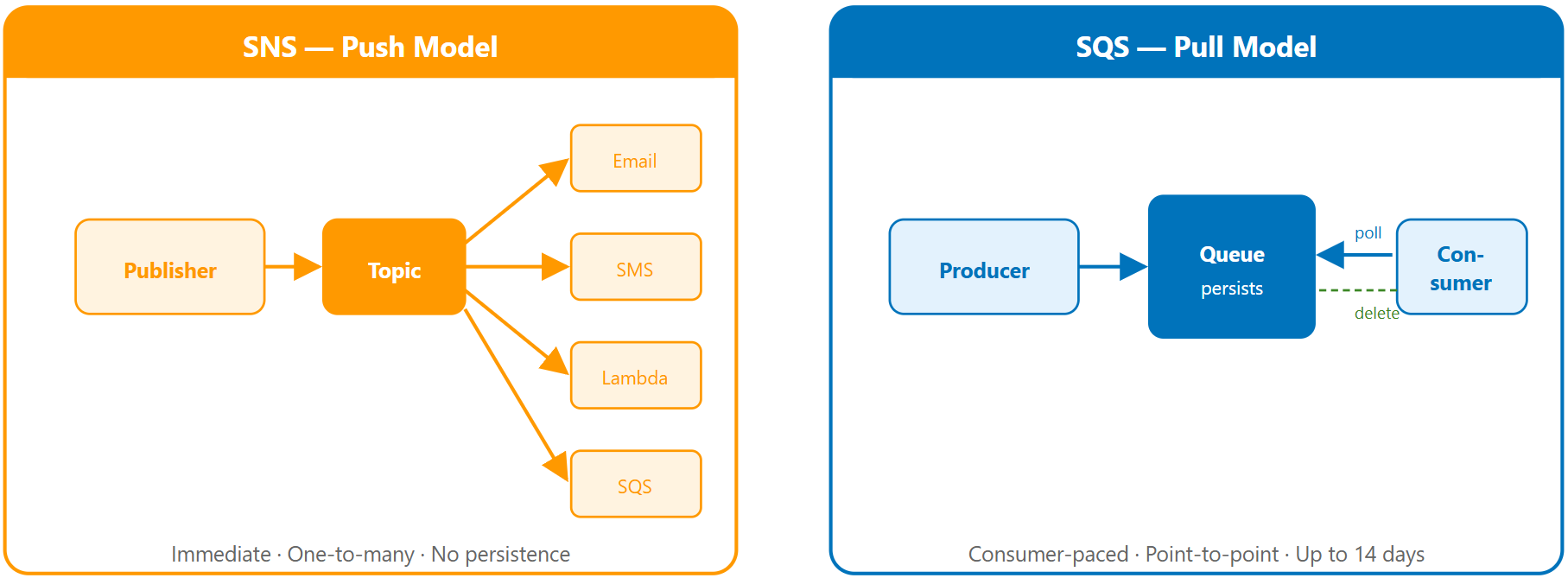
Porównanie SNS (dostarczanie przez push) i SQS (kolejkowanie wiadomości przez pull)

Monitoring and Troubleshooting AWS

Przykłady architektur


Prosty wzorzec alertów: powiadomienie SNS wysłane na email


Wzorzec przetwarzania asynchronicznego: API wysyła do kolejki SQS, z której pobiera dane worker

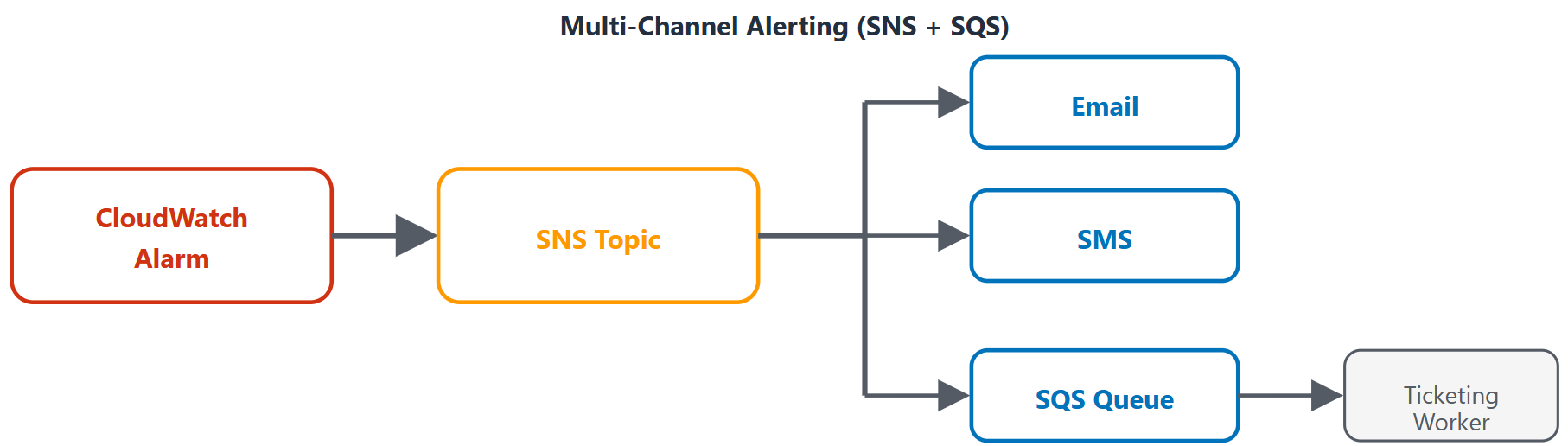
Wzorzec alertów wielokanałowych: jeden alarm rozsyłany do kilku kanałów powiadomień

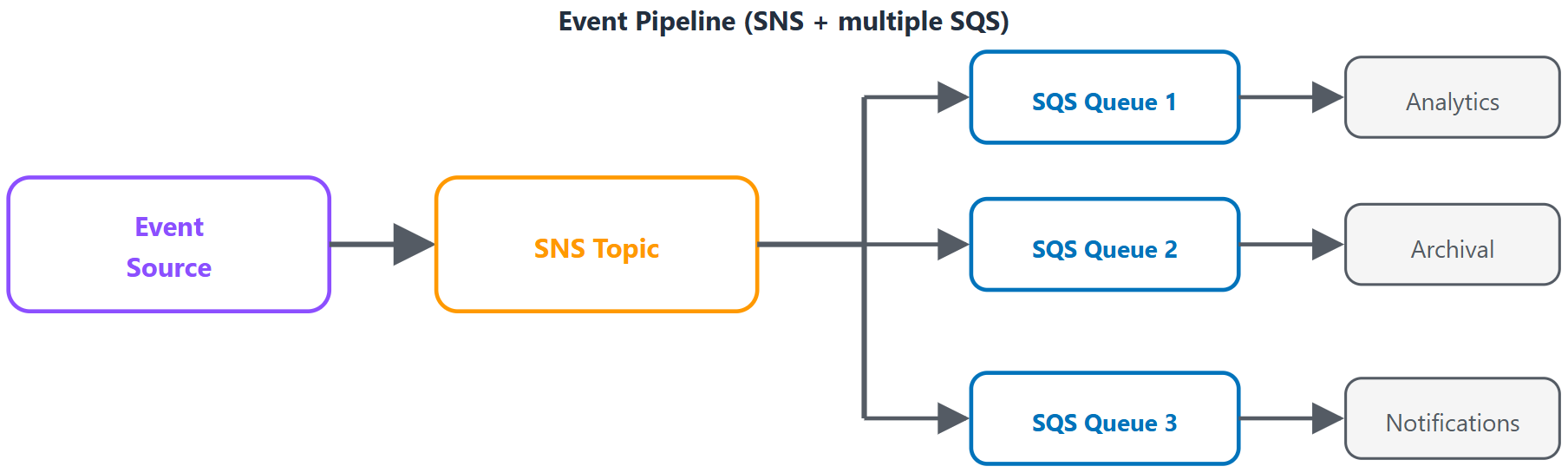
Wzorzec potoku zdarzeń: zdarzenie źródłowe kierowane do wielu kolejek SQS w celu przetworzenia

Monitoring and Troubleshooting AWS

Podsumowanie


  • Tematy SNS dostarczają powiadomienia alarmowe przez email, SMS, HTTP, Lambda i SQS
  • Wzorzec fan-out: jedna wiadomość SNS → wiele kolejek SQS do równoległego, niezawodnego przetwarzania
  • Filtrowanie wiadomości ogranicza szum u każdego subskrybenta
  • Kolejki utraconych wiadomości wychwytują błędnie dostarczone komunikaty
  • SNS do powiadomień push, SQS do niezawodnego przetwarzania, oba razem do fan-out z gwarancją dostarczenia
Monitoring and Troubleshooting AWS

Czas na praktykę!

Monitoring and Troubleshooting AWS

Preparing Video For Download...