還原與回復檔案

Git 入門

George Boorman

Curriculum Manager, DataCamp

犯錯的情境

版本庫中的四個檔案,其中三個已加入暫存區並有一個已提交:report.md、mental health survey.csv、summary statistics.csv

Git 入門

回復檔案

  • 將版本庫還原到上一個提交前的狀態

  • git revert

    • 還原先前版本並建立一次提交
    • 會還原「該次提交中更新的所有檔案」
    • a845edcbebe93178
    • HEADHEAD~1
git revert HEAD
Git 入門

回復檔案

git revert HEAD

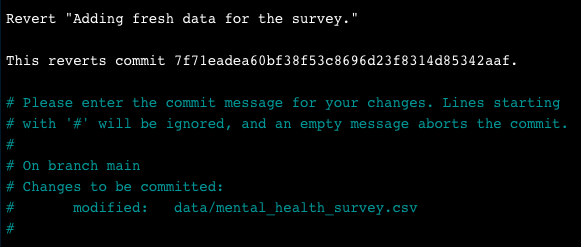
文字編輯器顯示該次提交

  • 儲存:Ctrl + O,再按 Enter
  • 離開:Ctrl + X
Git 入門

回復檔案

[main 7d11f79] Revert "Adding fresh data for the survey."
 Date: Tue Jul 30 14:17:56 2024 +0000
 1 file changed, 3 deletions(-)
Git 入門

git revert 旗標

  • 避免開啟文字編輯器
    git revert --no-edit HEAD


  • 僅回復但不提交(把檔案放入暫存區)
    git revert -n HEAD
    
Git 入門

回復單一檔案

  • git revert 作用於提交,不是個別檔案

  • 若只回復單一檔案:

    • 使用 git checkout
    • 搭配提交雜湊或 HEAD 語法
git checkout HEAD~1 -- report.md
Git 入門

檢查 checkout 結果

git status
On branch main
Changes to be committed:
  (use "git restore --staged <file>..." to unstage)

        modified:   report.md
Git 入門

建立提交

git commit -m "Checkout previous version of report.md"
[main daa6c87] Checkout previous version of report.md
 1 file changed, 1 deletion(-)
Git 入門

移出暫存區(unstage)

版本庫中的四個檔案,其中三個已加入暫存區:report.md、mental health survey.csv、summary statistics.csv

Git 入門

移出暫存區(unstage)

將 Summary statistics 從暫存區移回版本庫

Git 入門

移出單一檔案

  • 移出單一檔案:
git restore --staged summary_statistics.csv
  • 編輯該檔案
git add summary_statistics.csv
git commit -m "Adding age summary statistics"
Git 入門

移出所有檔案

  • 移出所有檔案:
git restore --staged
Git 入門

重點整理

指令 結果
git revert HEAD 回復指定提交中的所有檔案
git revert HEAD --no-edit 回復時不開啟文字編輯器
git revert HEAD -n 回復但不建立新提交
git checkout HEAD~1 -- report.md 從上一個提交回復單一檔案
git restore --staged report.md 從暫存區移除單一檔案
git restore --staged 從暫存區移除所有檔案
Git 入門

一起來練習吧!

Git 入門

Preparing Video For Download...