反覆式提示工程與優化

使用 OpenAI API 的提示工程

Fouad Trad

Machine Learning Engineer

反覆式提示工程

  • 一開始沒有完美的提示
  • 提示工程是反覆的流程,我們會:
    • 建立提示
    • 送入模型
    • 觀察並分析輸出
    • 重複優化讓提示更好

代表循環的圖示。藍色圓圈,四個箭頭首尾相連。

使用 OpenAI API 的提示工程

優化提示

初始提示
prompt = "Generate an Excel sheet containing
five student names and their grades"

print(get_response(prompt))
I'm sorry, but as a text-based AI, I am 
unable to directly provide an Excel sheet. 
However, I can help you generate a sample
representation of the data you requested.
精煉後的提示
prompt = "Generate a table that I can copy 
to Excel, containing five student names and 
their grades"
print(get_response(prompt))
| Student Name | Grade |
|--------------|-------|
| Student 1    |  90   |
| Student 2    |  85   |
| Student 3    |  95   |
| Student 4    |  88   |
| Student 5    |  92   |
使用 OpenAI API 的提示工程

範例:分析一個 Python 函式

code = '''
def calculate_rectangle_area(length, width):
    area = length * width
    return area
'''
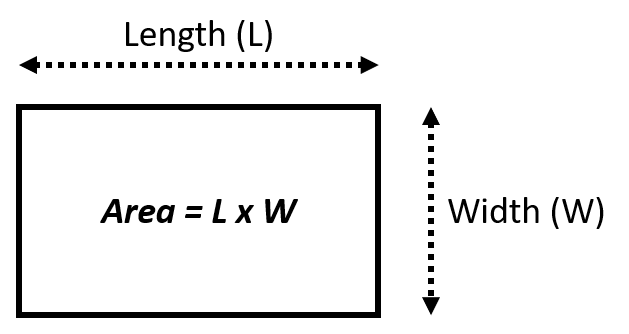
顯示長方形與其面積公式的圖片。Area = length\*width。

使用 OpenAI API 的提示工程

範例:初始提示

prompt = f"""
  Analyze the code delimited by triple backticks with one sentence
  ```{code}```.
"""
print(get_response(prompt))
The code calculates the area of a rectangle based on its length and width.
使用 OpenAI API 的提示工程

範例:提示精煉

我們修改提示以取得程式語言

prompt = f"""
  Analyze the code delimited by triple backticks and provide its programming 
  language with one sentence 
  ```{code}```.
"""
print(get_response(prompt))
The provided code is a function written in Python that calculates the area of a 
rectangle based on its length and width.
使用 OpenAI API 的提示工程

範例:提示精煉

我們修改提示以取得結構化輸出

prompt = f"""
  For the function delimited by triple backticks, provide in a structured format
  the following:
  - description: one sentence short description
  - language: the programming language used
  - input: the inputs to the function
  - output: the output returned by the function
  ```{code}```.
"""
print(get_response(prompt))
使用 OpenAI API 的提示工程

範例:提示精煉

description: This function calculates the area of a rectangle.

language: Python

input:
 - length: The length of the rectangle.
 - width: The width of the rectangle.

output:
 - area: The calculated area of the rectangle, which is the product of the length 
 and width.
使用 OpenAI API 的提示工程

少量示例提示的精煉

  • 天氣描述分類

初始提示

prompt = """
Clear skies and a gentle breeze. -> Sunny
Heavy rain and thunderstorms expected. -> Rainy
Fresh snowfall with freezing temperatures. -> 
"""
print(get_response(prompt))
Snowy
使用 OpenAI API 的提示工程

少量示例提示的精煉

  • 天氣描述分類

初始提示

prompt = """
Clear skies and a gentle breeze. -> Sunny
Heavy rain and thunderstorms expected. -> Rainy
The wind of change brought a refreshing breeze to the company's operations. -> 
"""
print(get_response(prompt))
Windy
使用 OpenAI API 的提示工程

少量示例提示的精煉

精煉後的提示

prompt = """
Clear skies and a gentle breeze. -> Sunny
Heavy rain and thunderstorms expected. -> Rainy
The political climate in the country was stormy -> Unknown
The wind of change brought a refreshing breeze to the company's operations. -> 
"""
print(get_response(prompt))
Unknown
使用 OpenAI API 的提示工程

各類提示的優化方式

  • 少量示例提示:優化範例
  • 多步驟提示:優化引導步驟
  • 連鎖思維與自我一致提示:優化問題描述

三列切換開關的圖片,手正在調整開關以反映精煉。

使用 OpenAI API 的提示工程

一起來練習吧!

使用 OpenAI API 的提示工程

Preparing Video For Download...