from mcp.server.fastmcp import FastMCP
import requests

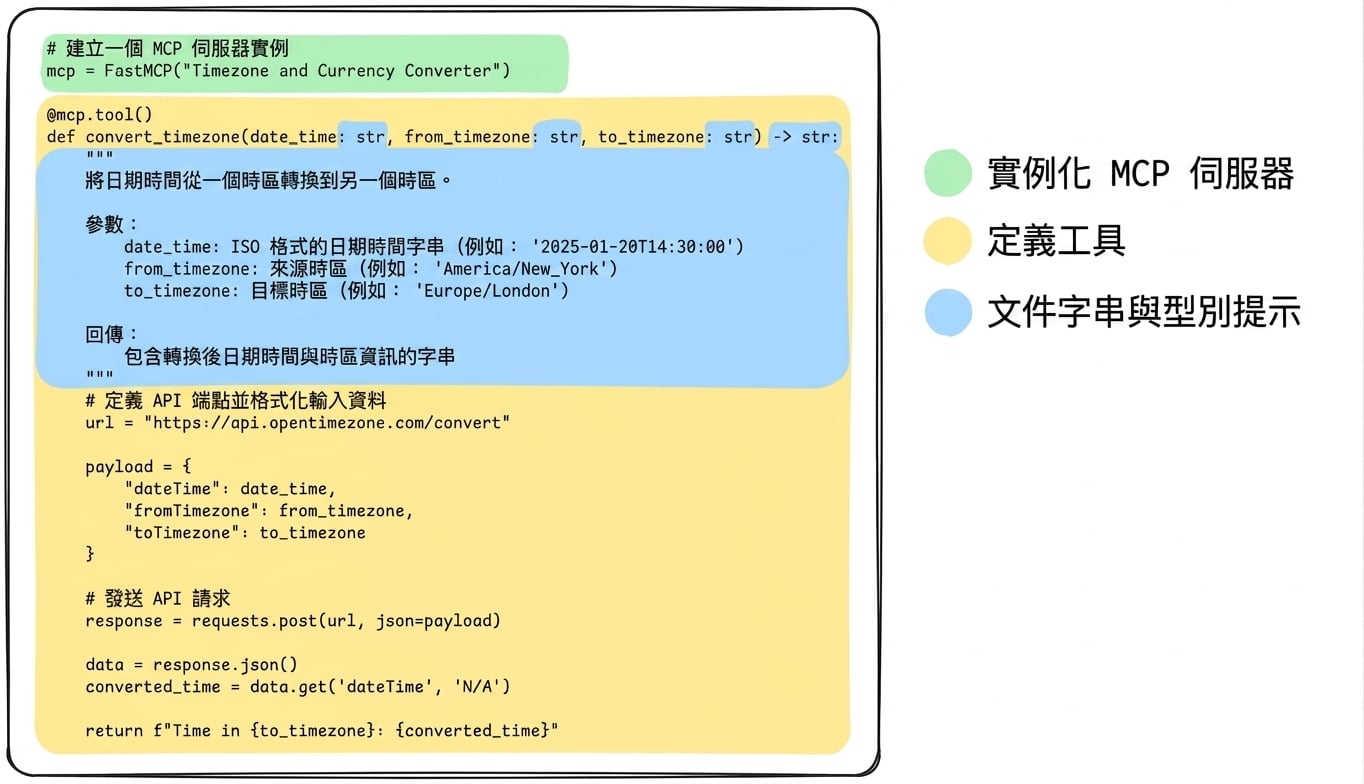
# Create an MCP server instance
mcp = FastMCP("Timezone Converter")
@mcp.tool()
def convert_timezone(date_time, from_timezone, to_timezone):
步驟 2:加入工具
@mcp.tool()
def convert_timezone(date_time, from_timezone, to_timezone):

    # Define the API endpoint and format input data

    url = "https://api.opentimezone.com/convert"
    payload = {"dateTime": date_time, "fromTimezone": from_timezone, "toTimezone": to_timezone}


    response = requests.post(url, json=payload)

    data = response.json()
    converted_time = data.get('dateTime', 'N/A')

    return f"Time in {to_timezone}: {converted_time}"
步驟 3:Docstring 與型別註記
@mcp.tool()
def convert_timezone(date_time: str, from_timezone: str, to_timezone: str) -> str:
    """
    Convert a datetime from one timezone to another.

    Args:
        date_time: The datetime string in ISO format (e.g., '2025-01-20T14:30:00')
        from_timezone: Source timezone (e.g., 'America/New_York')
        to_timezone: Target timezone (e.g., 'Europe/London')

    Returns:
        A string with the converted datetime and timezone information
    """