一致性

用 Python 進行資料清理

Adel Nehme

VP of AI Curriculum, DataCamp

本章重點


第 3 章-進階資料問題

用 Python 進行資料清理

資料範圍限制

range_examples

用 Python 進行資料清理

一致性

欄位 單位
溫度 32°C 同樣是 89.6°F
重量 70 Kg 同樣是 11 st.
日期 26-11-2019 同樣是 26, November, 2019
金額 100$ 同樣是 10763.90¥
用 Python 進行資料清理

範例

temperatures = pd.read_csv('temperature.csv')
temperatures.head()
       Date  Temperature
0  03.03.19         14.0
1  04.03.19         15.0
2  05.03.19         18.0
3  06.03.19         16.0
4  07.03.19         62.6
用 Python 進行資料清理

範例

temperatures = pd.read_csv('temperature.csv')
temperatures.head()
       Date  Temperature
0  03.03.19         14.0
1  04.03.19         15.0
2  05.03.19         18.0
3  06.03.19         16.0
4  07.03.19         62.6   <--
用 Python 進行資料清理

範例

# Import matplotlib
import matplotlib.pyplot as plt

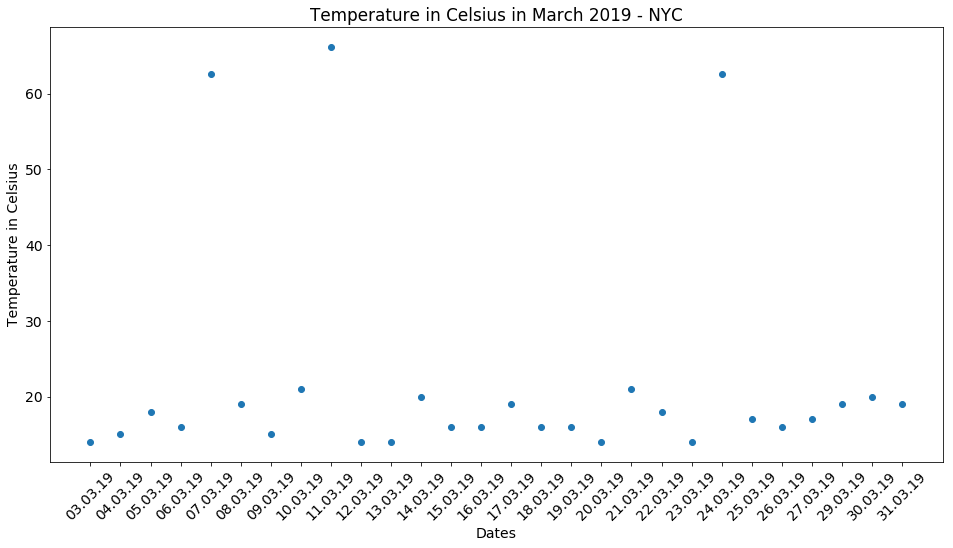
# Create scatter plot plt.scatter(x = 'Date', y = 'Temperature', data = temperatures)
# Create title, xlabel and ylabel plt.title('Temperature in Celsius March 2019 - NYC') plt.xlabel('Dates') plt.ylabel('Temperature in Celsius')
# Show plot plt.show()
用 Python 進行資料清理

用 Python 進行資料清理

用 Python 進行資料清理

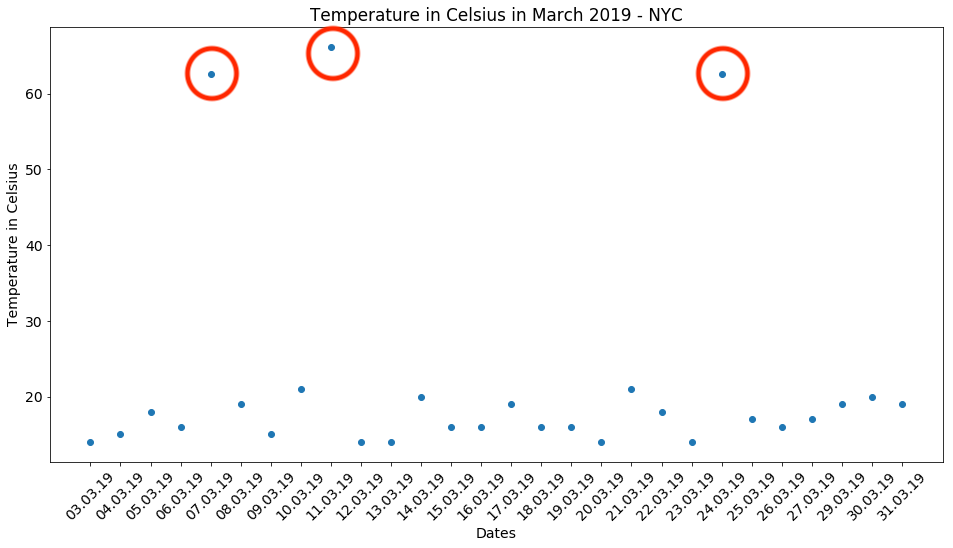
處理溫度資料

$$C = (F - 32) \times \frac{5}{9}$$


temp_fah = temperatures.loc[temperatures['Temperature'] > 40, 'Temperature']

temp_cels = (temp_fah - 32) * (5/9)
temperatures.loc[temperatures['Temperature'] > 40, 'Temperature'] = temp_cels
# Assert conversion is correct
assert temperatures['Temperature'].max() < 40
用 Python 進行資料清理

處理日期資料

birthdays.head()
          Birthday First name Last name
0         27/27/19      Rowan     Nunez
1         03-29-19      Brynn      Yang
2  March 3rd, 2019     Sophia    Reilly
3         24-03-19     Deacon    Prince
4         06-03-19   Griffith      Neal
用 Python 進行資料清理

處理日期資料

birthdays.head()

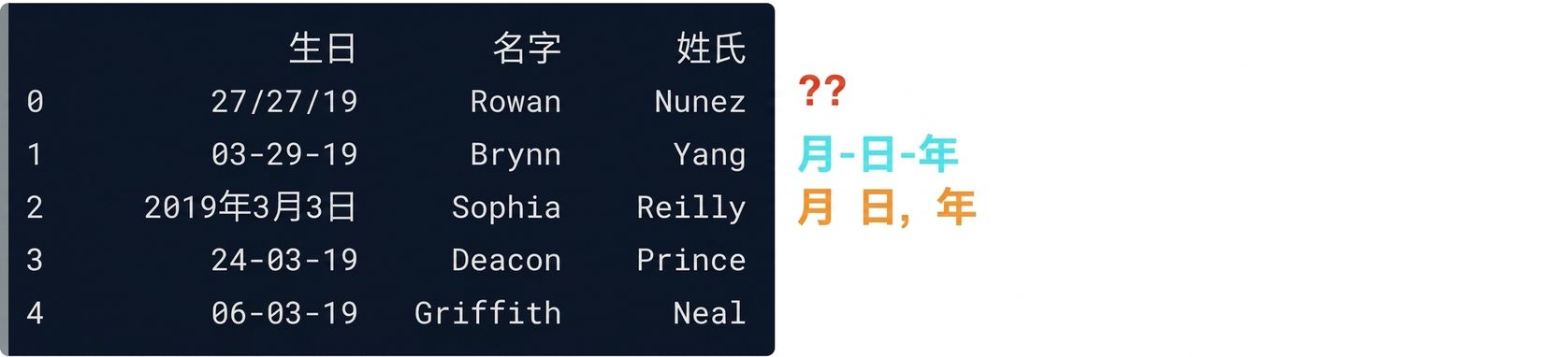
A table showing the output of the birthdays dataset - one row has a date in month, day, year format; another has it written out in full; a final row contains a format that is clearly an error - repeating the day component twice.

用 Python 進行資料清理

Datetime 格式化

datetime 可用來表示日期

日期 datetime 格式
25-12-2019 %d-%m-%Y
December 25th 2019 %c
12-25-2019 %m-%d-%Y
... ...

pandas.to_datetime()

  • 多數格式可自動辨識
  • 遇到錯誤或陌生格式可能失敗
用 Python 進行資料清理

處理日期資料

# Converts to datetime - but won't work!
birthdays['Birthday'] = pd.to_datetime(birthdays['Birthday'])
ValueError: month must be in 1..12
# Will work!
birthdays['Birthday'] = pd.to_datetime(birthdays['Birthday'],
                                       # Return NA for rows where conversion failed
                                       errors = 'coerce')
用 Python 進行資料清理

處理日期資料

birthdays.head()
    Birthday First name Last name
0        NaT      Rowan     Nunez
1 2019-03-29      Brynn      Yang
2 2019-03-03     Sophia    Reilly
3 2019-03-24     Deacon    Prince
4 2019-06-03   Griffith      Neal
用 Python 進行資料清理

處理日期資料

birthdays['Birthday'] = birthdays['Birthday'].dt.strftime("%d-%m-%Y")
birthdays.head()
     Birthday First name Last name
0         NaT      Rowan     Nunez
1  29-03-2019      Brynn      Yang
2  03-03-2019     Sophia    Reilly
3  24-03-2019     Deacon    Prince
4  03-06-2019   Griffith      Neal
用 Python 進行資料清理

處理含糊的日期


2019-03-08」是 8 月還是 3 月?


  • 轉為 NA 並另外處理
  • 依資料來源推斷格式
  • 依 DataFrame 前後文推斷格式
用 Python 進行資料清理

一起來練習吧!

用 Python 進行資料清理

Preparing Video For Download...