語意搜尋與強化嵌入

Introduction to Embeddings with the OpenAI API

Emmanuel Pire

Senior Software Engineer, DataCamp

語意搜尋

  • 使用嵌入回傳與查詢最相似的結果
  • 範例:線上新聞網站的語意搜尋

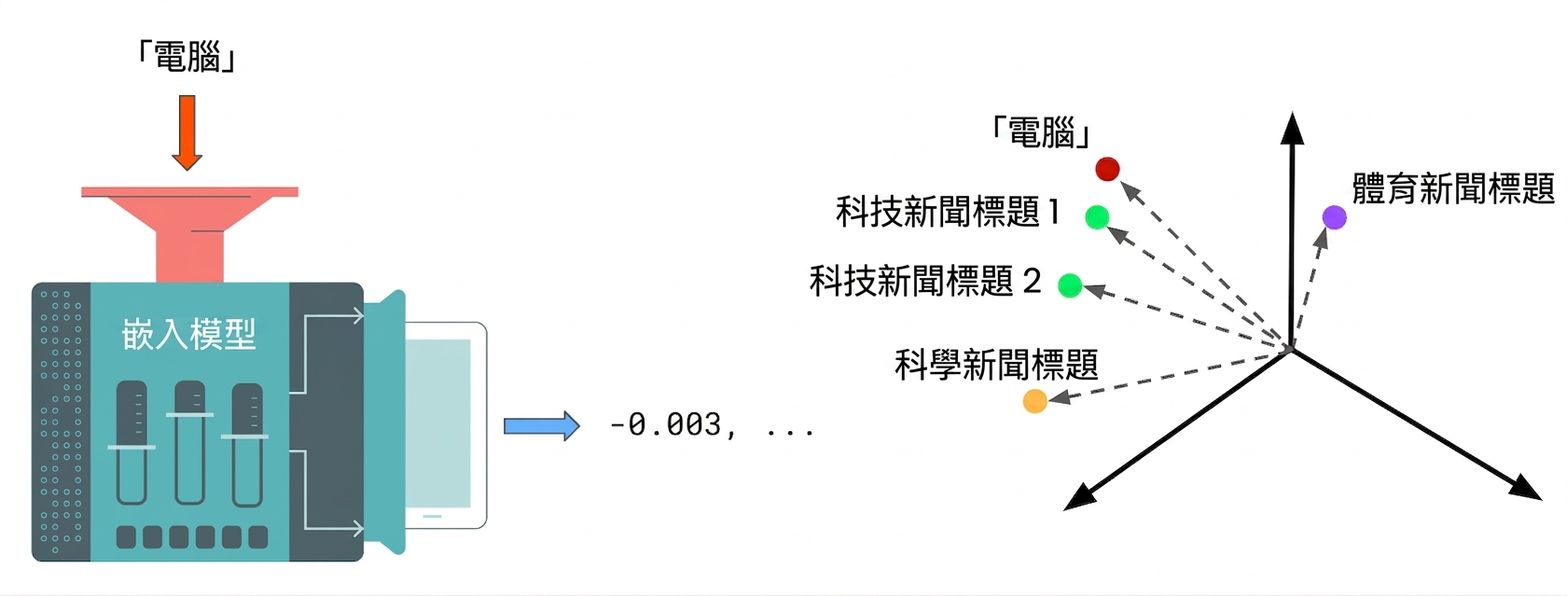
語意搜尋的運作方式:搜尋文字先由嵌入模型轉為嵌入向量,接著計算該向量與各標題嵌入向量的距離,回傳最近的標題。

Introduction to Embeddings with the OpenAI API

語意搜尋

語意搜尋的運作方式:搜尋文字先由嵌入模型轉為嵌入向量,接著計算該向量與各標題嵌入向量的距離,回傳最近的標題。

  1. 將查詢與其他文字進行「嵌入」
  2. 計算「cosine 距離」
  3. 擷取 cosine 距離「最小」的文字
Introduction to Embeddings with the OpenAI API

強化嵌入

articles = [
    {"headline": "Economic Growth Continues Amid Global Uncertainty",
     "topic": "Business",
     "keywords": ["economy", "business", "finance"]},
    ...
    {"headline": "1.5 Billion Tune-in to the World Cup Final",
     "topic": "Sport",
     "keywords": ["soccer", "world cup", "tv"]}
]
Headline: Economic Growth Continues Amid Global Uncertainty
Topic: Business
Keywords: economy, business, finance
Introduction to Embeddings with the OpenAI API

用 F-strings 結合特徵

articles = [..., {"headline": "1.5 Billion Tune-in to the World Cup ",
                  "topic": "Sport",
                  "keywords": ["soccer", "world cup", "tv"]}]


def create_article_text(article):
return f"""Headline: {article['headline']} Topic: {article['topic']} Keywords: {', '.join(article['keywords'])}"""
print(create_article_text(articles[-1]))
Headline: 1.5 Billion Tune-in to the World Cup Final
Topic: Sport
Keywords: soccer, world cup, tv
Introduction to Embeddings with the OpenAI API

建立強化嵌入

article_texts = [create_article_text(article) for article in articles]

article_embeddings = create_embeddings(article_texts)
print(article_embeddings)
[[-0.019609929993748665, -0.03331860154867172, ...],
 ...,
 [..., -0.014373429119586945, -0.005235843360424042]]
Introduction to Embeddings with the OpenAI API

計算距離

from scipy.spatial import distance

def find_n_closest(query_vector, embeddings, n=3):

distances = [] for index, embedding in enumerate(embeddings): dist = distance.cosine(query_vector, embedding) distances.append({"distance": dist, "index": index})
distances_sorted = sorted(distances, key=lambda x: x["distance"])
return distances_sorted[0:n]
Introduction to Embeddings with the OpenAI API

回傳搜尋結果

query_text = "AI"

query_vector = create_embeddings(query_text)[0]
hits = find_n_closest(query_vector, article_embeddings)
for hit in hits: article = articles[hit['index']] print(article['headline'])
Tech Giant Buys 49% Stake In AI Startup
Tech Company Launches Innovative Product to Improve Online Accessibility
India Successfully Lands Near Moon's South Pole
Introduction to Embeddings with the OpenAI API

一起來練習吧!

Introduction to Embeddings with the OpenAI API

Preparing Video For Download...