粒度、度量與階層
Power BI 中級資料建模

Maarten Van den Broeck
Content Developer at DataCamp
理解粒度
- 粒度(granularity):資料相對於各維度是以哪個層級儲存?
- 可用來查詢的最小細節層級
- 用「by」陳述式定義粒度:
- 例如:by customer、by product、by day
- 例如:by id、by NAICS$^1$ code、by establishment age、by year

1 NAICS: North American Industry Classification System
在 Power BI 處理粒度


度量(Measures)
- 可被聚合或計算的欄位或欄位組合
- 直接來自事實資料
- 也可計算新的度量

建立度量
- 數值欄位會自動轉為度量,並以加總聚合
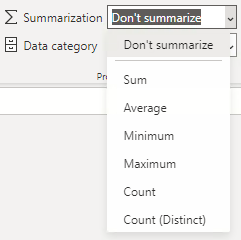
- 在 Power BI 中使用 DAX 建立自己的度量
- 透過對話方塊建立特定計算類型:快速度量(Quick measures)

- 很適合學習建立中等複雜度的度量

