使用 Pinecone 與 OpenAI 的 RAG 聊天機器人

使用 Pinecone 構建 AI 應用

James Chapman

Curriculum Manager, DataCamp

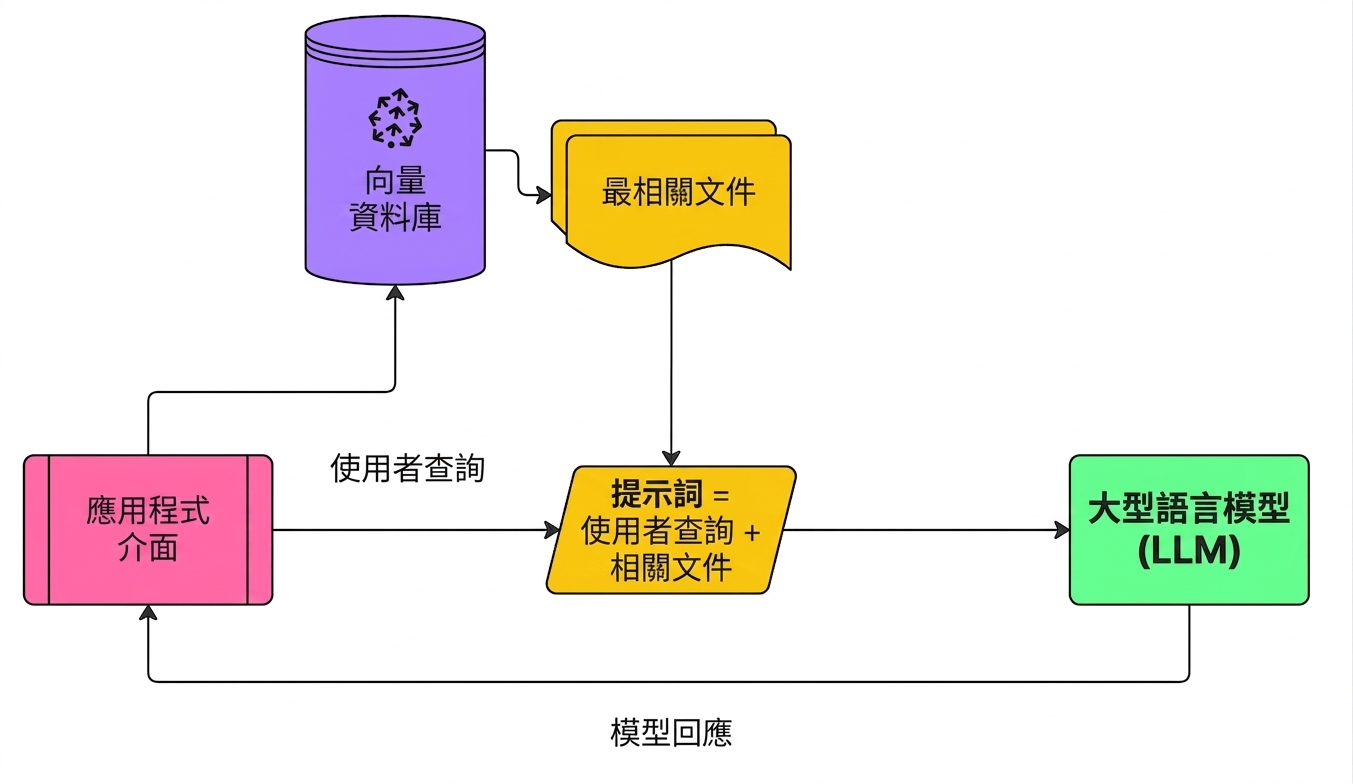
檢索增強式生成(RAG)

  1. 對使用者提問做嵌入
  2. 擷取相似文件
  3. 將文件加入 prompt

檢索增強式生成

使用 Pinecone 構建 AI 應用

初始化 Pinecone 與 OpenAI

from openai import OpenAI
from pinecone import Pinecone
import pandas as pd
from uuid import uuid4


client = OpenAI(api_key="OPENAI_API_KEY") pc = Pinecone(api_key="PINECONE_API_KEY")
index = pc.Index("semantic-search-datacamp")
使用 Pinecone 構建 AI 應用

YouTube 逐字稿

youtube_df = pd.read_csv('youtube_rag_data.csv')
| id | blob | channel_id | end | published | start | text | title | url |
|----|------|------------|-----|-----------|-------|------|-------|-----|
|int | dict | str        | int | datetime  | int   | str  | str   | str |
使用 Pinecone 構建 AI 應用

匯入文件

batch_limit = 100


for batch in np.array_split(youtube_df, len(youtube_df) / batch_limit):
metadatas = [{"text_id": row['id'], "text": row['text'], "title": row['title'], "url": row['url'], "published": row['published']} for _, row in batch.iterrows()]
texts = batch['text'].tolist()
ids = [str(uuid4()) for _ in range(len(texts))]
response = client.embeddings.create(input=texts, model="text-embedding-3-small") embeds = [np.array(x.embedding) for x in response.data]
index.upsert(vectors=zip(ids, embeds, metadatas), namespace='youtube_rag_dataset')
使用 Pinecone 構建 AI 應用

檢索函式

def retrieve(query, top_k, namespace, emb_model):

query_response = client.embeddings.create(input=query, model=emb_model) query_emb = query_response.data[0].embedding
retrieved_docs = [] sources = [] docs = index.query(vector=query_emb, top_k=top_k, namespace='youtube_rag_dataset', include_metadata=True)
for doc in docs['matches']: retrieved_docs.append(doc['metadata']['text']) sources.append((doc['metadata']['title'], doc['metadata']['url']))
return retrieved_docs, sources
使用 Pinecone 構建 AI 應用

檢索輸出

query = "How to build next-level Q&A with OpenAI"
documents, sources = retrieve(query, top_k=3, namespace='youtube_rag_dataset',
                              emb_model="text-embedding-3-small")
Document: To use for Open Domain Question Answering. We're going to start...
Source: How to build a Q&A AI in Python [...], https://youtu.be/w1dMEWm7jBc

Document: Over here we have Google and we can ask Google questions...
Source: How to build next-level Q&A with OpenAI, https://youtu.be/coaaSxys5so

Document: We need vector database to enhance the quality of Q&A systems...
Source: How to Build Custom Q&A Transfo [...], https://youtu.be/ZIRmXKHp0-c
使用 Pinecone 構建 AI 應用

含脈絡的 prompt 建立函式

def prompt_with_context_builder(query, docs):
    delim = '\n\n---\n\n'
    prompt_start = 'Answer the question based on the context below.\n\nContext:\n'
    prompt_end = f'\n\nQuestion: {query}\nAnswer:'

    prompt = prompt_start + delim.join(docs) + prompt_end
    return prompt
使用 Pinecone 構建 AI 應用

含脈絡 prompt 的輸出

query = "How to build next-level Q&A with OpenAI"
context_prompt = prompt_with_context_builder(query, documents)
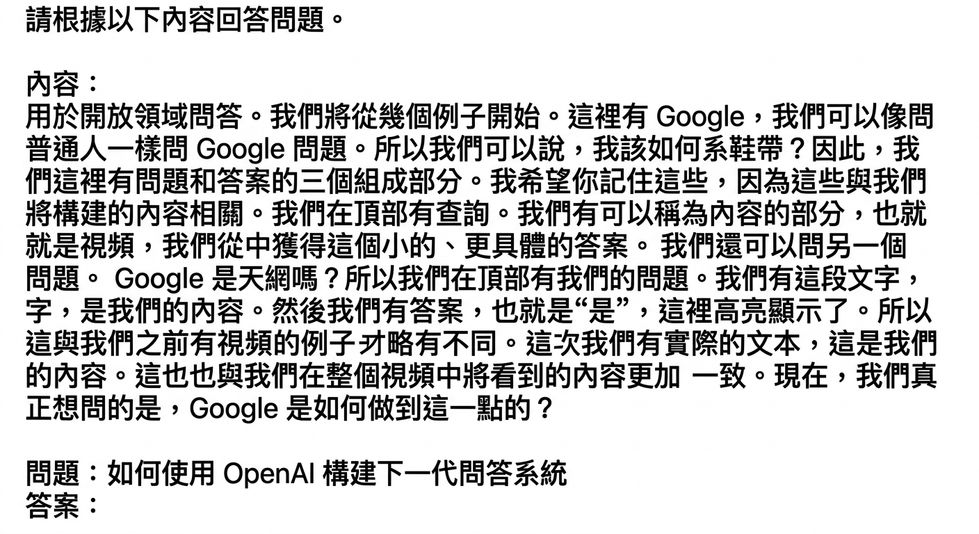
prompt_with_context_builder 函式的輸出

使用 Pinecone 構建 AI 應用

問答函式

def question_answering(prompt, sources, chat_model):

sys_prompt = "You are a helpful assistant that always answers questions."
res = client.chat.completions.create( model=chat_model, messages=[{"role": "system", "content": sys_prompt}, {"role": "user", "content": prompt} ], temperature=0)
answer = res.choices[0].message.content.strip() answer += "\n\nSources:" for source in sources: answer += "\n" + source[0] + ": " + source[1] return answer
使用 Pinecone 構建 AI 應用

問答輸出

query = "How to build next-level Q&A with OpenAI"
answer = question_answering(prompt_with_context, sources,
                            chat_model='gpt-4o-mini')
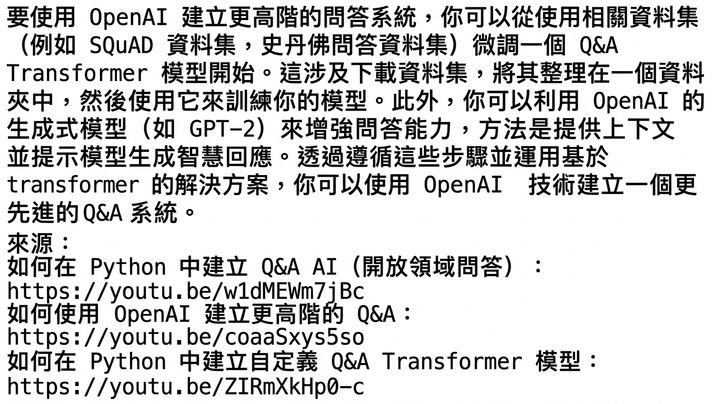
question_answering 函式的輸出

使用 Pinecone 構建 AI 應用

整合流程

query = "How to build next-level Q&A with OpenAI"
documents, sources = retrieve(query, top_k=3, 
                              namespace='youtube_rag_dataset', 
                              emb_model="text-embedding-3-small")
prompt_with_context = prompt_with_context_builder(query, documents)
answer = question_answering(prompt_with_context, sources,
                            chat_model='gpt-4o-mini')
使用 Pinecone 構建 AI 應用

一起來練習吧!

使用 Pinecone 構建 AI 應用

Preparing Video For Download...