CLI 介面

Python 測試入門

Alexander Levin

Data Scientist

範例:程式碼

冪次運算子測試:

# test_sqneg.py
import unittest
# Declaring the TestCase class
class TestSquared(unittest.TestCase):
    # Defining the test
    def test_negative(self):
        self.assertEqual((-3) ** 2, 9)

CLI 指令:

python3 -m unittest test_sqneg.py

使用模組 unittest 執行 Python 指令稿 test_sqneg.py

Python 測試入門

範例:輸出

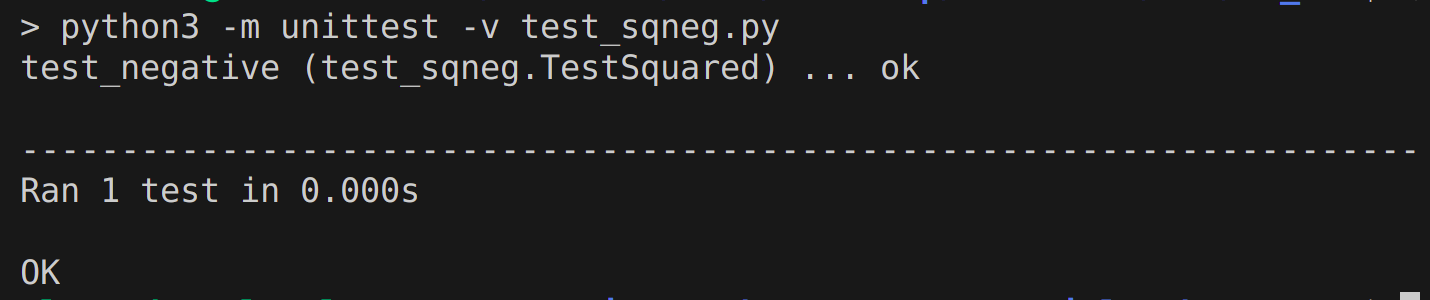
指令: python3 -m unittest test_sqneg.py

測試輸出: unittest test_sqneg.py 的輸出

Python 測試入門

關鍵字參數 -k

unittest -k —— 只執行符合關鍵字或樣式的測試方法與類別

指令python3 -m unittest -k "SomeStringOrPattern" test_script.py

範例python3 -m unittest -k "Squared" test_sqneg.py

輸出含關鍵字的輸出

1 https://docs.python.org/3/library/unittest.html
Python 測試入門

快速失敗旗標 -f

unittest -f —— 在第一個錯誤或失敗時停止測試。

指令python3 -m unittest -f test_script.py

使用情境:所有測試都很關鍵,例如航班起飛前的檢查。
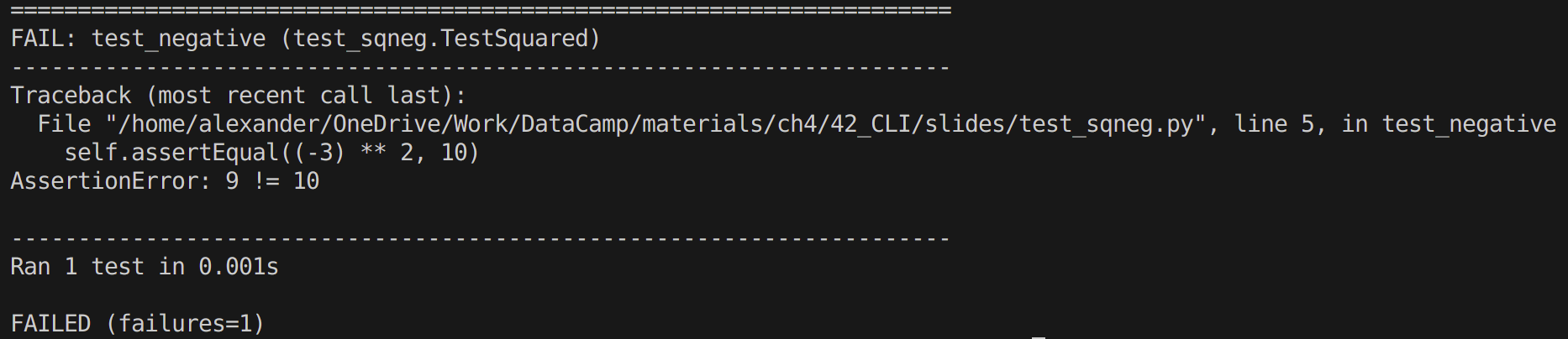
失敗測試範例

1 https://docs.python.org/3/library/unittest.html
Python 測試入門

捕捉旗標 -c

捕捉旗標 unittest -c —— 允許按下「Ctrl - C」中斷測試。

  • 若「Ctrl - C
    • 按一次,unittest 會等當前測試結束並回報目前結果。
    • 按兩次,unittest 會拋出 KeyboardInterrupt 例外。

指令python3 -m unittest -c test_script.py

使用情境:除錯大型測試套件時。

1 https://docs.python.org/3/library/unittest.html
Python 測試入門

詳細旗標 -v

unittest -v —— 以詳細模式執行測試

指令python3 -m unittest -v test_script.py

使用情境:用於除錯

輸出範例帶有詳細旗標的 unittest 輸出

1 https://docs.python.org/3/library/unittest.html
Python 測試入門

重點整理

  • 基本指令(無參數)python3 -m unittest test_script.py

  • unittest 的輸出

  • 關鍵字參數:python3 -m unittest -k "SomeStringOrPattern" test_script.py

  • 快速失敗旗標:python3 -m unittest -f test_script.py

  • 捕捉旗標:python3 -m unittest -c test_script.py

  • 詳細旗標:python3 -m unittest -v test_script.py

Python 測試入門

一起來練習吧!

Python 測試入門

Preparing Video For Download...