M 公式語言

Excel 中級 Power Query

Lyndsay Girard

Performance Analytics Consultant

進階編輯器

  • 使用 M 公式語言(M 程式碼)
    • 區分大小寫
  • Let 運算式有兩個部分:
    • 「let」與「in」子句
    • 以逗號分隔的變數名稱或步驟識別名稱
      • 每個步驟可透過名稱參照前一步驟的結果
    • 「in」子句後的步驟為可見的查詢輸出
let
    Source = ""
in
    Source
Excel 中級 Power Query

進階編輯器

let
    MyTable = Table.FromRecords({
    [ID = 1, Name = "A", Result = 10],
    [ID = 2, Name = "B", Result = 5]})
in
    MyTable

單一步驟的 Let 運算式

Excel 中級 Power Query

進階編輯器

let
    MyTable = Table.FromRecords({
    [ID = 1, Name = "A", Result = 10],
    [ID = 2, Name = "B", Result = 5]}),
    #"Sorted Rows" = Table.Sort(MyTable,{{"Result", Order.Ascending}})
in
    #"Sorted Rows"

兩步驟的 Let 運算式

Excel 中級 Power Query

進階編輯器

let
    MyTable = Table.FromRecords({
    [ID = 1, Name = "A", Result = 10],
    [ID = 2, Name = "B", Result = 5]}),
    #"Sort" = Table.Sort(MyTable,{{"Result", Order.Ascending}}),
    #"Lower" = Table.TransformColumns(#"Sort",{{"Name", Text.Lower, type text}})
in
    #"Lower"

三步驟的 Let 運算式

Excel 中級 Power Query

值的型別

原始型別

  • 單一部分的值(例如數值、布林、文字或 null)
    [ID = 1, Name = "A"]
    

結構化型別

  • List(清單)
  • Record(記錄)
  • Table(資料表)
  • Function(函式)
Excel 中級 Power Query

結構化值的型別

List:

  • 以 0 起始的有序序列,單欄值集合
    List = {1,2,3}
    

Record:

  • 具有單列、多欄的結構
    Record = [Column1=1,Column2=2]
    

Table:

  • 多列多欄的組合
    Table = #table({"Column A","Column B"},
          {{1,10},{2,20}})
    
Excel 中級 Power Query

M 內建函式

Function:

  • 一種值,被引數呼叫時會產生新值。
  • Table 函式
  • List 函式
  • Number 函式
  • Record 函式
  • Date 函式
  • Time 函式
  • Duration 函式
  • ……還有更多!
1 https://learn.microsoft.com/en-us/powerquery-m/power-query-m-function-reference
Excel 中級 Power Query

自訂函式

  • 複雜計算
  • 可重用性
  • 參數化
  • 效能最佳化


  自訂函式語法:

= (Variable as Data Type, Variable as Data Type) => (Output Expression)
Excel 中級 Power Query

自訂函式

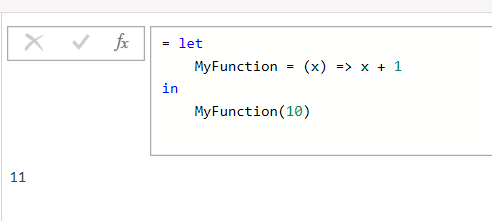
簡單自訂函式範例:

let
    MyFunction = (x) => x + 1
in
    MyFunction(10)


Ch3_simple_custom_function.png

Excel 中級 Power Query

查詢參數

  • 以參數作為佔位符,動態傳入查詢
    • 讓查詢更彈性、可重用
      • 動態篩選
      • 自訂函式

調整滑桿按鈕、變更畫面設定。使用切換開關自訂介面

Excel 中級 Power Query

一起來練習吧!

Excel 中級 Power Query

Preparing Video For Download...