評估物件辨識模型

使用 PyTorch 進行影像深度學習

Michal Oleszak

Machine Learning Engineer

分類與定位
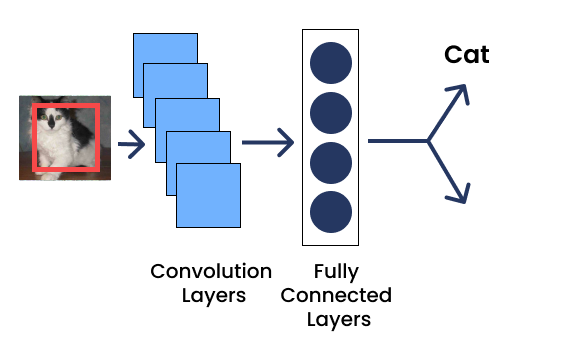
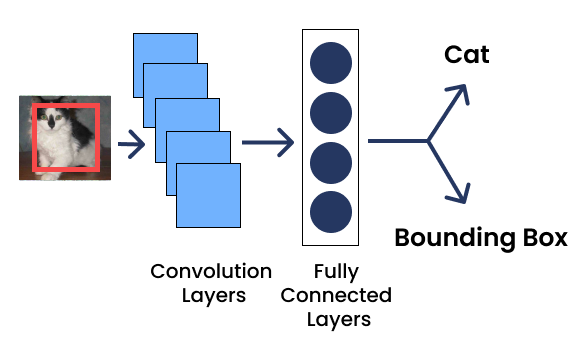
物件定位

  • 輸出 1:分類(例如 cat)
使用 PyTorch 進行影像深度學習

分類與定位

物件定位

  • 輸出 1:分類(例如 cat)
  • 輸出 2:邊界框回歸 [x1, y1, x2, y2]
使用 PyTorch 進行影像深度學習

交並比(IoU)

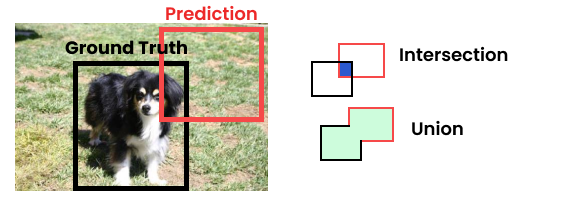
  • 目標物件:圖像中要偵測的物件(例如 dog)
  • 真實邊界框:包住目標物件的正確邊界框
  • 交並比:衡量兩個框重疊程度的指標

jaccard

  • IoU = 交集面積 / 並集面積
    • IoU = 0 無重疊,IoU = 1 完全重疊
    • IoU >0.5 視為不錯的預測
使用 PyTorch 進行影像深度學習

在 PyTorch 計算 IoU

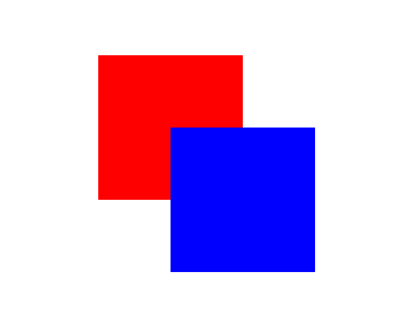
bbox1 = [50, 50, 150, 150]
bbox2 = [100, 100, 200, 200]


bbox1 = torch.tensor(bbox1).unsqueeze(0) bbox2 = torch.tensor(bbox2).unsqueeze(0)
from torchvision.ops import box_iou

iou = box_iou(bbox1, bbox2)
print(iou)
tensor([[0.1429]])
  • 兩組框(x1, y1, x2, y2)

2 組框

  • 向量轉成 2 維張量
  • 計算 IoU
使用 PyTorch 進行影像深度學習

預測邊界框

model.eval()
with torch.no_grad():

output = model(input_image)
print(output)
[{'boxes': tensor([[ 42.8553, 271.9481, 180.6003, 346.7082],
                  [191.6016,  80.4759, 247.8009, 387.5475], ....),
'scores': tensor([1.0000, 1.0000, 0.9998, ... ]),
'labels': tensor([18,  1, 20, 18, 18, 18 ...])
}]
boxes = output[0]["boxes"]

scores = output[0]["scores"]
使用 PyTorch 進行影像深度學習

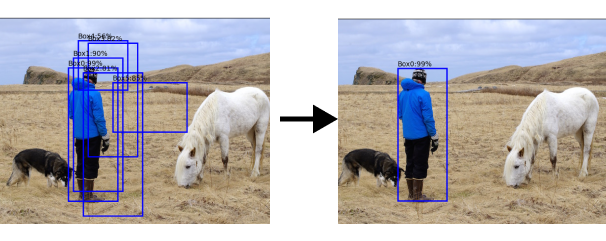
非極大值抑制(NMS)

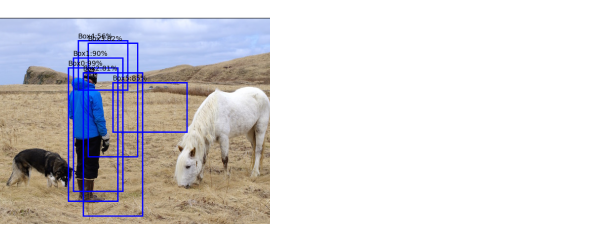
多個框

使用 PyTorch 進行影像深度學習

非極大值抑制(NMS)

多個框

非極大值抑制:選出最相關邊界框的常用技巧

  • Non-max:丟棄對含有物件之信心分數較低的框

  • Suppression:丟棄 IoU 較低的框

使用 PyTorch 進行影像深度學習

PyTorch 中的非極大值抑制

from torchvision.ops import nms


box_indices = nms( boxes=boxes, scores=scores, iou_threshold=0.5, ) print(box_indices)
tensor([ 0,   1,   2,   8])
filtered_boxes = boxes[box_indices]
  • Boxes:形狀為 [N, 4] 的邊界框座標張量

  • Scores:形狀為 [N]、各框的信心分數張量

  • iou_threshold:介於 0.0 到 1.0 的門檻

  • 輸出:篩選後邊界框的索引

使用 PyTorch 進行影像深度學習

一起來練習吧!

使用 PyTorch 進行影像深度學習

Preparing Video For Download...