Bash 指令稿入門
Alex Scriven
Data Scientist
在 shell 裡,數字不像多數 REPL(主控台)如 R 和 Python 那樣原生支援。
在 Python 或 R 中你可以這樣做:
>>> 1 + 4
5
就能直接得到結果!
在 shell 裡不原生支援數字:
(在終端機)
1 + 4
bash: 1: command not found
expr 是個實用的小工具程式(就像 cat 或 grep)。
用它就能運算(在終端機):
expr 1 + 4
5
不錯吧!
expr 無法原生處理小數位數:
(在終端機)
expr 1 + 2.5
expr: not a decimal number: '2.5'
別擔心!有解法。
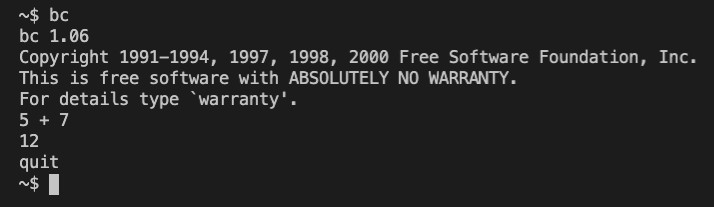
bc(basic calculator)是實用的命令列計算程式。
你可以在終端機開啟它並進行計算:

不開啟 bc 互動介面也能計算,可用管線傳入:
echo "5 + 7.5" | bc
12.5
bc 也有 scale 參數可設定小數位數。
echo "10 / 3" | bc
3
echo "scale=3; 10 / 3" | bc
注意用 ; 在終端機中分隔「行」。
3.333
我們可像字串一樣指定數值變數:
dog_name='Roger' dog_age=6echo "My dog's name is $dog_name and he is $dog_age years old"
注意:dog_age="6" 也能用,但會變成字串!
My dog's name is Roger and he is 6 years old
數值變數的單層括號語法有個變體:
expr 5 + 7
echo $((5 + 7))
12
12
注意此法用的是 expr,不是 bc(不支援小數!)
還記得上一課我們如何呼叫子 shell 嗎?
這對數值變數很有用:
model1=87.65 model2=89.20echo "The total score is $(echo "$model1 + $model2" | bc)"echo "The average score is $(echo "($model1 + $model2) / 2" | bc)"
The total score is 176.85
The average score is 88
Bash 指令稿入門