封裝 ML 模型

Developing Machine Learning Models for Production

Sinan Ozdemir

Data Scientist, Entrepreneur, and Author

為何封裝很重要

  • 最佳化效能
  • 確保相容性
  • 讓模型更容易部署

封裝方法

  • 序列化:簡單、輕量、與語言無關
  • 環境封裝:擷取完整軟體環境
  • 容器化:可攜、可重現、相互隔離的環境
Developing Machine Learning Models for Production

如何封裝 ML 模型

  • 序列化:儲存與讀取 ML 模型

  • 環境封裝:為 ML 模型提供一致、可重現的環境

  • 容器化:把模型、相依項與環境打包進單一「container」

Developing Machine Learning Models for Production

序列化 scikit-learn 模型

使用 pickle 序列化 sklearn 模型:

import pickle

model = ...  # Train the scikit-learn model

# Serialize the model to a file
with open('model.pkl', 'wb') as f:
    pickle.dump(model, f)

# Load the serialized model from the file
with open('model.pkl', 'rb') as f:
    model = pickle.load(f)

HDF5 格式序列化 sklearn 模型:

import h5py
import numpy as np
from sklearn.externals import joblib

model = ...  # Train the scikit-learn model

# Serialize the model to an HDF5 file
with h5py.File('model.h5', 'w') as f:
    f.create_dataset('model_weights',
    data=joblib.dump(model))

# Load the serialized model from the HDF5 file
with h5py.File('model.h5', 'r') as f:
    model = joblib.load(f['model_weights'][:])
Developing Machine Learning Models for Production

序列化 PyTorch 與 Tensorflow 模型

序列化 PyTorch 模型:

import torch

# Train a PyTorch model and store it in a variable
trained_model = ...

# Serialize the trained model to a file
serialized_model_path = 'model.pt'
torch.save(trained_model.state_dict(), serialized_model_path)

# Load the serialized model from a file
loaded_model = ... # Initialize the model
loaded_model.load_state_dict(
    torch.load(serialized_model_path))

序列化 Tensorflow 模型:

import tensorflow as tf

# Train a Tensorflow model
trained_model = ...

# Save the trained model to a directory 
saved_model_directory = 'model/'
tf.saved_model.save
    (trained_model, saved_model_directory)

# Load the saved model from the directory 
loaded_model = tf.saved_model.load(
    saved_model_directory)
Developing Machine Learning Models for Production

用 Docker 封裝 ML 環境

  • 確保模型的執行環境可用
  • virtualenv 等工具建立一致、可重現的環境
  • Docker 容器為易於部署的自含單元

docker

Developing Machine Learning Models for Production

Dockerfile 範例

# Use an existing image as the base image
FROM python:3.8-slim

# Set the working directory
WORKDIR /app

# Copy the requirements file to the image
COPY requirements.txt .

# Install the required dependencies
RUN pip install -r requirements.txt

# Copy the ML model and its dependencies to the image
COPY model/ .

# Set the entrypoint to run the model
ENTRYPOINT ["python", "run_model.py"]

<---- 使用 Python 3.8 基底映像


<---- 設定工作目錄


<---- 複製 requirmentes.txt 檔案


<---- 安裝模型所需的相依套件


<---- 複製模型到容器中


<---- 指定容器的啟動方式
Developing Machine Learning Models for Production

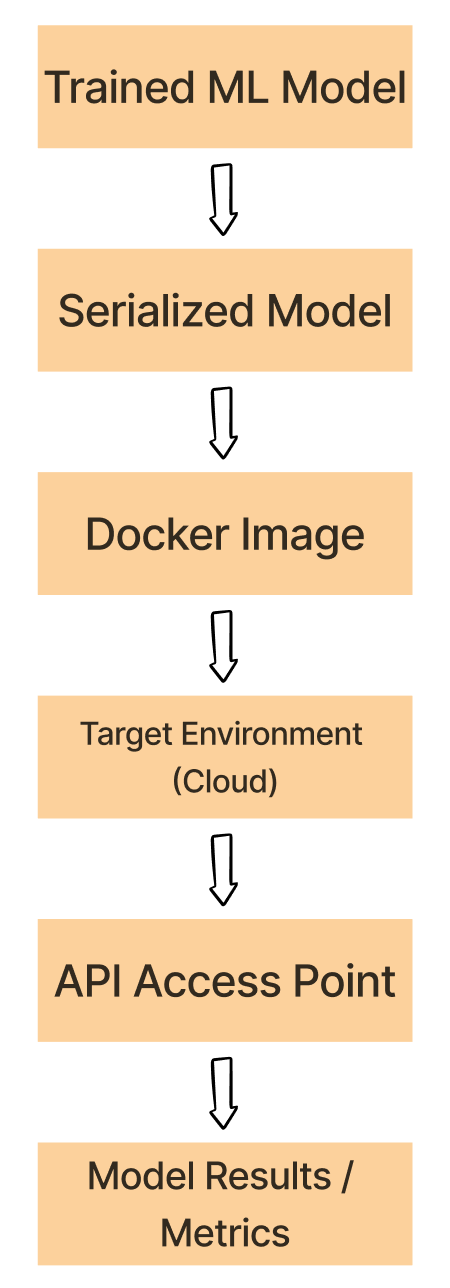
實驗到 Docker 的流程

  1. 使用 pickle、HDF5 或 PyTorch 等格式將已訓練的 ML 模型進行序列化

  2. 將序列化後的模型、相依項與環境進行容器化

  3. 將 Docker 映像部署到目標環境(如雲端平台)

  4. 由已部署的映像啟動 Docker 容器,並執行 ML 模型。

  5. 透過 API 或其他介面在容器內使用該模型。

Docker Workflow

Developing Machine Learning Models for Production

一起來練習吧!

Developing Machine Learning Models for Production

Preparing Video For Download...