時間序列的索引與重取樣
Manipulating Time Series Data in Python

Stefan Jansen
Founder & Lead Data Scientist at Applied Artificial Intelligence
時間序列轉換
常見的時間序列轉換:
解析日期字串並轉為
datetime64針對特定子期間選取與切片
設定與變更
DateTimeIndex的頻率- 上取樣 vs 下取樣
取得 GOOG 股價
google = pd.read_csv('google.csv') # import pandas as pdgoogle.info()
<class 'pandas.core.frame.DataFrame'>
RangeIndex: 504 entries, 0 to 503
Data columns (total 2 columns):
date     504 non-null object
price    504 non-null float64
dtypes: float64(1), object(1)
google.head()
         date   price
0  2015-01-02  524.81
1  2015-01-05  513.87
2  2015-01-06  501.96
3  2015-01-07  501.10
4  2015-01-08  502.68
將日期字串轉為 datetime64
pd.to_datetime():- 解析日期字串
- 轉為
datetime64
google.date = pd.to_datetime(google.date)google.info()
<class 'pandas.core.frame.DataFrame'>
RangeIndex: 504 entries, 0 to 503
Data columns (total 2 columns):
date     504 non-null datetime64[ns]
price    504 non-null float64
dtypes: datetime64[ns](1), float64(1)
將日期字串轉為 datetime64
.set_index():- 將日期設為索引
inplace:- 不建立複本
google.set_index('date', inplace=True)google.info()
<class 'pandas.core.frame.DataFrame'>
DatetimeIndex: 504 entries, 2015-01-02 to 2016-12-30
Data columns (total 1 columns):
price    504 non-null float64
dtypes: float64(1)
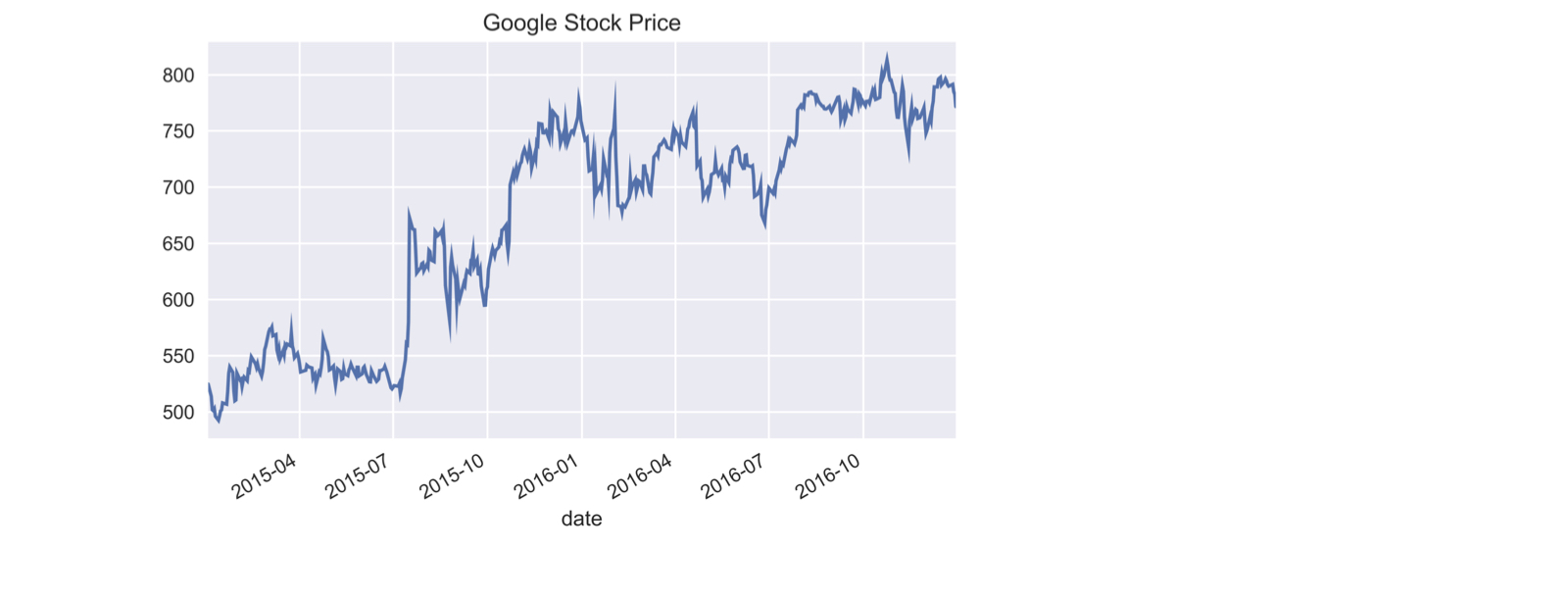
繪製 Google 股價時間序列
google.price.plot(title='Google Stock Price')plt.tight_layout(); plt.show()
部分字串索引
- 使用可解析為日期的字串進行選取/索引
google['2015'].info() # Pass string for part of date
DatetimeIndex: 252 entries, 2015-01-02 to 2015-12-31
Data columns (total 1 columns):
price    252 non-null float64
dtypes: float64(1)
google['2015-3': '2016-2'].info() # Slice includes last month
DatetimeIndex: 252 entries, 2015-03-02 to 2016-02-29
Data columns (total 1 columns):
price    252 non-null float64
dtypes: float64(1)
memory usage: 3.9 KB
部分字串索引
google.loc('2016-6-1', 'price') # Use full date with .loc[]
734.15
.asfreq():設定頻率
.asfreq('D'):- 將
DateTimeIndex設為曆日頻率
- 將
google.asfreq('D').info() # set calendar day frequency
DatetimeIndex: 729 entries, 2015-01-02 to 2016-12-30
Freq: D
Data columns (total 1 columns):
price    504 non-null float64
dtypes: float64(1)
.asfreq():設定頻率
- 上取樣:
- 頻率提高會產生新日期 ⇒ 出現遺漏值
google.asfreq('D').head()
             price
date
2015-01-02  524.81
2015-01-03     NaN
2015-01-04     NaN
2015-01-05  513.87
2015-01-06  501.96
.asfreq():重設頻率
.asfreq('B'):- 將
DateTimeIndex設為營業日頻率
- 將
google = google.asfreq('B') # Change to calendar day frequencygoogle.info()
DatetimeIndex: 521 entries, 2015-01-02 to 2016-12-30
Freq: B
Data columns (total 1 columns):
price    504 non-null float64
dtypes: float64(1)
.asfreq():重設頻率
google[google.price.isnull()] # Select missing 'price' values
            price
date
2015-01-19    NaN
2015-02-16    NaN
...
2016-11-24    NaN
2016-12-26    NaN
- 非交易日的營業日
一起來練習吧!
Manipulating Time Series Data in Python

