存取 S3 中的私有物件

Python 中的 AWS Boto 入門

Maksim Pecherskiy

Data Engineer

下載私有檔案

df = pd.read_csv('https://gid-staging.potholes.csv')
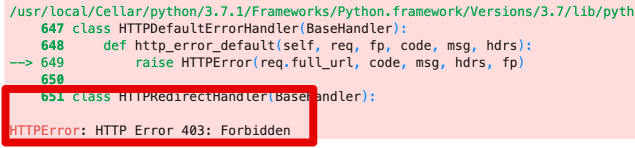
預覽

Python 中的 AWS Boto 入門

下載私有檔案

下載檔案

s3.download_file(
  Filename='potholes_local.csv',
  Bucket='gid-staging', 
  Key='2019/potholes_private.csv')

從磁碟讀取

pd.read_csv('./potholes_local.csv')
Python 中的 AWS Boto 入門

存取私有檔案

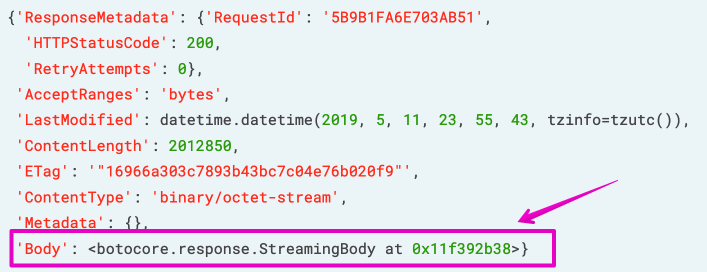
使用 '.get_object()'

obj = s3.get_object(Bucket='gid-requests', Key='2019/potholes.csv')
print(obj)
Python 中的 AWS Boto 入門

存取私有檔案

存取私有檔案

Python 中的 AWS Boto 入門

存取私有檔案

取得物件

obj = s3.get_object(
  Bucket='gid-requests', 
  Key='2019/potholes.csv')

StreamingBody 讀入 Pandas

pd.read_csv(obj['Body'])
Python 中的 AWS Boto 入門

預先簽章的 URL(Pre-signed URLs)

  • 設定有效期限後失效
  • 適合臨時存取

範例

https://?AWSAccessKeyId=12345&Signature=rBmnrwutb6VkJ9hE8Uub%2BBYA9mY%3D&Expires=1557624801
Python 中的 AWS Boto 入門

預先簽章的 URL(Pre-signed URLs)

上傳檔案

s3.upload_file(
  Filename='./potholes.csv', 
  Key='potholes.csv', 
  Bucket='gid-requests')
Python 中的 AWS Boto 入門

預先簽章的 URL(Pre-signed URLs)

產生預先簽章 URL

share_url = s3.generate_presigned_url(
  ClientMethod='get_object',
  ExpiresIn=3600,
  Params={'Bucket': 'gid-requests','Key': 'potholes.csv'}
)

在 Pandas 中開啟

pd.read_csv(share_url)
Python 中的 AWS Boto 入門

將多個檔案載入同一個 DataFrame

# 建立清單以存放 DataFrame
df_list = []

# 向 S3 請求帶有前綴的 csv 清單;取得內容 response = s3.list_objects( Bucket='gid-requests', Prefix='2019/')
# 取得回應內容 request_files = response['Contents']
Python 中的 AWS Boto 入門

將多個檔案載入同一個 DataFrame

# 逐一遍歷每個物件
for file in request_files:
    obj = s3.get_object(Bucket='gid-requests', Key=file['Key'])

# 讀成 DataFrame obj_df = pd.read_csv(obj['Body'])
# 將 DataFrame 加入清單 df_list.append(obj_df)
Python 中的 AWS Boto 入門

將多個檔案載入同一個 DataFrame

# 串接清單中的所有 DataFrame
df = pd.concat(df_list)

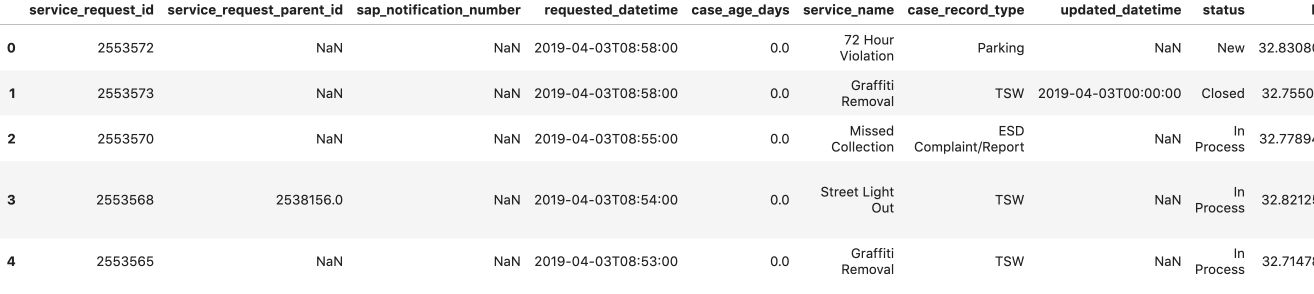
# 預覽 DataFrame df.head()

預覽 DataFrame

Python 中的 AWS Boto 入門

複習:存取 S3 中的私有物件

先下載再開啟

s3.download_file()

直接開啟

s3.get_object()

產生預先簽章 URL

s3.generate_presigned_url()
Python 中的 AWS Boto 入門

複習:分享 URL

公開檔案:Public Object URL

使用 .format() 產生

'https://{bucket}.{key}'
私有檔案:Presigned URL

使用 .get_presigned_url() 產生

'https://?AWSAccessKeyId=12345&Signature=rBmnrwutb6VkJ9hE8Uub%2BBYA9mY%3D&Expires=1557624801'
Python 中的 AWS Boto 入門

一起來練習吧!

Python 中的 AWS Boto 入門

Preparing Video For Download...