Tablesaw 簡介
Java 中的資料匯入

Anthony Markham
VP Quant Developer
匯入 Tablesaw
- 用於資料處理的函式庫
- 最常見的匯入:
import tech.tablesaw.api.* - 特定功能需額外匯入,例如:
import tech.tablesaw.api.DoubleColumnimport tech.tablesaw.api.StringColumn
- 統計運算:
import tech.tablesaw.aggregate.*
1 https://jtablesaw.github.io/tablesaw/
表格格式
- 以列與欄組織資料
- 欄=變數/特徵
- 列=觀測/樣本
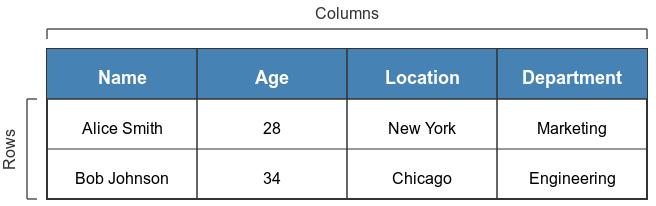
表格格式
- 可用陣列或集合儲存資料
// 傳統 Java 作法(繁瑣)
import java.util.Arrays;
import java.util.List;
List<String> names = Arrays.asList("Anna", "Bob", "Carlos");
List<Integer> ages = Arrays.asList(25, 34, 42);
建立資料表
- 選項:從零建立、由外部檔案、或用現有欄位
// Creating from scratch
Table employees = Table.create("Employees")
    .addColumns(
        StringColumn.create("Name", "John", "Lisa", "Omar"),
        DoubleColumn.create("Salary", 50000, 60000, 55000)
    );
// From existing columns
StringColumn dept = StringColumn.create("Department",
    "Sales", "Marketing", "Engineering");
Table departments = Table.create("Departments", dept);
addColumns()與create()方法
資料表中繼資料
- 維度:
table.shape() - 欄名:
table.columnNames() - 結構:
table.structure() - 預覽資料:
table.first(n)、table.last(n)
// Print dimensions
System.out.println(data.shape());  // [rows, columns]
[10, 4]
資料表中繼資料
// 列印欄名
System.out.println(table.columnNames());
[Day, Temperature, Precipitation]
// 列印詳細結構
System.out.println(table.structure());
         Structure of table
 Index  |   Column Name   |  Column Type  |
     0  |            Day  |       STRING  |
     1  |    Temperature  |       DOUBLE  |
     2  |  Precipitation  |       DOUBLE  |
資料表中繼資料
// 預覽前 3 列
System.out.println(table.first(3));
                  table
    Day     |  Temperature  |  Precipitation  |
    Monday  |         22.5  |              0  |
   Tuesday  |           24  |            2.5  |
 Wednesday  |         23.2  |            5.2  |
新增欄位
- 新增欄位:
table.addColumns(newColumn)
// 新增一個欄位
DoubleColumn bonus = DoubleColumn.create("Bonus", 1000, 1500, 2000);
employees = employees.addColumns(bonus);
移除與重新命名欄位
// 移除欄位
employees = employees.removeColumns("StartDate");
// 重新命名欄位
employees.column("Salary").setName("AnnualSalary");
// 取得欄位型別
employees.column("Salary").type();
ColumnType.INTEGER
$$
- 操作會回傳已修改的資料表 💡
重點整理
| 方法/語法 | 說明 |
|---|---|
Table.create("TableName") |
以指定名稱建立新資料表 |
StringColumn.create("ColumnName", values) |
建立字串欄位 |
table.shape() |
回傳維度 [rows, columns] |
table.columnNames() |
回傳資料表中的欄名 |
table.structure() |
顯示資料表結構資訊 |
table.first(n) |
回傳前 n 列資料 |
table.last(n) |
回傳後 n 列資料 |
table.addColumns(newColumn) |
將新欄位加入資料表 |
1 https://www.javadoc.io/doc/tech.tablesaw/tablesaw-core
一起來練習吧!
Java 中的資料匯入

