Python 中的超參數調校

Python 超參數調校

Alex Scriven

Data Scientist

導論


為何要學這門課?

  • 新的複雜演算法,含多個超參數
  • 調校常很耗時
  • 超越預設值,培養更深入的理解

你可能會對引擎蓋下的發現感到驚訝!

Python 超參數調校

資料集


此資料集與信用卡違約有關。

包含臺灣部分消費者的財務歷史相關變數。共有 30,000 位使用者與 24 個屬性。

我們的建模目標是他們是否違約貸款。

資料已預先處理,有時會取較小樣本示範概念。

可在此找到更多資料集資訊:

https://archive.ics.uci.edu/ml/datasets/default+of+credit+card+clients

Python 超參數調校

參數總覽


什麼是參數?

  • 建模過程中由模型學到的組成部分
  • 你不會手動設定(其實也不能)
  • 演算法會替你找出來
Python 超參數調校

羅吉斯迴歸中的參數

一個簡單的羅吉斯迴歸模型:

log_reg_clf = LogisticRegression() 
log_reg_clf.fit(X_train, y_train)

print(log_reg_clf.coef_)
array([[-2.88651273e-06, -8.23168511e-03,  7.50857018e-04,
         3.94375060e-04,  3.79423562e-04,  4.34612046e-04,
         4.37561467e-04,  4.12107102e-04, -6.41089138e-06,
        -4.39364494e-06,  cont... ]])
Python 超參數調校

羅吉斯迴歸中的參數

整理係數:

# Get the original variable names
original_variables = list(X_train.columns)

# Zip together the names and coefficients zipped_together = list(zip(original_variables, log_reg_clf.coef_[0])) coefs = [list(x) for x in zipped_together]
# Put into a DataFrame with column labels coefs = pd.DataFrame(coefs, columns=["Variable", "Coefficient"])
Python 超參數調校

羅吉斯迴歸中的參數


現在排序並列印前三大係數

coefs.sort_values(by=["Coefficient"], axis=0, inplace=True, ascending=False)
print(coefs.head(3))
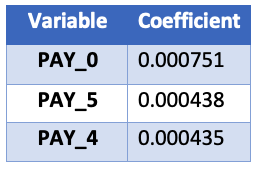
係數表

Python 超參數調校

在哪裡找參數


要找出參數,我們需要:

  1. 先懂一些演算法
  2. 參考 Scikit Learn 說明文件

參數會列在「Attributes」區段,非「parameters」區段!

Python 超參數調校

隨機森林中的參數

那樹為基礎的演算法呢?

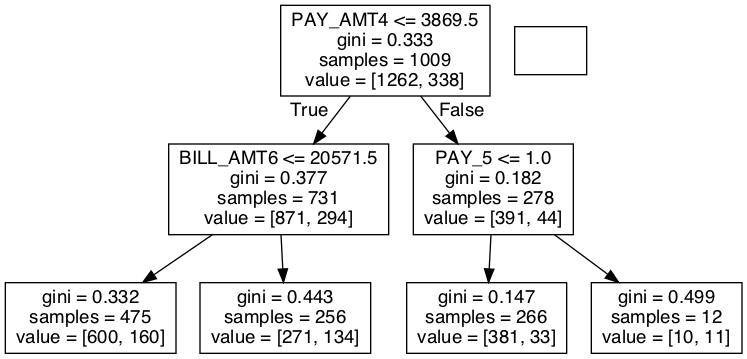
隨機森林沒有係數,只有節點決策(用哪個特徵、在哪個值切分)。

# A simple random forest estimator
rf_clf = RandomForestClassifier(max_depth=2)
rf_clf.fit(X_train, y_train)

# Pull out one tree from the forest chosen_tree = rf_clf.estimators_[7]

為簡化,我們會直接展示決策樹的最終產物(圖片)。想更深入可自行探索所用套件(graphviz 與 pydotplus)。

Python 超參數調校

隨機森林單一樹的決策流程圖

Python 超參數調校

擷取節點決策

我們可以擷取左側、倒數第二層節點的細節:

# Get the column it split on
split_column = chosen_tree.tree_.feature[1]
split_column_name = X_train.columns[split_column]

# Get the level it split on split_value = chosen_tree.tree_.threshold[1]
print("This node split on feature {}, at a value of {}" .format(split_column_name, split_value))

「This node split on feature PAY_0, at a value of 1.5」

Python 超參數調校

一起來練習吧!

Python 超參數調校

Preparing Video For Download...