語音辨識與音訊生成

使用 Hugging Face 的多模態模型

James Chapman

Curriculum Manager, DataCamp

語音

 

語音波形的重要要素是什麼?

  • 音高(Pitch):男性平均頻率 85–180Hz,女性 165–255Hz
  • 重音(Stress):受語言、口音與情緒影響
  • 節奏(Rhythm):受脈絡、情緒與語言影響


社群媒體貼文

使用 Hugging Face 的多模態模型

自動語音辨識

音訊先編碼,再解碼為音訊或文字。

  • 文字與音訊皆為「序列」
  • :逐字稿、翻譯、文字轉語音
使用 Hugging Face 的多模態模型

自動語音辨識

  • Tiny 模型:3,900 萬參數,模型大小 150MB
  • 訓練資料:680k 小時(含標註)
from transformers import WhisperProcessor, WhisperForConditionalGeneration
processor = WhisperProcessor.from_pretrained("openai/whisper-tiny")
model = WhisperForConditionalGeneration.from_pretrained("openai/whisper-tiny")
1 https://github.com/openai/whisper
使用 Hugging Face 的多模態模型

自動語音辨識

from datasets import load_dataset, Audio
dataset = load_dataset("CSTR-Edinburgh/vctk")["train"]
dataset = dataset.cast_column("audio", Audio(sampling_rate=16_000))

sample = dataset[0]["audio"]
input_preprocessed = processor(sample["array"], sampling_rate=sample["sampling_rate"], return_tensors="pt")
predicted_ids = model.generate(input_preprocessed.input_features)
transcription = processor.batch_decode(predicted_ids, skip_special_tokens=True) print(transcription)
['Please cool Stella.']
使用 Hugging Face 的多模態模型

音訊生成

產生音訊的三個元件:

  • 前處理器:重採樣與特徵擷取
  • 模型:特徵轉換
  • 聲碼器(Vocoder):獨立的音訊波形生成模型
from transformers import SpeechT5Processor, SpeechT5ForSpeechToSpeech, SpeechT5HifiGan

processor = SpeechT5Processor.from_pretrained("microsoft/speecht5_vc") model = SpeechT5ForSpeechToSpeech.from_pretrained("microsoft/speecht5_vc") vocoder = SpeechT5HifiGan.from_pretrained("microsoft/speecht5_hifigan")
使用 Hugging Face 的多模態模型

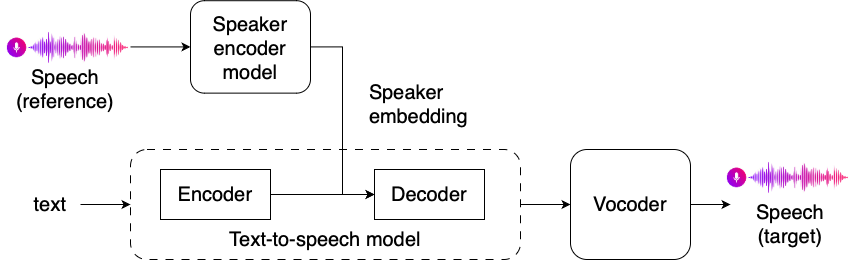
語音嵌入

說話者嵌入如何放入語音生成流程的示意圖

使用 Hugging Face 的多模態模型

產生說話者嵌入

  • 預先訓練的編碼器:音訊波形陣列 → 編碼陣列(常見為 512 維)
from speechbrain.inference.speaker import EncoderClassifier
speaker_model = EncoderClassifier.from_hparams(source="speechbrain/spkrec-xvect-voxceleb")
speaker_embeddings = speaker_model.encode_batch(torch.tensor(dataset[0]["audio"]["array"]))

speaker_embeddings = torch.nn.functional.normalize(speaker_embeddings, dim=2).unsqueeze(0)
使用 Hugging Face 的多模態模型

音訊生成

inputs = processor(audio=dataset[0]["audio"], 
                   sampling_rate=dataset[0]["audio"]["sampling_rate"], 
                   return_tensors="pt")


speech = model.generate_speech(inputs["input_values"], speaker_embedding, vocoder=vocoder)
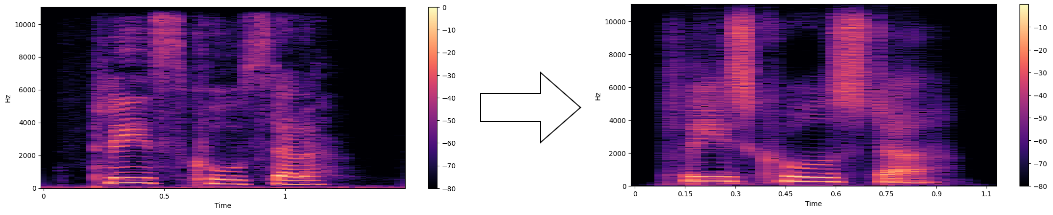
前後頻譜圖

使用 Hugging Face 的多模態模型

一起來練習吧!

使用 Hugging Face 的多模態模型

Preparing Video For Download...