撰寫與視覺化 DVC pipeline
使用 DVC 進行資料版本控管入門

Ravi Bhadauria
Machine Learning Engineer
DVC Pipeline
定義機器學習流程與相依性的多個階段序列
- 以 Git 版本控管並追蹤
由
dvc.yaml檔定義- 輸入資料與指令碼(
deps) - 參數(
params) - 階段執行指令(
cmd) - 輸出成品(
outs)- 特殊資料如
metrics與plots
- 特殊資料如
- 輸入資料與指令碼(
加入前處理階段
- 使用
dvc stage add建立階段
dvc stage add \
-n preprocess \
-p params.yaml:preprocess \
-d raw_data.csv \
-d preprocess.py \
-o processed_data.csv \
python3 preprocess.py
stages:
  preprocess:
    cmd: python3 preprocess.py
    params:
      # Keys from params.yaml
      - params.yaml
        - preprocess
    deps:
    - preprocess.py
    - raw_data.csv
    outs:
    - processed_data.csv
加入訓練與評估階段
- 使用前一步的輸出加入訓練步驟
dvc stage add \
-n train_and_evaluate \
-p train_and_evaluate \
-d train_and_evaluate.py \
-d processed_data.csv \
-o plots.png \
-o metrics.json \
python3 train_and_evaluate.py
- 有向無環圖(DAG)
stages:
  train_and_evaluate:
    cmd: python3 train_and_evaluate.py
    params:
      # Skip specifying parameter file
      # Defaulted to params.yaml
      - train_and_evaluate
    deps:
    - processed_data.csv
    - train_and_evaluate.py
    outs:
    - plots.png
    - metrics.json
更新階段
- 多次執行
dvc stage add
ERROR: Stage 'train_and_evaluate'
already exists in 'dvc.yaml'.
Use '--force' to overwrite.
- 使用
dvc stage add --force
dvc stage add --force \
-n train_and_evaluate \
-p train_and_evaluate \
-d train_and_evaluate.py \
-d processed_data.csv \
-o plots.png \
-o metrics.json \
python3 train_and_evaluate.py
視覺化 DVC pipeline
# 在終端機列印 DAG
dvc dag
# 顯示至指定步驟的 DAG
dvc dag <target>
            +------------+
            | preprocess |
            +------------+
                   *
                   *
                   *
        +--------------------+
        | train_and_evaluate |
        +--------------------+
視覺化 DVC pipeline
# 以輸出作為節點顯示
dvc dag --outs
                    +-------------------------------+
                    | processed_dataset/weather.csv |
                    +-------------------------------+
                          ***               ***
                       ***                     ***
                     **                           **
          +--------------+                    +-----------+
          | metrics.json |                    | plots.png |
          +--------------+                    +-----------+
視覺化 DVC pipeline
dvc dag --dot
strict digraph  {
"preprocess";
"train_and_evaluate";
"preprocess" -> "train_and_evaluate";
}
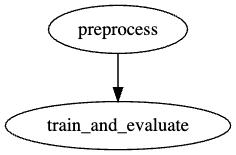
1 https://dreampuf.github.io/GraphvizOnline/
一起來練習吧!
使用 DVC 進行資料版本控管入門

