圖形與 RAG

使用 LangChain 與 Neo4j 的 Graph RAG

Adam Cowley

Manager, Developer Education at Neo4j

認識你的講師

 

  • Neo4j 開發者教育經理
  • 透過 Neo4j GraphAcademy 推動開發者教育
  • 超過 20 年軟體開發經驗
  • 超過 10 年 Neo4j 經驗


Adam 的照片

1 https://graphacademy.neo4j.com
使用 LangChain 與 Neo4j 的 Graph RAG

RAG 裡的 R

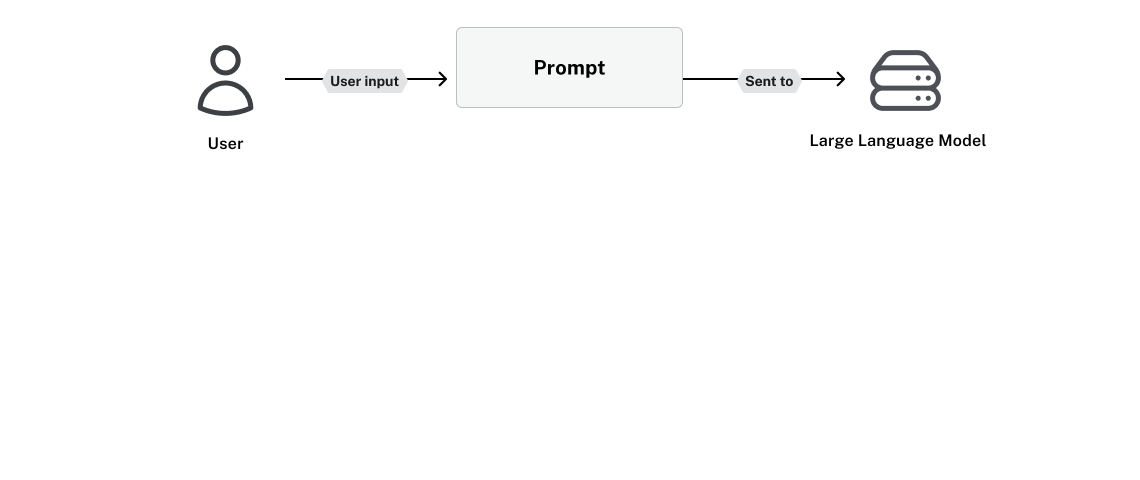
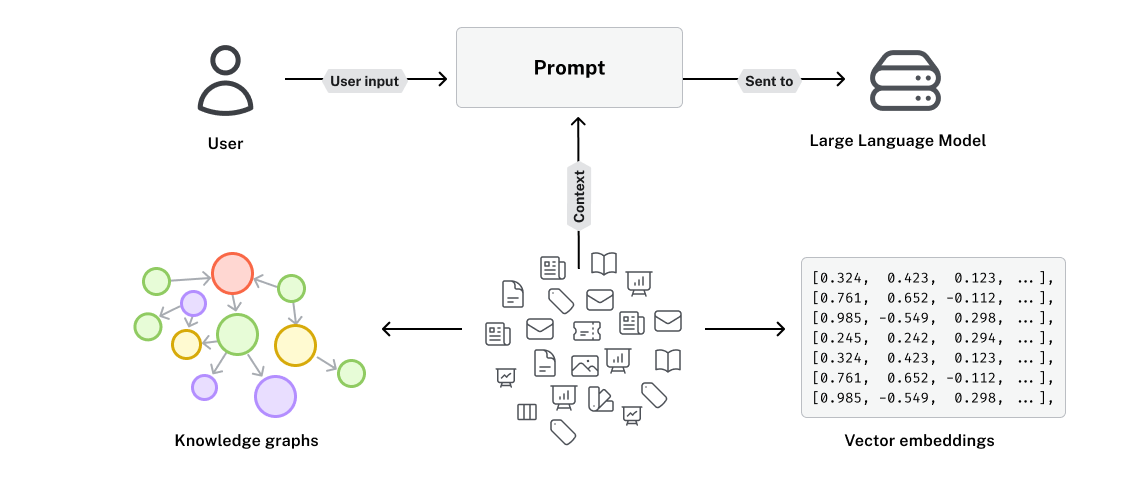
一個應用程式示意圖,使用者輸入被加入提示並送到 LLM

使用 LangChain 與 Neo4j 的 Graph RAG

RAG 裡的 R

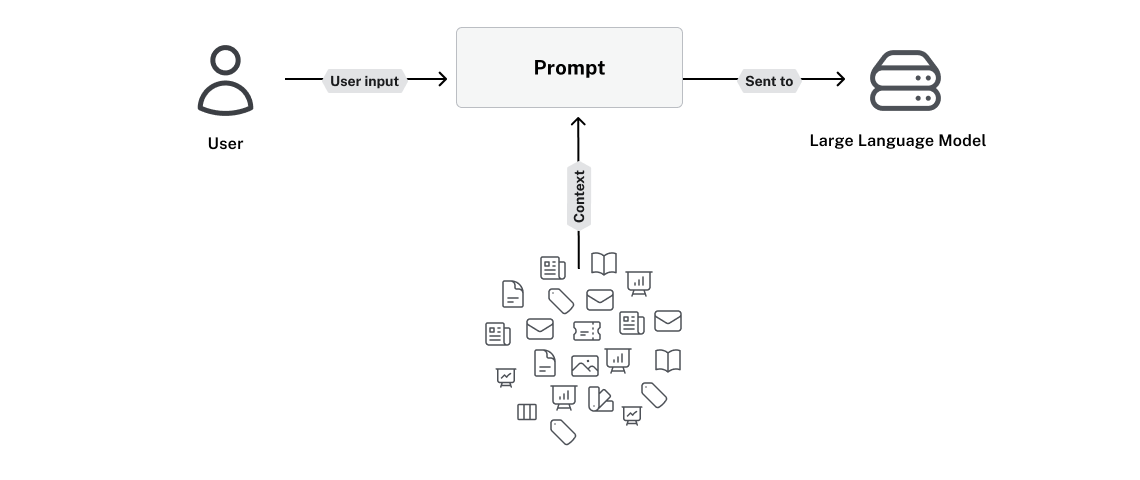
提示需要來自文件與資料來源的脈絡

使用 LangChain 與 Neo4j 的 Graph RAG

RAG 裡的 R

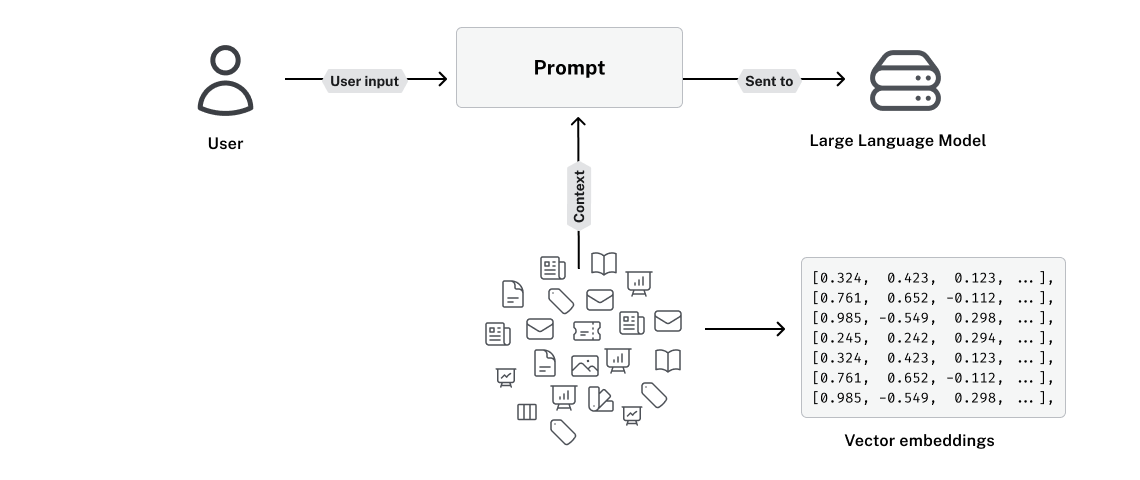
這些資料常會被轉成向量嵌入

使用 LangChain 與 Neo4j 的 Graph RAG

語意搜尋會在哪裡失手?

向量適合用於

  • 模糊或開放式問題

向量不利於

  • 高度具體或事實型問題
  • 數值或精確比對查詢
  • 邏輯推理查詢

Paul Graham 對生成式 AI 有何看法?

Paul Graham 投資了多少家生成式 AI 新創?

使用 LangChain 與 Neo4j 的 Graph RAG

向量 vs. 知識圖譜

文字 向量嵌入
He's just a city boy born [0.12, -0.34, 0.56, 0.78, ..., -0.91]
born and raised in South Detroit [0.22, 0.45, -0.67, 0.11, ..., 0.33]
He took the midnight train [-0.55, 0.89, 0.12, -0.44, ..., 0.67]
going anywhere [0.78, -0.23, 0.45, 0.91, ..., -0.12]

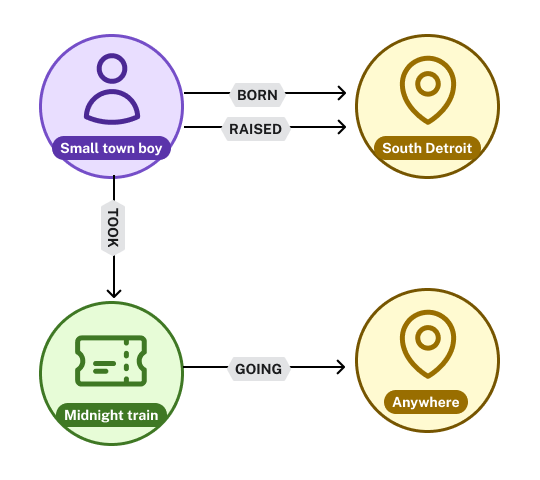
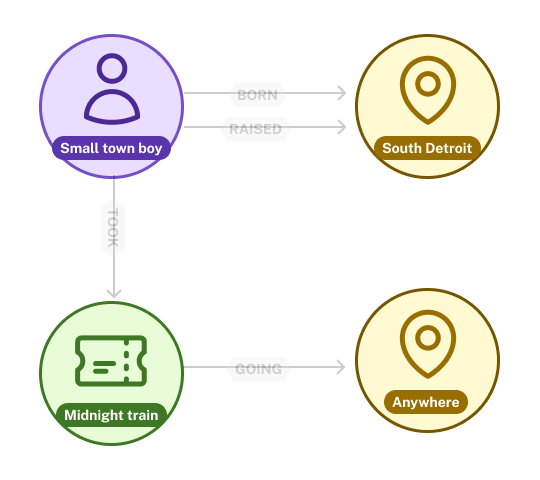
一個圖形示意圖,顯示歌曲 Don't Stop Believin' 歌詞中的實體:一位小鎮男孩,與 South Detroit 有 BORN 與 RAISED 關係

使用 LangChain 與 Neo4j 的 Graph RAG

向量 vs. 知識圖譜

文字 向量嵌入
He's just a city boy born [0.12, -0.34, 0.56, 0.78, ..., -0.91]
born and raised in South Detroit [0.22, 0.45, -0.67, 0.11, ..., 0.33]
He took the midnight train [-0.55, 0.89, 0.12, -0.44, ..., 0.67]
going anywhere [0.78, -0.23, 0.45, 0.91, ..., -0.12]

節點包括人物:Small town boy;地點:South Detroit;火車:Midnight Train;以及地點:Anywhere

使用 LangChain 與 Neo4j 的 Graph RAG

向量 vs. 知識圖譜

文字 向量嵌入
He's just a city boy born [0.12, -0.34, 0.56, 0.78, ..., -0.91]
born and raised in South Detroit [0.22, 0.45, -0.67, 0.11, ..., 0.33]
He took the midnight train [-0.55, 0.89, 0.12, -0.44, ..., 0.67]
going anywhere [0.78, -0.23, 0.45, 0.91, ..., -0.12]

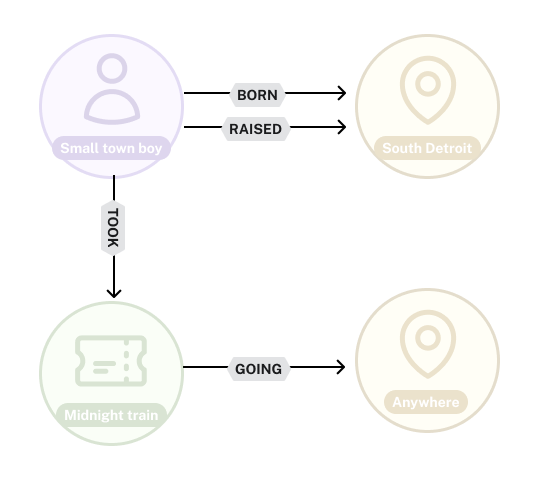
關係 BORN 與 RAISED 由人物節點連到地點;GOING 火車由 Midnight Train 節點連到 Anywhere 節點

使用 LangChain 與 Neo4j 的 Graph RAG

知識圖譜與 Neo4j


  • Neo4j 是全球領先的圖形資料庫
  • 彈性高,綱要選擇性
  • langchain-neo4j LangChain 整合
  • LCELLangChain Expression Language

neo4j 與 langchain 標誌

1 https://db-engines.com/en/ranking/graph%20dbms
使用 LangChain 與 Neo4j 的 Graph RAG

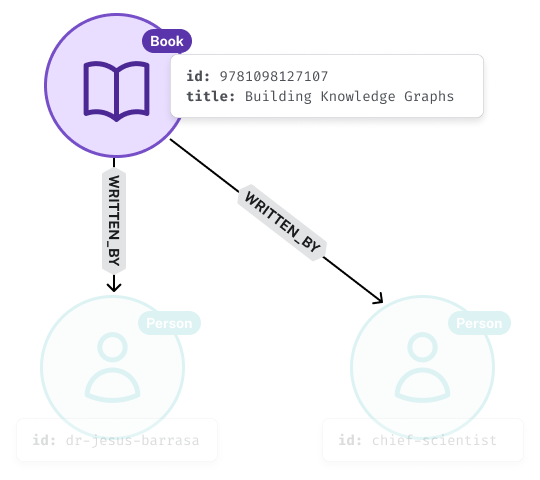
節點代表事物

from langchain_neo4j.graphs.graph_document \
  import Node

book = Node(
type="Book",
id=f"9781098127107",
properties={ "title": "Building Knowledge Graphs" }
)

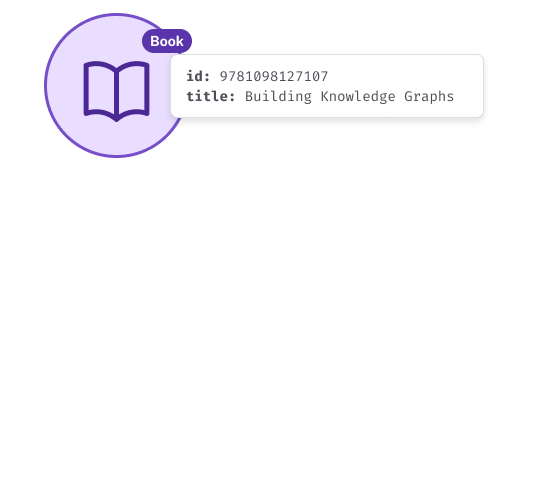
圖中書本節點,具備 ID 與 Title 屬性

使用 LangChain 與 Neo4j 的 Graph RAG

關係連結節點

from langchain_neo4j.graphs.graph_document \
  import Node, Relationship

book = Node(type="Book", id=f"9781098127107")

jesus = Node(type="Person", id="dr-jesus-barrasa")
jim = Node(type="Person", id="chief-scientist")
for author in [jesus, jim]:
    relationship = Relationship(


)

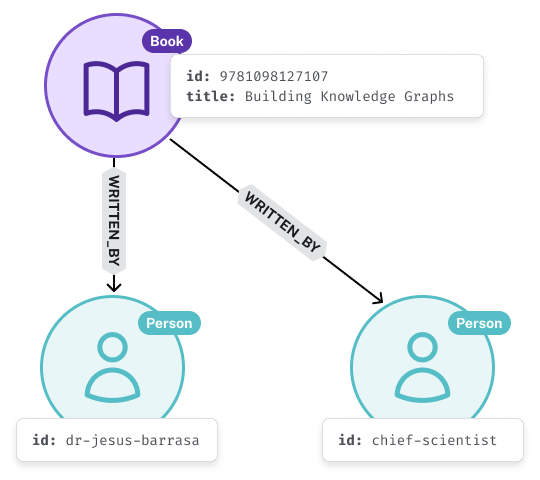
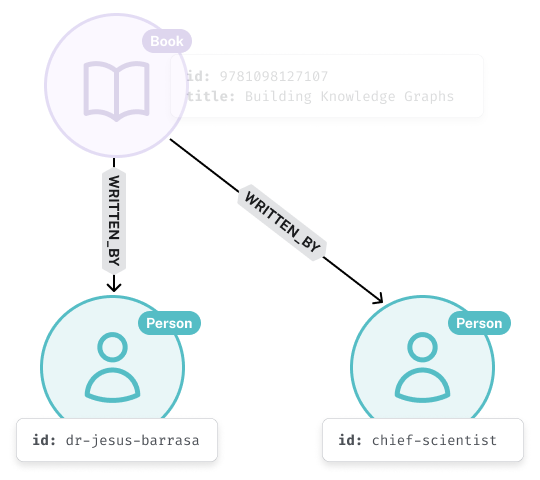
兩個 WRITTEN_BY 關係,從 Book 節點連到兩個代表作者的人物節點

使用 LangChain 與 Neo4j 的 Graph RAG

關係連結節點

from langchain_neo4j.graphs.graph_document \
  import Node, Relationship

book = Node(type="Book", id=f"9781098127107")

jesus = Node(type="Person", id="dr-jesus-barrasa")
jim = Node(type="Person", id="chief-scientist")
for author in [jesus, jim]:
    relationship = Relationship(

source=book,


)

WRITTEN_BY 關係的來源節點是 Book 節點

使用 LangChain 與 Neo4j 的 Graph RAG

關係連結節點

from langchain_neo4j.graphs.graph_document \
  import Node, Relationship

book = Node(type="Book", id=f"9781098127107")

jesus = Node(type="Person", id="dr-jesus-barrasa")
jim = Node(type="Person", id="chief-scientist")
for author in [jesus, jim]:
    relationship = Relationship(

source=book,
target=author,


)

WRITTEN_IN 關係的目標節點是 Person

使用 LangChain 與 Neo4j 的 Graph RAG

關係連結節點

from langchain_neo4j.graphs.graph_document \
  import Node, Relationship

book = Node(type="Book", id=f"9781098127107")

jesus = Node(type="Person", id="dr-jesus-barrasa")
jim = Node(type="Person", id="chief-scientist")
for author in [jesus, jim]:
    relationship = Relationship(

source=book,
target=author,
type="WRITTEN_BY"
properties=dict(...)
)

包含 Book 與兩個連到作者的 WRITTEN_BY 關係之節點圖,示範節點可有多個關係。

使用 LangChain 與 Neo4j 的 Graph RAG

連線到 Neo4j

from langchain_neo4j import Neo4jGraph


graph = Neo4jGraph( url=NEO4J_URI, username=NEO4J_USERNAME, password=NEO4J_PASSWORD )
1 https://neo4j.com/docs/getting-started/
使用 LangChain 與 Neo4j 的 Graph RAG

儲存圖形文件

from langchain_neo4j.graphs.graph_document import GraphDocument


# Nodes 與 Relationships 的包裝器 doc = GraphDocument(
nodes=[book, jesus, jim],
relationships=[jesus_wrote_book, jim_wrote_book]
)
# 將節點與關係儲存到資料庫 graph.add_graph_documents([graph_document])
使用 LangChain 與 Neo4j 的 Graph RAG

那麼,什麼是 GraphRAG?

前一張圖,包含來自文件與其嵌入的脈絡

使用 LangChain 與 Neo4j 的 Graph RAG

那麼,什麼是 GraphRAG?

前一張圖,在文件脈絡外新增由文件萃取而來的知識圖譜(節點與關係)

使用 LangChain 與 Neo4j 的 Graph RAG

一起來練習吧!

使用 LangChain 與 Neo4j 的 Graph RAG

Preparing Video For Download...