情緒分析

使用 Python 分析社群媒體資料

Alex Hanna

Computational Social Scientist

認識情緒分析

  • 方法
    • 計算文件中的正向/負向詞彙
    • 評估整份文件的正負向
  • 用途
    • 分析大眾對公司、產品、政治人物或政策的反應
使用 Python 分析社群媒體資料

情緒分析工具

  • VADER SentimentIntensityAnalyzer()
    • Natural Language Toolkit(nltk)的一部分
    • 適合短文字,如推文
    • 衡量特定詞的情緒(例如 angry、happy)
    • 也考量表情符號(😀)與大小寫(Nice vs NICE)的情緒
使用 Python 分析社群媒體資料

實作情緒分析

from nltk.sentiment.vader import SentimentIntensityAnalyzer

sid = SentimentIntensityAnalyzer()
sentiment_scores = tweets['text'].apply(sid.polarity_scores)
使用 Python 分析社群媒體資料

解讀情緒分數

  • 將閱讀推文作為流程的一部分
    • 是否具備「表面效度」?(也就是:這是否符合你對正向或負向的直覺判斷?)
使用 Python 分析社群媒體資料

解讀情緒分數

tweet1 = 'RT @jeffrey_heer: Thanks for inviting me, and thanks 
for the lovely visualization of the talk! ...'
print(sid.polarity_scores(tweet1))
{'neg': 0.0, 'neu': 0.496, 'pos': 0.504, 'compound': 0.9041}
tweet2 = 'i am having problems with google play music'
print(sid.polarity_scores(tweet2)
{'neg': 0.267, 'neu': 0.495, 'pos': 0.238, 'compound': -0.0772}
使用 Python 分析社群媒體資料

產生情緒平均值

sentiment = sentiment_scores.apply(lambda x: x['compound'])

sentiment_fb = sentiment[check_word_in_tweet('facebook', tweets)] .resample('1 min').mean() sentiment_gg = sentiment[check_word_in_tweet('google', tweets)] .resample('1 min').mean()
使用 Python 分析社群媒體資料

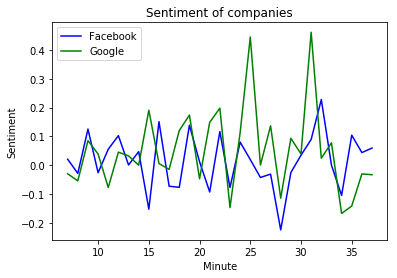
繪製情緒分數

plt.plot(
    sentiment_fb.index.minute, 
    sentiment_fb, color = 'blue'
    )
plt.plot(
    sentiment_g.index.minute, 
    sentiment_gg, color = 'green'
    )   
plt.xlabel('Minute')
plt.ylabel('Sentiment')
plt.title('Sentiment of companies')
plt.legend(('Facebook', 'Google'))
plt.show()

Facebook 與 Google 的情緒走勢

使用 Python 分析社群媒體資料

一起來練習吧!

使用 Python 分析社群媒體資料

Preparing Video For Download...